Account, plans, credits, and teams
Manage your BeYourCover account: access levels, credit balances, billing, team roles, and enterprise controls for individuals and publishing teams.
Last reviewed against the product: September 15, 2026
Open your account controls
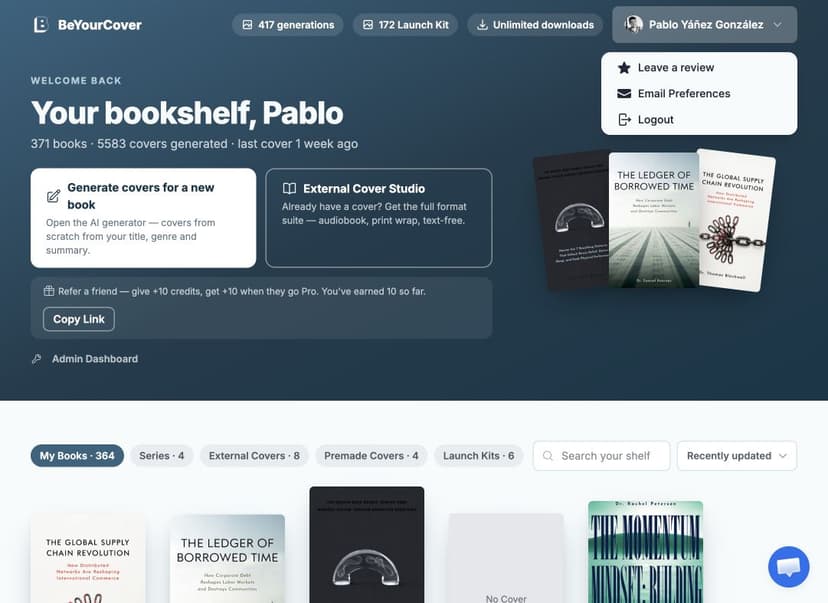
Select your name or avatar in the Dashboard. The account menu can include:
- Billing for eligible subscription owners
- Enterprise dashboard
- Leave a review
- Email preferences
- Logout
The available items depend on the account and team role.
Generation and download balances
The Dashboard and cover workspace display the balances relevant to your plan.
Basic purchases can attach generation and download allowances to a particular book. Pro accounts use generation credits across their books and include unlimited high-resolution downloads. Enterprise subscriptions use a shared monthly and overage generation balance and also include unlimited high-resolution downloads.
Any promotional or signup free credits are included in your generations balance and are always spent before paid credits — so the balance goes down as you use those tools even while a purchased pack still looks untouched.
What each action costs
Every credit-consuming action shows its cost in the interface before it runs. The amounts below are in generation (image) credits unless a row says otherwise. Because Pro and Enterprise include unlimited high-resolution downloads, download credits apply only to Free and Basic access.
Creating and varying covers
| Action | Cost |
|---|---|
| First cover concepts for a new book | 1 per variation you generate |
| Generate More — close variations of an existing cover | 1 each |
| Generation guided by a reference image | 1 each |
Editing a cover
| Action | Cost |
|---|---|
| AI visual edit, element transform, or chat edit | 1 |
| Style conversion (restyle into a different look) | 1 |
| AI typography restyle | 1 per direction generated (up to 3) |
| Text-free version (AI removes the cover text) | 1 |
| Preparing a cover for advanced text editing | 1 |
Other outputs and exports
| Action | Cost |
|---|---|
| Audiobook (square) version | 1 |
| Solid-color full-wrap back | 1 |
| AI-designed full-wrap back — textured, continuation, complementary, or a reused design | 2 |
| Regenerating a full wrap from the editor | 1 |
| Marketing banner, ad image, cover reveal, or mockup | 1 each — banners per platform, mockups per scene |
| Promotion video | 10 |
| High-resolution download or export | 1 download credit — Free and Basic only |
Costs shown in the live interface take precedence if the product changes.
Buy more credits
Use Buy more credits in the Dashboard or cover workspace.
If a Basic purchase has no valid credit allocation for another book, BeYourCover opens the plan or generation-pack chooser before starting a new project. Pro refills apply to the shared Pro balance. Enterprise credit purchases are managed from the Enterprise dashboard by eligible owners or administrators.
If you leave a credit-pack checkout before paying, your checkout is saved: you may receive a single email with a link that reopens it so you can complete your one-time purchase. The link stays valid for 30 days, and the email is only sent if you haven't purchased in the meantime.
Credit expiry
Paid credits expire six months after the purchase. Free trial credits expire after seven days.
We email you 30 days, 7 days, and 1 day before paid credits expire. The workspace header also shows the number of credits and the date when paid credits are within 60 days of expiry.
You have three ways to keep expiring credits:
- Use them. Renders, downloads, audiobook covers, print wraps, and series covers are yours to keep after the credits are gone.
- Extend once, free. Select Keep them 60 more days in a reminder email or in the workspace header. Every account can do this one time. It moves every unused paid credit 60 days later.
- Buy any pack. A new purchase moves all your unused paid credits to the new pack's expiry date.
If credits expire, they leave your balance. Buy any pack within 30 days after the expiry date and we add the expired credits back on top of the new pack, with the new pack's expiry date.
Refer a friend
The Dashboard's header band includes a Refer a friend strip just under the main actions — Copy link puts your personal referral link on the clipboard. When a friend opens your link and later goes Pro — the Pro plan, a Pro-granting pack, or the New User Bonus offer — you both receive +10 generation credits: yours are added to your balance, your friend's are added on top of their plan.
- Referral credits expire 180 days after they're granted.
- The link stays associated with your friend's browser for 30 days after they open it.
- Each new Pro member can trigger a referral bonus once, and referring yourself doesn't pay out.
Billing
Eligible subscription owners can open Billing from the account menu or Enterprise dashboard. Billing is managed through Stripe's customer portal.
Team members do not manage the owner's subscription unless their role and subscription settings explicitly grant that access.
Enterprise dashboard
Owners and administrators can open the Enterprise dashboard to manage:
- Shared credit balance and overage
- Subscription tier
- Team seats
- API keys
- Webhook URL
- Recent API activity
- Billing or tier changes
The API documentation covers programmatic book and cover workflows.
Team roles
| Role | Main permissions |
|---|---|
| Owner/Admin | Team management, full dashboard access, generation, and eligible billing/API controls |
| Editor | Generate and edit covers using the shared workspace |
| Reviewer | View books and covers without generation or editing controls |
The Dashboard can show books created by the owner and active teammates. Credits come from the effective enterprise subscription.
Invite a team member
- Open Enterprise → Team Management.
- Enter the email address.
- Choose Editor or Reviewer.
- Select Invite.
Pending invitations show their expiry date. You can revoke an invitation before it is accepted.
After a member joins, an owner or administrator can change the member between Editor and Reviewer or remove the member. The owner occupies one seat.
If all seats are used, upgrade the plan before inviting another person.
API keys and webhooks
Every enterprise tier (Starter, Growth, and Scale) includes REST API access. Subscribers can:
- Create named API keys.
- View the raw key once at creation.
- Revoke active keys.
- Save a webhook URL.
- Review recent jobs.
The API covers the same work as the browser: creating books, generating covers (including from reference images you upload), editing them, removing rendered text, upscaling to print resolution, audiobook covers, and full print wrap covers — back artwork, typeset back-cover copy, and a KDP-ready PDF, without opening the editor.
Keep API keys secret. Revocation cannot be undone. For endpoint details and webhook payloads, use the API documentation.
Connect an AI agent (MCP)
Enterprise API keys also work with AI agents. BeYourCover runs a remote MCP (Model Context Protocol) server that lets tools like Claude create books, generate covers (including more options for a book you already started), check job status and credits, list your books and the covers already made for each one, download covers, upscale them to print resolution, edit them with text instructions, remove all rendered text for a text-free version, design a cover from reference images you share with the agent, create audiobook covers, and calculate KDP print-wrap dimensions on your behalf — using your subscription's credits.
Agents can also build a complete print wrap: hand one a finished cover, your trim size and page count, and your back-cover copy, and it generates the back artwork, lays the text out, extends the front to the full print panel, and hands back the KDP-ready PDF (2 credits with a solid back cover, 4 with AI artwork).
Changing your mind afterwards is free. Ask the agent to update the wrap — never to make a second one — and it can rework the text, the spine colour, and, on a solid-back wrap, the back-cover colour itself, at no charge. You only have to name what you want changed: everything you don't mention stays as it is, and the agent can read the wrap's current back-cover text back to you at any time rather than asking you to retype it. Re-running the front extension is free too, if the artwork came back with a visible seam or a white edge. The one thing that does cost again is new AI back artwork: on a wrap whose back is AI-generated, the colour comes from the art, so a different look means generating it fresh. Wraps an agent creates are real designs: they show up in the wrap editor named API, so you can open one and adjust it by hand. It works the other way round too: if you built a wrap yourself in the editor, an agent changing its text or its colour leaves your own text blocks, your images and your arrangement exactly as you set them.
Because the agent can list your existing books and covers, you can come back days later in a fresh conversation and say "show me the covers for my thriller" — it doesn't need anything from the chat where you first made them.
There are two ways to connect, both pointing at https://beyourcover.com/api/mcp:
- Sign in with your account (OAuth). In clients that support custom connectors (Claude Desktop, claude.ai), add that URL as a connector and approve the connection on a BeYourCover sign-in screen — no API key to copy. You can revoke a connected app anytime from your dashboard.
- API key. In developer tools like Claude Code, connect with your enterprise API key as a Bearer token.
Connecting works with any BeYourCover account, so you can add the server and see what it offers before you commit to anything. The tools themselves need an Enterprise plan: without one, the agent lists them and then says the account has no active plan when you ask it to do the work. If you do have a plan and still see that, check that you signed in with the account that holds it — and, if you're on a team, that your seat is active.
Every finished cover comes back with a download link that opens the full-resolution image, valid for an hour. Ask again any time for a fresh one.
The cover is also sent as an image, which some agent tools display right in the conversation — Claude Code does. Claude Desktop and claude.ai currently don't show it, so there you'll get the description and the link rather than the picture. Print-resolution files are always a link, because they're too large to display anywhere. If you're driving the server from a script and only want links, ask for include_images: false.
Connection examples and the full tool list are on the MCP server page. Either way, the agent spends your subscription's generation credits, so only connect agents you trust.
Email preferences and reviews
Email Preferences manages two separate channels, each with its own switch:
- Newsletter — publishing tips, design trends, and the biweekly BeYourCover newsletter. Off unless you opt in.
On the free plan, the app asks for this opt-in once, on the Images Dashboard, when your first covers are on screen: tick the box and we email you your covers together with the book launch checklist. The covers in that email are low-resolution previews with our watermark; upgrading unlocks the full-resolution, watermark-free files. If you choose Not now, you get one more chance on a later visit, and then the question does not come back. Paid plans are not asked on the dashboard — use the switch here. Either way, you can change it at any time.
- Product updates — occasional news about new features for the tools you use. Shown to paying customers, on by default, and you can switch it off any time.
The unsubscribe link in any email opens a preference page where you choose: stop that email's channel only, or stop everything. Turning off the newsletter keeps product updates, and the other way round. Choices made there and on this page stay in sync. Marking an email as spam stops both channels. Transactional messages required for account, purchase, or batch-download delivery are handled separately. Credit expiry reminders are account notices and are always sent; the "unsubscribe from marketing emails" link in their footer stops offers, not the notice.
Use Leave a review to submit product feedback and, when offered, consent to publication of your testimonial.