Buy a premade cover
Pick a one-of-a-kind premade book cover, put your own title and author on it, and download it KDP-ready — it's removed from sale the moment you buy it.
Last reviewed against the product: October 23, 2026
What premade covers are
The premade marketplace sells finished, hand-curated cover designs. Unlike the generator (which creates new artwork from your book's details), a premade cover is exactly what you see on its page — you make the text yours, not the artwork.
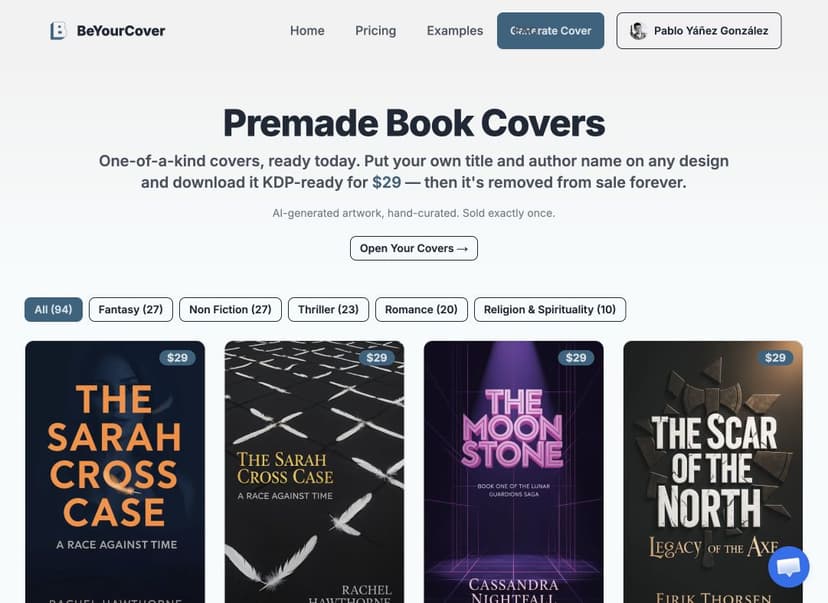
Two promises apply to every premade cover:
- Sold exactly once. The moment someone buys a cover, it is permanently removed from sale. No other author will ever download it.
- AI-generated, disclosed. The artwork is created with AI image models and curated by our team. We say so on every cover, so you can make an informed choice — and disclose it to your readers if you wish.
Browse and pick a cover
- Open Premade Book Covers and filter by genre.
- Click any cover to open its page: price, genre, what's included, and similar covers.
- A sold cover leaves the marketplace for good — that's the exclusivity promise working. Its own page stays up and shows SOLD.
Customize the text (free)
Click Customize this cover on any available design. You'll need a free account — no purchase and no credit card to start editing.
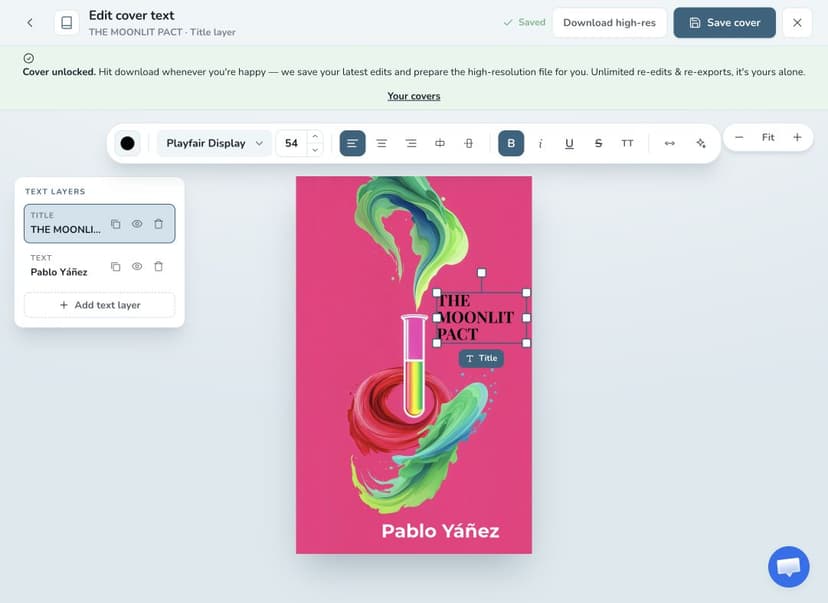
If you're the very first person to open a design, it takes about a minute to get the cover ready for editing — after that it opens instantly, for you and everyone else. Once it's ready, the editor shows the cover's text as editable layers:
- Replace the placeholder title, subtitle, and author with your own.
- Move any text block, resize it, or rotate it.
- Change fonts (the full Google Fonts library), colors, alignment, letter spacing, shadows, and outlines.
- Add new text layers (a series name, a tagline) or hide ones you don't need.
Until you buy the cover, the preview is watermarked across the whole image and served at reduced resolution.
The editor does not save by itself. Select Save cover before you leave — Back and Close leave the editor without a warning, and unsaved edits are lost. A saved cover is in your account when you come back.
Buy and download
- Click Buy this cover in the editor — the price is shown on the button (one-time payment, no subscription).
- The Make this cover yours window opens with two choices: buy just this cover, or get the Pro plan. Pick the cover to go to checkout.
- After payment, the editor unlocks the clean artwork.
- Click Download high-res whenever your text looks right. If you have unsaved edits, the download saves them first.
The first download takes about a minute: we enlarge the artwork to full print-ready resolution and re-apply your text on top of it, so the letters stay crisp instead of being blown up with the picture. That happens automatically — there's nothing to set up and nowhere else to go. If you download again without new edits, the download is instant, because the enlarged artwork is kept for you. Each save makes a new version of the cover, so the first download after a save takes about a minute again.
After purchase:
- Unlimited re-edits and re-downloads. Fix a typo next month, change the subtitle for a new edition — the cover is yours; export as often as you like.
- Coming back later: open Your covers — linked from the top of the marketplace, and worth bookmarking. Your covers also appear under the Premade Covers tab in your Dashboard, next to My Books and Series. Either route opens the same editor, where you can change the text again or re-download. If you hide the cover on the Dashboard, it leaves the Premade Covers tab until you turn on Show hidden; Your covers still lists it.
- On the cover's own page: the marketplace page of your cover shows You own this cover — open it in your dashboard.
- The design is removed from the marketplace and the public gallery forever.
What the purchase covers (and what it doesn't)
The premade purchase covers the ebook cover for that one design. It does not include generating new covers, print full-wrap layouts, or audiobook covers — those are part of the Pro plan, which also gives you unlimited high-res downloads across all your books.
Troubleshooting
- "This cover has been sold" — someone bought it between your visits. Every cover is one-of-one; browse what's still available.
- "This cover was just sold to someone else." — if you started customizing before someone else bought the cover, the editor still opens, but the purchase is refused.
- Do I need to save before downloading? — no. Download high-res saves your latest edits first. You still need Save cover if you leave the editor without a download.
- Payment done but the editor still shows the watermark — the unlock usually lands within a few seconds. The page checks automatically after checkout; use the check again link in the banner if needed, or refresh once.
- Paid, but the banner stays on "Payment still processing" — if two people pay for the same cover at the same moment, the second payment is refunded automatically. Contact support and we will confirm it.
- "The high-resolution version wasn't available just now" — the enlargement step was busy. Your download still worked and the cover is perfectly usable; click download again in a minute to get the larger file.
- Can't find a cover you bought — open Your covers, or the Premade Covers tab in your Dashboard. Everything you've bought or started customizing is in both, for as long as you have the account. A hidden cover shows on the Dashboard tab only when Show hidden is on.