KDP Self Publishing: A Complete 2026 Author's Guide
Ready to self-publish your book? This complete KDP self publishing guide walks you through manuscript prep, cover design, marketing, and more for 2026.
Posted by
 Pablo Yáñez
Related reading
Are Premade Book Covers Worth It? A Practical Guide
Learn when premade book covers are worth buying. Compare speed, exclusivity, customization, series needs, rights, print files, and total cost before you choose.
How to Build a Character Profile for Book Cover Design
Build a visual character profile that keeps cover art accurate and consistent. Define appearance, clothing, references, exclusions, and series continuity.
How to Create Consistent Book Series Covers
Create consistent book series covers with a repeatable visual system. Keep typography, colors, style, and recurring characters recognizable across every title.
Ready to design your cover?
Use our AI book cover generator to create tailored book cover concepts in minutes.

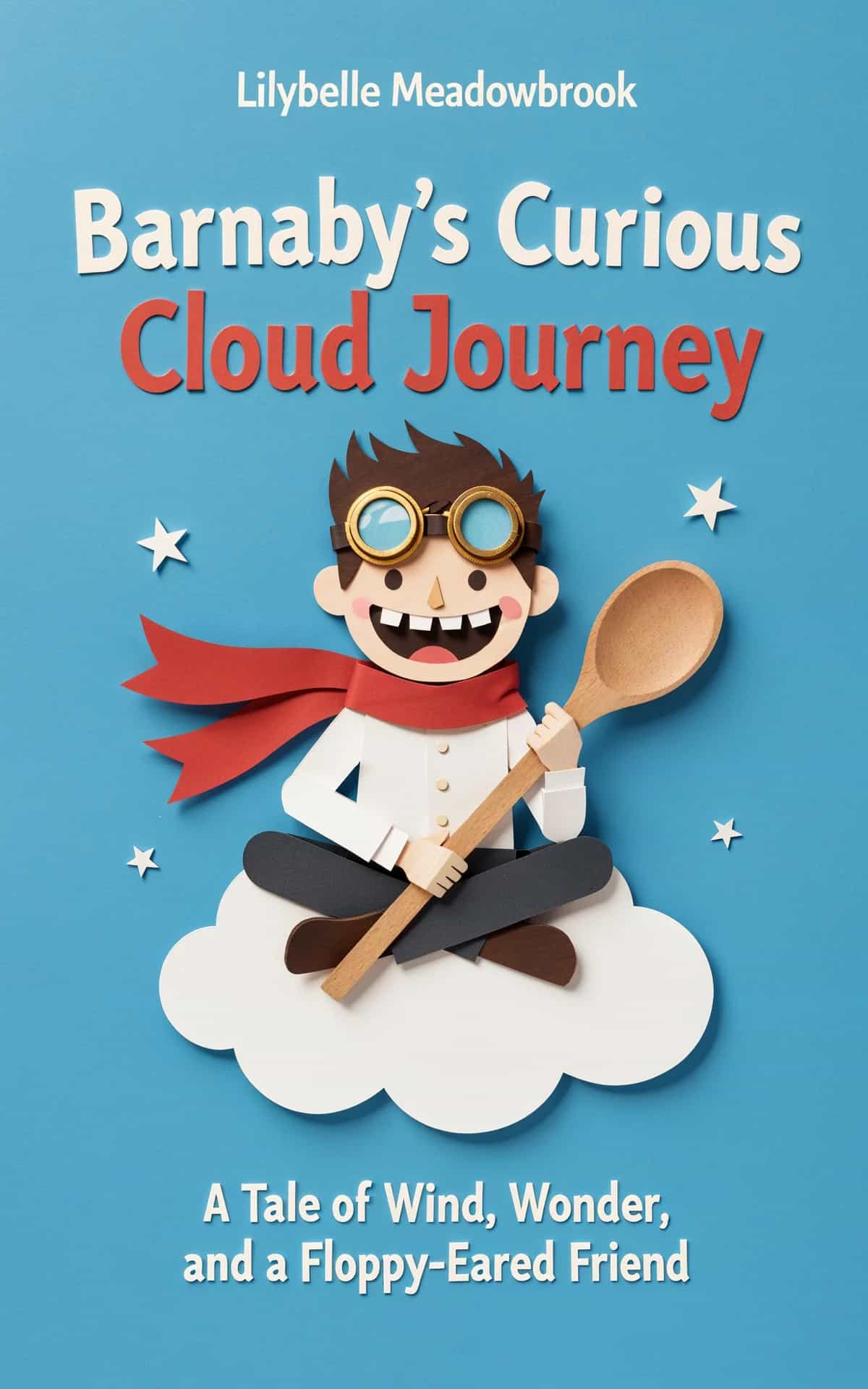
You've finished the manuscript. The hard part should be over, but many first-time authors often stall.
The draft is done, yet the next decisions feel less familiar than writing ever did. File formats, trim sizes, keywords, ISBNs, distribution choices, launch timing. None of them are glamorous, and each one can affect whether your book looks professional, gets discovered, and earns back the effort you put into it.
That's what makes KDP self publishing deceptively simple. Amazon makes the upload process accessible, but easy access isn't the same as easy execution. The authors who do well on KDP usually don't win because they clicked the right dashboard buttons. They win because they made solid decisions before upload, positioned the book clearly, and treated launch week like part of publishing, not an afterthought.
Your Path from Manuscript to Marketplace
A finished manuscript creates a false sense that the book is nearly done. In practice, the writing draft is only one asset in a longer commercial workflow. You still need a clean interior file, a cover that works at thumbnail size, usable metadata, a pricing strategy, and a plan for what happens after the title goes live.
That work sits inside a larger shift in publishing. By 2024, the global self-publishing market was estimated at $1.85 billion and is projected to grow at a 16.7% CAGR to reach $6.16 billion by 2033, reflecting a broader move toward author-controlled publishing according to this self-publishing market overview. That matters because KDP self publishing is no longer a side lane for hobby projects. It's part of a durable publishing business model.
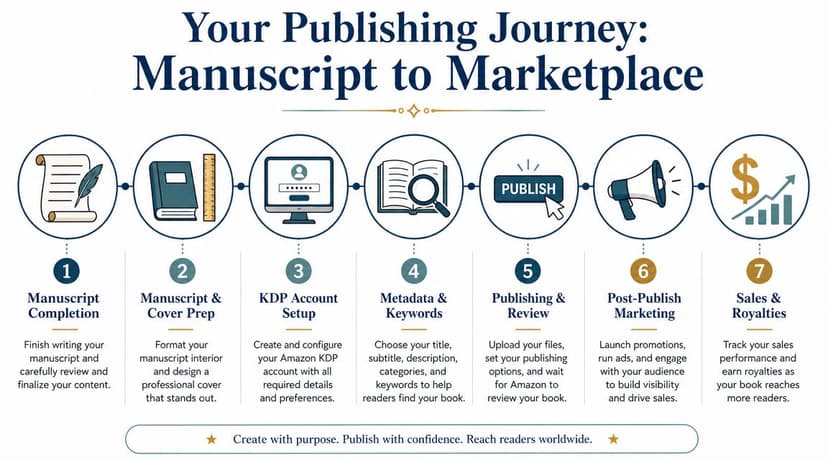
What the full workflow actually looks like
Most new authors focus on the dashboard too early. The actual sequence is closer to this:
- Finish the manuscript properly. “Done writing” and “ready to publish” aren't the same.
- Prepare production files. Ebook and print files have different requirements.
- Create market-facing packaging. Cover, title, subtitle, categories, and description all shape conversion.
- Set up KDP correctly. Account, tax profile, publishing rights, and title details need to be accurate.
- Choose distribution and pricing. These are business choices, not admin tasks.
- Launch with intent. Early traction affects long-term visibility.
If you skip one of those steps, the book usually suffers in a visible way. Poor formatting makes the reading experience feel amateur. Weak metadata buries a good book. A rushed cover lowers click-through before anyone reads a sample.
Practical rule: Don't enter KDP until you can upload files, write the product page, and make pricing decisions without guessing.
A cleaner way to approach it is to treat publishing as production plus positioning. Production makes the book readable. Positioning makes it buyable.
If you want a parallel walkthrough focused on the broader publishing process, BeYourCover's guide on how to self-publish a book is a useful companion piece. For this guide, the focus stays on the choices inside the KDP path itself.
Where new authors usually lose momentum
The common failure points aren't dramatic. They're small, cumulative mistakes:
- Uploading a document that still needs editing
- Using a cover built for personal taste instead of market fit
- Choosing vague categories
- Pricing without a clear reason
- Publishing first, then thinking about launch
That's why KDP self publishing works best when you think like both author and publisher. The writing matters. So do the packaging, timing, and product decisions around it.
Preparing Your Manuscript and Cover for Upload
The upload stage should be boring. If it feels chaotic, the work started too late.
Most publishing problems show up before KDP ever sees your files. A manuscript that still needs cleanup will create formatting problems later. A cover that looks fine in full size but weak at thumbnail size will hurt conversion no matter how polished the prose is. That's why I treat manuscript prep and cover prep as the two assets that carry the whole release.
The market has also changed. The KDP marketplace has shifted away from mass-produced, low-quality books toward high-quality, niche-specific products, which means sharp differentiation and professional presentation matter more now, as noted in this KDP trend analysis.
Get the manuscript clean before you export it
Authors often ask which file type KDP prefers. That isn't the first question. The first question is whether the manuscript is finished.
A solid pre-upload manuscript usually needs several passes:
- Developmental clarity. Does the structure work? Are chapters in the right order? Does the book deliver what the premise promises?
- Line-level polish. Are sentences readable, consistent in voice, and free of clutter?
- Copyediting and proofreading. Have you removed grammar errors, typos, repeated words, and formatting glitches?
Skipping those stages is expensive in a different way. You may save money upfront and then pay for it in poor reviews, refund requests, and a harder relaunch later.
For the actual file, simplicity helps. Clean styles, consistent paragraph spacing, proper scene breaks, and restrained use of tabs or manual spacing make conversion easier. If you need a practical file-prep reference, this guide to formatting for Kindle Direct Publishing covers the common setup issues.
Build the cover for the store, not for yourself
A cover has one job before anything else. It has to stop the right reader.
That doesn't mean “make it loud.” It means signal the book's category, tone, and promise fast. Readers make snap judgments from a tiny thumbnail. If the cover doesn't tell them what shelf they're on, they move on.
Here's the checklist I use before approving a cover concept:
- Genre signal first. A thriller should read like a thriller before anyone reads the subtitle.
- Title hierarchy second. If the title is unreadable at small size, the design isn't ready.
- Single focal point. Too many visual ideas make the cover feel unsure.
- Typography discipline. Good font pairing matters more than decorative effects.
- Print readiness. Ebook art and full-wrap print files are different deliverables.
For image-based covers, resolution matters more than many authors expect. If you're unsure how print sharpness, size, and resolution interact, this guide on optimizing images for print quality is worth reviewing before you finalize files.
A cover doesn't need to be clever first. It needs to be legible, category-aware, and convincing in a crowded search result.
Use tools to test concepts before locking the final design
AI can be useful if used as part of the workflow, not as a shortcut around judgment. Testing multiple visual directions quickly can help you find stronger compositions, stronger genre alignment — checked against proven fantasy book cover ideas or the leaders in your own category — or a better title treatment before you invest time in final refinement.
Tools such as Canva, Adobe Express, and dedicated book-cover generators can help you explore options. BeYourCover is one example built specifically for authors who want to generate and iterate cover concepts from a title, genre, and short summary, then refine typography and layout before export.
That said, concept generation isn't the final step. You still need to check whether the design works in thumbnail form, whether it fits your category expectations, and whether the print version has correct wrap specs.
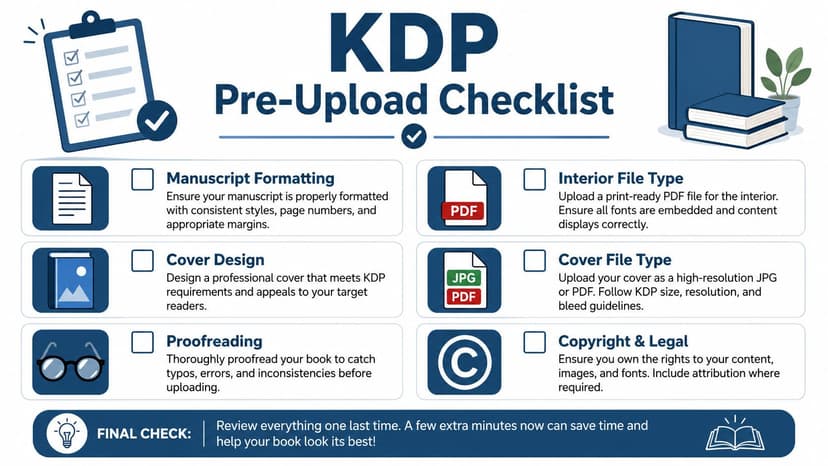
Pre-upload checklist
Before logging into KDP, make sure you have these ready:
- Final manuscript file with front matter, clean chapter styling, and no tracked changes
- Proofread interior after export, not just in the writing file
- Ebook cover in the correct format for digital upload
- Print cover as a separate wrap file if you're doing paperback or hardcover
- Copyright and contributor details settled before setup
- Series naming finalized if the book belongs to one
When this stage is done well, KDP becomes a publishing platform instead of a troubleshooting environment.
Navigating KDP Account and Book Setup
The KDP interface is less complicated than many authors expect. The anxiety usually comes from not knowing which mistakes are harmless and which ones follow the book for a long time.
Your account setup falls into the second category. Get the foundation right once, and future titles become much easier to publish.
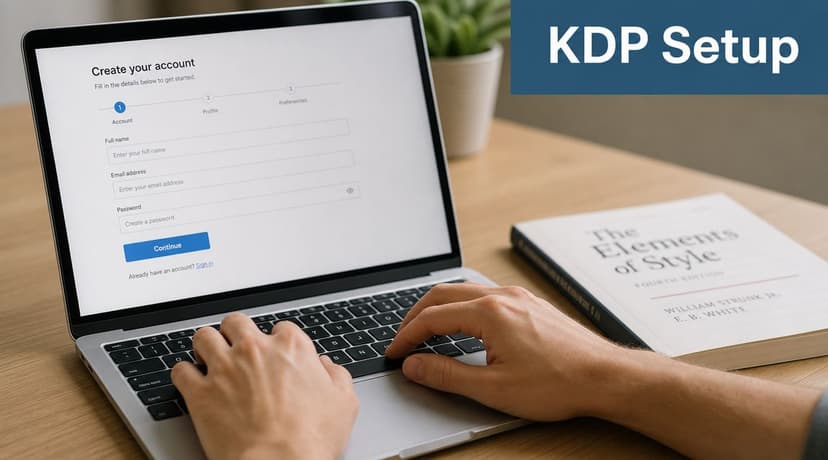
Set up the account like a business asset
Use your existing Amazon account if you already have one. Don't create duplicate identities unless there's a real business reason and you understand the consequences. Consistency matters across your legal name, banking details, and tax information.
The account setup usually asks for:
- Identity details tied to your legal information
- Bank payment details for royalty deposits
- Tax profile information through Amazon's interview flow
- Business classification if you're publishing as an individual or company
The tax interview intimidates new authors more than it should. In practice, it's a guided form. Read each prompt slowly, answer based on your actual tax status, and don't improvise. If you're unsure how Amazon expects certain publishing fields to work, a practical overview of Kindle Direct Publishing guidelines can help before you start entering title data.
Fill in the book details carefully the first time
When you click to create a new title, KDP walks you through the title setup page. This part feels simple, but several fields affect discoverability, branding, and reader trust.
The fields that deserve extra care are:
- Book title and subtitle. Don't stuff these with keywords. They need to read like a real book.
- Series information. If the book belongs in a series, enter it consistently from the start.
- Author name. Decide early whether you're using your real name or a pen name.
- Contributors. Add illustrators, editors, or co-authors where relevant.
- Description draft. Even if you refine it later, don't leave this rushed.
- Publishing rights. Only claim what you control.
A common beginner mistake is treating this page like a form to finish quickly. It's better to think of it as the data layer for your storefront.
If your title, subtitle, series info, and author name aren't stable yet, stop and settle them before publishing. Changing them later is possible, but it creates avoidable friction.
Reduce avoidable setup errors
The smoothest setup sessions happen when you prepare a small publishing sheet in advance. Mine usually includes title, subtitle, author name, series number, book description, contributor names, categories, keywords, pricing notes, and rights status in one place.
That keeps you from making tired decisions inside the dashboard.
A few practical cautions matter here:
- Don't rush the age-range and content questions if your book falls into children's, YA, or sensitive categories.
- Don't guess on rights for public domain, translated, or previously published work.
- Don't hit publish just because the files uploaded cleanly. A clean upload is not the same as a well-positioned book.
This part of KDP self publishing should feel administrative. If it feels strategic, you probably haven't prepared the metadata thoroughly enough yet.
Mastering Metadata and Keywords for Discovery
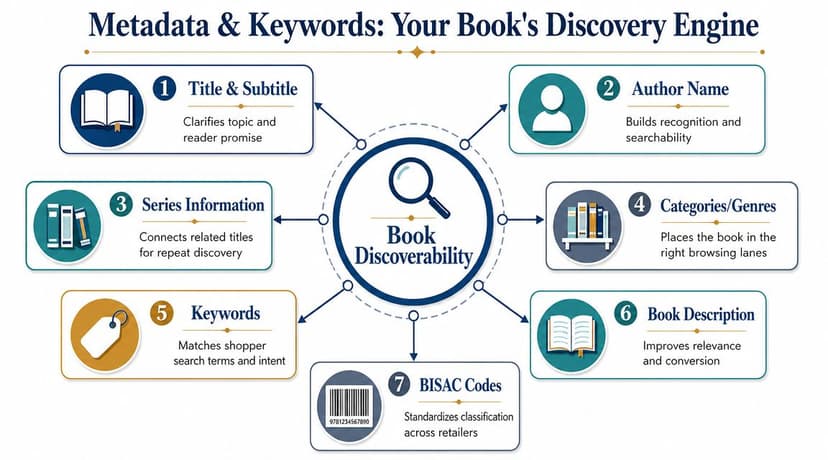
Many books fail to gain traction on KDP because the metadata does weak work. The writing may be good. The cover may be competent. But if Amazon can't understand who the book is for, the listing struggles to appear in the right searches and the wrong readers end up seeing it.
Metadata is how you tell the store what the book is, who it belongs to, and what nearby books it should stand beside.
Think in terms of reader intent
Authors often choose keywords based on what they would type. That's a start, but it isn't enough. Reader search behavior usually reflects problem, promise, mood, trope, or subgenre.
For nonfiction, readers often search for outcomes or use cases.
For fiction, they often search for combinations of genre signals, tropes, and emotional expectations.
That's why broad terms are usually weak. “Fantasy novel” tells Amazon almost nothing useful. A more specific phrase can align the book with a real search pattern and a clearer reader expectation.
If you want a broader framework for evaluating search language and organizing keyword research, this roundup of best SEO tools for bloggers is useful because the same search-intent thinking applies to book discoverability, even though books have their own marketplace dynamics.
Categories and keywords should support each other
Don't choose categories in isolation. Don't choose backend keywords in isolation either. The strongest metadata packages work because all the parts point in the same direction.
A practical way to judge your setup is to ask whether these elements tell the same story:
| Metadata element | What it should communicate |
|---|---|
| Title and subtitle | Core promise or genre fit |
| Categories | The shelf the book belongs on |
| Backend keywords | The search terms likely readers use |
| Description | Why this specific book is worth buying |
If one of those pieces points elsewhere, the listing weakens. A serious nonfiction cover paired with vague inspirational keywords creates confusion. A romance-coded cover — the look you see across these romance book cover ideas — paired with generic “women's fiction” language may attract the wrong clicks.
How to choose useful backend keywords
KDP gives you limited keyword space, so each phrase should carry intent. I look for terms that are specific enough to signal audience fit but broad enough to reflect real search behavior.
Useful keyword phrases often come from:
- Subgenre language readers already use
- Trope combinations in fiction
- Problem-solution phrasing in nonfiction
- Format signals when they matter, such as workbook or guided journal
- Audience descriptors only when they clarify fit
Avoid phrases that say almost nothing, such as “good book,” “must read,” or single-word category labels. Also avoid repeating words that already appear in your title unless the phrase itself adds meaningful context.
Metadata should narrow the audience before it expands reach. The wrong visibility wastes impressions.
Write a description that converts, not one that summarizes everything
The book description isn't there to explain the whole book. It's there to create a buying decision.
That usually means the first lines matter most. Readers skim. They look for clarity, momentum, and confidence. For fiction, open with conflict, stakes, or premise. For nonfiction, lead with the problem and the result the reader wants.
A strong description usually does four things:
- Hooks fast
- Clarifies who the book is for
- Shows what makes it distinct
- Ends with a clear reason to buy now
Formatting helps. Short paragraphs and simple HTML styling can improve readability on the product page. If you want help shaping the blurb, a free description-structuring tool can speed up drafts. BeYourCover offers a free tool for book marketing assets and descriptions that can help you test wording before you finalize the listing.
Good metadata doesn't make a weak book sell. It does make a good book easier to find and easier to understand.
Choosing Your ISBN, Pricing, and Distribution Strategy
At this stage, KDP self publishing becomes a business model instead of a file-delivery system.
The wrong choices here won't always kill a book, but they can lock you into avoidable limitations. ISBN ownership affects flexibility. Distribution affects where your ebook can live. Pricing affects not only royalties but also how readers interpret value.
ISBN decisions are mostly about control
For ebooks, you can usually keep things simple. For print, the decision deserves more thought.
Your main options are:
- Use the free KDP ISBN if you want convenience and are comfortable with Amazon handling that identifier on the print edition.
- Buy your own ISBN if publisher identity and broader long-term control matter to you.
- Skip ISBN questions for ebook-only planning where the format doesn't require the same print setup logic.
The trade-off is straightforward. The free route is easier. Owning your ISBN gives you more control over the publishing record and can simplify platform flexibility later.
If you're still researching how search behavior influences product positioning beyond Amazon itself, this guide on how to find the best keywords for SEO is useful background for thinking about discoverability and audience intent before you price and position the book.
KDP Select and wide distribution solve different problems
This is one of the few KDP decisions that should match your career model, not internet advice.
KDP Select gives your ebook access to Kindle Unlimited and Amazon promotional tools, but requires ebook exclusivity for the enrollment term.
Going wide keeps the ebook non-exclusive so you can distribute through other retailers and ecosystems.
Here's the practical comparison:
| Feature | KDP Select (Exclusive) | Going Wide (Non-Exclusive) |
|---|---|---|
| Ebook exclusivity | Required during the term | Not required |
| Kindle Unlimited access | ✓ Yes | ✗ No |
| Amazon promo tools | Available | Limited compared with Select |
| Other ebook retailers | Not during exclusivity | Allowed |
| Best fit | Amazon-first strategy | Multi-store strategy |
I've seen authors make the wrong choice by treating this as ideology. It isn't. It's a fit question.
Select can make sense if:
- Your audience already buys heavily on Amazon
- You want a simpler launch path
- You're willing to focus your ebook strategy in one place
Wide can make sense if:
- You want platform diversification
- You're building a long-term direct and multi-retailer presence
- Your readers use Apple Books, Kobo, or other stores regularly
Pick the model you can support operationally. Wide sounds appealing until you realize each storefront needs attention, assets, and follow-through.
Price for positioning, not only for royalty math
Authors often ask what the “best” price is. There isn't one. There is only the best price for this book, in this category, with this audience expectation.
For ebooks, Amazon uses 35% and 70% royalty tiers depending on price band and eligibility. That means price affects both perceived value and royalty structure. For print, the math is different because unit printing cost also matters.
A sound pricing process usually asks:
- What do comparable books appear to promise at their current price points?
- Is this book positioned as entry-level, premium, or series-driving?
- Does the print version leave enough margin after production cost?
- Will a low price help, or will it make the book look disposable?
Cheap pricing isn't automatically smart. It can undermine trust, especially in nonfiction or premium niche categories. High pricing isn't automatically strong either if the listing doesn't justify it.
The useful mindset is this. Price is part of marketing. It tells the reader what kind of product they're looking at before they ever click Buy Now.
Setting Up Paperback and Hardcover Versions
Print-on-demand adds complexity, but it also changes how readers perceive the project. A paperback or hardcover makes the book feel established, giftable, and easier to place in more buying contexts.
It also introduces technical requirements that ebook-only authors often underestimate.
Start with the trim size and interior setup
Print formatting starts with physical dimensions. Your trim size affects page count, spine width, visual balance, and sometimes reader expectations.
You don't need to be exotic here. In most cases, standard trim sizes are safer because they align with what readers already recognize in your category. A novel should usually look like a novel in the hand. A workbook should leave room to write. A hardcover should feel intentional, not like a paperback awkwardly forced into a case format.
The interior also needs a decision on bleed versus no bleed.
- Bleed means images or design elements extend to the page edge.
- No bleed means content stays inside margins and doesn't print to the very edge.
If the book is text-heavy, no bleed is often simpler. If the book includes full-page visuals, planners, or illustrated pages, bleed may be necessary.
Build the cover from the final print specs
Many print covers go wrong when authors design the wrap before the print settings are settled, then have to rebuild the file after page count changes.
The safer order is:
- Finalize the interior PDF
- Confirm page count and trim size
- Use KDP's cover calculator or template specs
- Build the full-wrap file for that exact book
That full-wrap file is a different asset from the ebook front cover. It includes front, spine, and back cover as one print-ready piece.
Some design tools and AI-assisted cover tools can help generate a starting wrap concept once you have the correct dimensions. The important part isn't the software. It's matching the file to the final specs, not approximating.
Never approve a print cover based on an estimate of page count. Spine width changes the whole file.
Always order a proof copy
This is the step too many authors skip because they're tired and eager to launch. Don't skip it.
A digital preview can catch obvious errors, but it won't tell you everything that matters in print. Physical proofing reveals issues you won't see on screen:
- Spine text alignment
- Margin comfort while reading
- Paper feel and ink density
- Image darkness or muddiness
- Unexpected trim or barcode placement
- Typography that looked larger on screen than in hand
Hardcover makes proofing even more important because casing, wrap alignment, and finish choices can change the presentation more noticeably than in ebook release.
If you plan paperback and hardcover together, don't assume one file adjustment translates perfectly to both. Treat each format as its own product with its own proof stage.
Post-Publish Marketing and Optimization Tactics
Publishing isn't the finish line. It's the handoff from production to demand generation.
A book can be well written, well packaged, and still vanish if the launch has no early movement. That's why I treat the first stretch after release as part of the publishing process itself, not as optional promotion if I still have energy left.
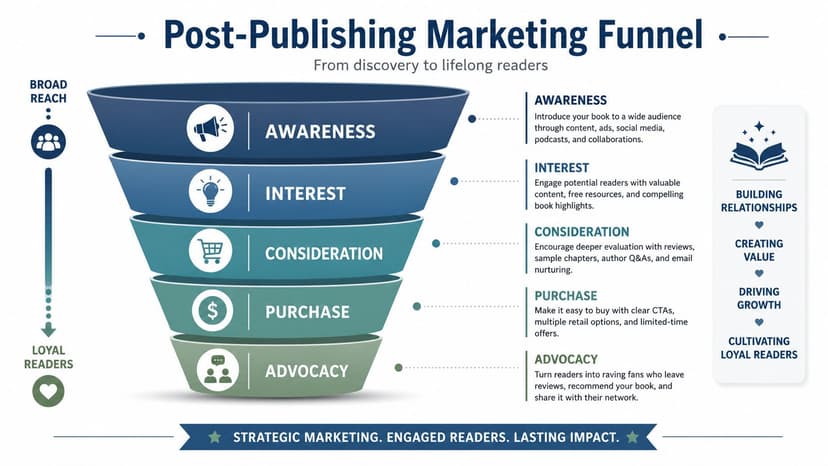
One especially useful launch principle is timing. A KDP creator interview argues that authors should validate demand, differentiate clearly, and generate reviews and purchases within the first 7-to-14-day window because Amazon responds to early activity. It also suggests ads are often more effective after some organic sales already exist, as discussed in this KDP launch interview.
Focus on early traction before you buy ads
New authors often assume the answer is immediate ad spend. Sometimes it isn't.
If the product page is still weak, the cover hasn't been tested, and there are no early signs of audience fit, ads can just accelerate bad data. Better to create early momentum from people most likely to care first.
That usually means:
- Email subscribers if you have them
- ARC or launch readers who can offer genuine reviews
- Existing social audience that already knows your work
- Personal network outreach handled carefully and professionally
- Reader communities where your niche already participates
The point isn't to manufacture noise. It's to show Amazon that real readers are responding.
Watch the listing like a product page
Once the book is live, pay attention to what may need refinement. You can adjust parts of the listing over time, and you should.
The main areas worth reviewing are:
| Area | What to look for |
|---|---|
| Cover | Does it still compete well in thumbnail view? |
| Description | Does the opening actually hook browsers? |
| Keywords | Are they too broad or mismatched? |
| Categories | Is the book shelved where readers expect it? |
| Reviews | Do comments reveal a positioning gap? |
Sometimes the issue isn't the book. It's the packaging promise. If reviews repeatedly praise one aspect you barely emphasized, that may be the angle the listing should lead with.
Launch week is diagnostic. It tells you how readers interpret the product you built.
Add assets that improve conversion
Amazon gives authors some tools many never use. One of the most practical is A+ Content for eligible listings. If you have access to it, use it to reinforce the book's promise, highlight series context, answer likely objections, or present visual supporting material more clearly.
This is also where cover-adjacent marketing assets matter. Consistent graphics for social posts, ads, and launch announcements make the release feel coherent. If you're creating these yourself, keep the visual language tied closely to the cover so readers recognize the book instantly across channels.
Finally, keep checking your KDP dashboard. Sales, royalties, and format-level patterns won't tell you everything, but they do tell you whether the market is responding and where to keep refining.
KDP self publishing rewards authors who stay engaged after release. Not obsessively. Consistently.
If you want the short version, here it is. Write the best book you can, package it like a professional product, choose metadata with intent, make your ISBN and distribution decisions deliberately, proof every print format, and treat launch as part of publication. That's the difference between uploading a book and publishing one.
Ready to Create Your Own Book Cover?
Turn your story into a visual masterpiece. Fill in the details below to start generating professional covers instantly.