A Guide to Kindle Direct Publishing Guidelines for Indie Authors
Master Kindle Direct Publishing guidelines with this comprehensive guide. Learn KDP rules for covers, manuscripts, and royalties to publish successfully.
Posted by
 Pablo Yáñez
Related reading
9 Best Book Marketing Tools for Indie Authors (2026)
Compare nine book marketing tools for indie authors, from market research and cover design to reader delivery, email, promotion, and ad tracking.
How to Build a Character Profile for Book Cover Design
Build a visual character profile that keeps cover art accurate and consistent. Define appearance, clothing, references, exclusions, and series continuity.
How to Repurpose One Book Cover for Print, Audio, and Ads
Turn one approved front cover into a print wrap, audiobook square, text-free artwork, mockups, ads, and social assets without rebuilding the design.
Ready to design your cover?
Use our AI book cover generator to create tailored book cover concepts in minutes.


Welcome to the definitive guide for navigating Amazon's Kindle Direct Publishing (KDP). Think of this as your go-to reference for mastering the Kindle Direct Publishing guidelines, from the nitty-gritty technical specs to the crucial content policies that can make or break your launch.
Getting these rules right isn't a suggestion—it's the foundation of a smooth and successful publishing journey. When you understand the requirements, you can focus on what matters most: connecting with readers.
When you get to the print-cover requirements, the KDP Cover Size Calculator can save you from manual spine and bleed mistakes. And when your front cover is ready, the free KDP Cover Creator assembles the complete print file from it.
Your Essential Reference for Amazon KDP Guidelines
Publishing on Amazon KDP places your book in one of the biggest marketplaces on the planet. To succeed, you have to play by their rules. This isn't just about uploading a file; it’s about preparing your book to meet the professional standards that both Amazon and its readers demand.
A small mistake in cover dimensions, file formatting, or metadata can get your book flagged for rejection or, even worse, deliver a disappointing experience to your readers. This guide is here to ensure that doesn't happen.
We'll break down the practical steps you need to take, including:
- Technical Specifications: The correct file formats, dimensions, and resolutions for your manuscript and cover.
- Content and Rights Policies: A clear look at what you can and can't publish on the platform.
- Metadata Optimization: How to properly use keywords, categories, and descriptions to get discovered.
- Pricing and Royalties: Making smart financial decisions that work for you and your book.
By understanding these rules, you’re setting yourself up to publish with confidence. This page owns KDP rules and compliance checks; the KDP self-publishing guide covers the Amazon process, while the platform-neutral self-publishing guide compares the wider publishing journey.
Meeting Manuscript and Interior Formatting Requirements
Before your story can grab a reader, your manuscript file has to meet Amazon's technical standards. Following KDP’s interior formatting guidelines is non-negotiable. It's the only way to guarantee a professional reading experience, whether on a Kindle screen or in print.
A poorly formatted file is a fast track to frustrating upload rejections. Worse, it can lead to bad reviews from readers who encounter glitches, formatting errors, or text that’s just plain hard to read.
KDP accepts a few different file types, but the most reliable and widely used are DOCX, EPUB, and KPF (Kindle Package Format). While you can upload a DOCX file straight from Microsoft Word, it offers the least control over the final look. For a more polished and predictable result, EPUB is the industry standard for ebooks.
Reflowable vs. Fixed-Layout Ebooks
First, you need to decide how your content should behave on a screen. This choice boils down to two core ebook formats, and making the right call is critical for reader experience.
- Reflowable: This is the standard for most novels and text-heavy books. The text and images automatically "flow" to fit any screen size and adjust to the reader's preferred font settings. It creates a flexible and user-friendly experience across all Kindle devices and apps.
- Fixed-Layout: This format is best for books where the precise placement of text and images is essential, like children's picture books, cookbooks, or graphic novels. It essentially creates a digital snapshot of a physical page, locking your design in place.
For the vast majority of authors—especially if you're writing fiction like a compelling romance book—a reflowable format is the correct choice. It makes your story accessible and enjoyable for the widest possible audience.
Print Interior Requirements
When creating a paperback, the rules get more specific. You’ll need to prepare a print-ready PDF built to exact physical dimensions. Getting this right often involves the principles of desktop publishing (DTP), which are key to meeting KDP’s technical specs for layout and design.
Here are the critical elements to master for your print interior:
- Trim Size: The final, printed dimension of your book (e.g., 6" x 9").
- Margins: You must set specific inside, outside, top, and bottom margins to ensure no text gets cut off during printing and binding. KDP provides minimum required margins based on your book's page count.
- Bleed: If you have images or colored backgrounds that should run to the edge of the page, you must include a "bleed." This means extending those elements 0.125 inches past the final trim line on the top, bottom, and outer edges.
- Font Embedding: Every font used in your manuscript must be fully embedded into the PDF file to ensure they appear exactly as you intended when printed.
Nailing these technical details from the start saves significant time and headaches later. A properly formatted manuscript is the foundation of a book that looks professional both online and in a reader's hands.
KDP Book Cover Specifications and Design
Your book cover is the single most important marketing tool you have. Getting it right isn't just a good idea—it's essential for grabbing a reader's attention on Amazon's crowded digital shelves. Following Kindle Direct Publishing’s design guidelines is not optional; it's the first step to avoiding frustrating upload rejections and ensuring your book looks professional from day one.
These rules exist to create a high-quality, consistent experience for readers. A cover that’s pixelated, sized incorrectly, or has the title cut off instantly signals an amateur production, which can kill a potential sale before anyone even reads your book description.
First, let's quickly touch on the files for your book's interior.
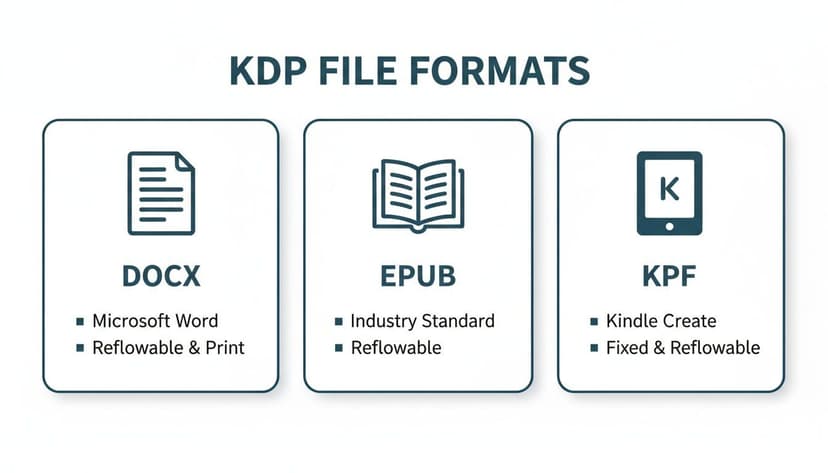
While you'll use formats like DOCX, EPUB, or KPF for your manuscript, your cover is a completely separate file. For both ebooks and paperbacks, this file needs to be a JPG or TIFF, designed to very specific dimensions.
Ebook Cover Requirements
For Kindle ebooks, the guidelines are straightforward but strict. The goal is a high-quality image that looks sharp on every device, from a small smartphone to a large tablet. Amazon’s ideal specs are designed to make your cover look crisp and professional no matter where it's viewed.
Here's a simple checklist of what you need:
- File Format: Your cover must be a JPG (JPEG) or TIFF (TIF) file. KDP won't accept other formats like PNG or PDF for an ebook cover.
- Dimensions: For the best results, KDP recommends a cover that is 2,560 pixels on the longest side and 1,600 pixels on the shortest side. This creates an ideal 1.6:1 aspect ratio.
- Resolution: The minimum image resolution is 72 DPI (Dots Per Inch), but to be safe, always upload a 300 DPI file. This ensures maximum clarity and prevents any chance of pixelation.
- Color Profile: Ensure your cover is in RGB (Red, Green, Blue) color mode, the standard for all digital screens.
Paperback Cover Essentials
Creating a print-ready paperback cover is more involved because it's not just a front cover—it's a single file that wraps around the entire physical book. This means your file has to include the front cover, back cover, and the spine, all calculated with precision.
Your final file must be a print-ready PDF, and its total size depends on three key factors: your book's trim size (e.g., 6" x 9"), your page count (which determines spine width), and whether you need a bleed.
- Bleed: If your cover design has images or colors that extend to the very edge of the page, you must include a 0.125” (3.2 mm) bleed on all sides. This extra margin gets trimmed off during printing, preventing white slivers at the edges of your finished book.
- Spine Calculation: KDP calculates the spine width for you based on your chosen paper type (cream or white) and the final page count. For example, a 300-page book on white paper will have a spine that's 0.675" wide.
- Resolution and Color: For print, there's no wiggle room. All paperback covers must have a resolution of 300 DPI and use a CMYK color profile to ensure the printed colors look as you intended.
KDP Cover Requirements Ebook vs Paperback
To make things easier, here’s a quick-reference table comparing the essential specs for both formats. Use this as a final check before you upload.
| Specification | Ebook Cover | Paperback Cover (Full Wrap) |
|---|---|---|
| File Format | JPG or TIFF | Print-Ready PDF |
| Ideal Dimensions | 1,600 x 2,560 pixels | Varies by trim size & page count |
| Resolution | 300 DPI (recommended) | 300 DPI (required) |
| Color Profile | RGB (for screens) | CMYK (for print) |
| Spine & Back | Not applicable (front only) | Required (calculated) |
| Bleed | Not applicable | 0.125" (if design touches edges) |
Remember, getting these details right is the foundation of a professional-looking book. Once you've mastered the specs, you can focus on the creative side—designing a cover that sells.
Understanding Content Quality and Rights Policies
Amazon's marketplace is built on customer trust, and their Kindle Direct Publishing guidelines are there to protect it. Following these rules isn't optional; it's a core part of being a successful publisher on the platform. Getting this wrong can lead to your book being blocked, royalties being withheld, or in serious cases, your entire KDP account being shut down.
Think of it as an agreement between you, Amazon, and your readers. The goal is simple: keep illegal material off the platform, protect intellectual property, and ensure customers get what they pay for. This means your book's content, cover, and metadata must be accurate and professional.
Prohibited and Restricted Content
KDP is very clear about what isn't allowed. While the official list is long, a few key areas trip up authors most often. Common pitfalls include:
- Illegal or Infringing Content: You must own the publishing rights to everything you upload. That means the manuscript, your cover art, and any images inside the book. Using copyrighted material without a proper license is a fast track to getting your book removed.
- Offensive Content: KDP has a zero-tolerance policy for hate speech, content that promotes terrorism, or any material involving child abuse. This is non-negotiable.
- Poor-Quality Content: This is a broad category for anything that creates a "disappointing customer experience." It covers everything from unedited, typo-riddled manuscripts to books with nonsensical AI-generated text. It also includes misleading covers that promise something the book doesn't deliver—a tactic sometimes seen in genres like low-content horror books.
As Amazon puts it, "We don't allow content that disappoints our customers or creates a poor shopping experience." Every content policy they have comes back to this one guiding principle.
Owning Your Publishing Rights
One of the most common stumbles for new authors is copyright, especially with images. Finding a picture on Google does not mean you can use it on your cover. You need to hold the exclusive publishing rights for every element, for every territory you intend to sell in.
If Amazon asks, you must be ready to prove you have the rights. Testing cover concepts with an AI tool is a modern way to explore visual directions, but you must confirm that the tool provides a full commercial license for the final image you use. Likewise, if you're publishing a public domain work, KDP requires you to add something new and original—like custom illustrations, a fresh translation, or detailed annotations. You cannot simply copy and paste a classic text and sell it as your own.
Navigating Royalties, Pricing, and Distribution
Understanding how you get paid is a huge piece of the Kindle Direct Publishing guidelines. Your profitability comes down to making smart choices about your book's price, royalty rate, and where you sell it. For ebooks, KDP offers two main royalty options, and your list price determines which one you get.
This isn't a minor detail—it directly impacts your earnings on every single sale.
- 70% Royalty: To get this much higher rate, your ebook needs a list price between $2.99 and $9.99. This is the sweet spot for most indie authors, as it maximizes your profit per book within a price range that readers are already comfortable with.
- 35% Royalty: This rate applies if your book is priced below $2.99 or above $9.99. It's typically used for promotional pricing, like a $0.99 launch special, or for very large, highly specialized non-fiction books that command a premium price.
Picking the right option is a strategic move. A 99-cent price might get you more downloads at launch, but the lower royalty rate means you earn significantly less per copy sold. Our guide on the costs of self-publishing can help you think through these financial trade-offs.
The KDP Select Decision
Beyond pricing, you must decide whether to enroll your ebook in KDP Select. Think of it as an all-or-nothing choice where you grant Amazon exclusive digital distribution rights for a 90-day period, which automatically renews unless you opt out.
What are the benefits of this exclusivity? Enrolling unlocks a few powerful advantages:
- Kindle Unlimited (KU): Your book joins the massive KU library, making it available to millions of subscribers. You then get paid for every page they read from a monthly global fund.
- Promotional Tools: You get access to exclusive marketing tools like Kindle Countdown Deals (limited-time price drops) and Free Book Promotions, which are great for boosting visibility.
The alternative to KDP Select is "going wide." This means you publish your ebook on other platforms like Apple Books, Kobo, and Barnes & Noble. While this diversifies your income, it also means you cannot use any of KDP's exclusivity-based promotional tools. It's a key decision that shapes your entire marketing strategy.
Payments and Tax Withholding
KDP pays out royalties monthly, approximately 60 days after the end of the month in which the sales were made. For example, your earnings from January sales will arrive at the end of March.
For international authors, it's critical to complete the tax interview in your KDP account. The U.S. has tax treaties with many countries that can reduce or even eliminate the standard 30% withholding tax on your royalties. To further sharpen your strategy and understand different markets, looking into various geo tools for Amazon sellers can offer some valuable regional insights.
Taking the time to get these financial decisions right ensures your publishing journey is as profitable as it is creative.
Optimizing Metadata and Book Details for Discoverability

Think of your book's metadata as its digital signpost on Amazon. It's much more than a box-ticking exercise; optimizing your book details is a fundamental part of the Kindle Direct Publishing guidelines because it’s what tells Amazon's algorithm where to shelve your book. Get it right, and you guide your target audience straight to your product page. Get it wrong, and your book might as well be invisible.
Every piece of metadata—from your title and description to your keywords and categories—works together to signal who your book is for. This is your single most important tool for finding the readers who will actually buy your work.
Crafting a Compelling Book Description
Your book description, or blurb, is your sales pitch. After a great cover grabs a reader's attention, the description is what seals the deal. KDP allows you to use basic HTML for formatting, and you should take advantage of it to make your blurb scannable and punchy.
A few simple HTML tags can make a world of difference:
- Bold text: Wrap a strong opening hook or a key selling point in
<b>and</b>tags to make it stand out. - Italics: Use
<i>and</i>for emphasis, character thoughts, or stylistic effect. - Bulleted lists: For non-fiction especially, using
<ul>for the list and<li>for each item is a clean way to highlight key takeaways or features.
A well-formatted description with a killer opening line is critical. Amazon only shows the first few sentences before a reader has to click "Read more," so you need to make those first words impossible to ignore.
Choosing Categories and Keywords Correctly
Categories and keywords are the scaffolding of Amazon's search engine. They act like the aisles and shelves in a physical bookstore, guiding readers to precisely the kind of book they're looking for.
When you set up your title, KDP allows you to choose two BISAC categories. Don’t just pick a broad category; drill down to the most specific and relevant option you can find. For example, instead of just "Fiction," go deeper to "Fiction > Thriller > Espionage." This move places your book right next to its direct competitors, like these great thriller book cover examples, attracting readers who are already searching for that specific type of story.
You also get to input up to seven keyword strings, each with a 50-character limit. The trick here is to think like a reader. What terms would someone type into the search bar to find a book like yours? Use a mix of broader terms ("sci-fi adventure") and highly specific ones that hit on popular tropes or character archetypes ("found family in space"). Mastering your keywords is your secret weapon for discoverability, and you can learn more in this overview of KDP's evolving landscape.
The Rules Around ISBNs
An ISBN (International Standard Book Number) is a unique 13-digit identifier for your book. KDP offers a free ISBN for your convenience, which works perfectly if your only goal is to publish on Amazon's platform.
However, if you purchase your own ISBN from a provider like Bowker, you are officially listed as the publisher of record. This gives you the flexibility to sell your book on any other platform or in any other format you choose. For authors who envision wide distribution beyond Amazon, investing in your own ISBN is a smart long-term move.
A Pre-Publishing KDP Compliance Checklist

Before you hit that final "Publish" button, run through one last check. This list covers the essential file formats, cover specs, metadata, and policies that often trip authors up. A few minutes spent here can save you hours of frustration and potential rejection later. Catching a simple formatting error now is far better than having to unpublish and start over.
For more inspiration on what a great cover looks like, you can browse these epic fantasy book cover ideas.
Manuscript Formatting
- File Type: Is your manuscript saved as a valid DOCX, EPUB, or KPF file?
- Margins and Bleed (for Print): Have you double-checked that your margins meet KDP's minimum requirements and added the 0.125" bleed on the top, bottom, and outer edges if needed?
- Fonts and Pages: Are all your fonts properly embedded? Is the pagination correct?
Cover Specifications
- Resolution and Size: Is your cover file 300 DPI? For ebooks, are the dimensions at least 2,560 × 1,600 pixels?
- Color Profile: Is it RGB for ebooks and CMYK for print?
- Paperback Wraps: Is your print cover a single PDF that includes the front, spine, and back, all sized to your final trim size?
For creative guidance, you can test ideas with an AI tool and compare your results with professional designs, like these professional thriller covers, to ensure you're hitting the right genre notes.
A high-resolution cover that instantly signals your genre is one of the best ways to boost reader clicks and avoid a frustrating KDP rejection.
Metadata and Rights
- Book Description: Is your description compelling and formatted with basic HTML like
<b>tags for emphasis? - Categories & Keywords: Have you chosen two highly specific BISAC categories and filled all seven keyword slots?
- ISBN Decision: Will you use the free KDP ISBN, or provide your own for wider distribution?
- Rights Verification: Have you confirmed you hold the publishing rights to every bit of text and every single image in your book?
Content Policy and Pricing
- Policy Review: Take five minutes to scan the official KDP content policy for prohibited material.
- Royalty Plan: Have you chosen your royalty rate (70% or 35%) based on your book's price point?
- KDP Select Decision: Will you go exclusive with Amazon or "go wide"?
- Territories: Have you confirmed which countries you'll be selling in?
Final Preview
- Use the eBook Previewer tool inside KDP to catch weird formatting issues before they go live.
- For print books, meticulously check the proof for bleed, spine text alignment, and the back cover layout.
- Once everything looks perfect, you can save it as a draft or take a deep breath and publish.
This checklist is your last line of defense, ensuring you align with all the core Kindle Direct Publishing guidelines so you can publish with total confidence.
Frequently Asked Questions About KDP Guidelines
Jumping into self-publishing always comes with questions. This section cuts through the noise to give you straight answers on the most common things authors ask about Kindle Direct Publishing guidelines.
Can I Make Changes to My Book After It Is Published?
Yes, absolutely. One of the best parts of KDP is the flexibility to update your book whenever you need to. You can easily upload a revised manuscript to fix typos or a new cover to freshen up your branding.
Once you submit the changes, Amazon’s team will review them. This usually takes up to 72 hours. Your book stays on sale with the old version during the review. As soon as your updates are approved, they’ll automatically replace the previous files in the Kindle Store.
Do I Need My Own ISBN for a KDP Ebook?
For a Kindle ebook, no, you don't need to bring your own ISBN. When you publish, Amazon assigns it a unique 10-digit ASIN (Amazon Standard Identification Number), which works perfectly as its ID number on their platform.
However, if you plan to sell your ebook on other sites like Kobo or Apple Books ("going wide"), you'll need a universal identifier. In that scenario, buying your own ISBN is a smart move. It officially lists you as the publisher of record and makes broad distribution possible.
What Is the Difference Between KDP and KDP Select?
Think of standard KDP as the open-road option. You publish your book on Amazon, and you’re free to sell it anywhere else you want, whenever you want.
KDP Select, on the other hand, is an optional program where you give Amazon exclusive digital distribution rights for a 90-day enrollment period. The trade-off is compelling: you get access to powerful promotional tools like Kindle Countdown Deals, and your book is included in Kindle Unlimited (KU). Authors in KU get paid based on the number of pages subscribers read.
Choosing between standard KDP and KDP Select is a key strategic decision. Exclusivity unlocks marketing tools, while going wide diversifies your income streams.
How Quickly Will My Book Be Available for Sale?
Once you hit "Publish," your book goes into a review queue. Amazon officially says this can take up to 72 hours, but it’s often much quicker—sometimes just a matter of hours. As soon as it passes the review, your book's sales page will go live in the Kindle Store.
Can I Use AI-Generated Art for My Book Cover?
Yes. KDP’s current rules allow you to use AI-generated images for your book cover, as long as you have the proper commercial rights and the art meets their content policies. You must disclose that the content is AI-generated when setting up your book's details.
Using an AI tool can be a fantastic way to create a high-quality, genre-specific cover that hits all the technical marks. To get a feel for what visuals resonate with readers, it’s a good idea to browse successful designs, like these romance book cover designs, and apply those winning principles to your own AI creation.
Relevant Free Tools
Keep going with the right generator
These tools match the topic of this article and give readers a direct next step.
Publishing Tool
KDP Cover Size Calculator
Free interactive calculator for exact KDP spine width and cover dimensions, with a downloadable blank template.
Open tool
Publishing Tool
KDP Cover Creator
Upload your front cover and build the full KDP print wrap — spine, back cover, exact bleed — then download a print-ready 300 DPI PDF. No sign-up, no watermark.
Open tool
Ready to Create Your Own Book Cover?
Turn your story into a visual masterpiece. Fill in the details below to start generating professional covers instantly.