Increasing Operational Efficiency for Indie Authors
Learn about increasing operational efficiency in your indie publishing workflow. Discover practical tips, smart tools, and strategies to publish faster.
Posted by
 Pablo Yáñez
Related reading
Letter of Transmittal Templates: Free Downloads 2026
Find the best letter of transmittal templates for any project. Get free, downloadable Word, PDF, & Google Docs files for business & authors.
Your Guide to the Perfect Book Cover Design Format
Master the book cover design format for KDP ebooks and print. Learn file types, dimensions, and color modes to publish your book with confidence.
How to Increase Book Sales on Amazon: An Author's Practical Guide
Learn how to increase book sales on Amazon with actionable strategies for metadata, pricing, ads, and cover design to amplify your KDP success.
Ready to design your cover?
Use our AI book cover generator to create tailored book cover concepts in minutes.


For a self-published author, being a great writer is only half the job. The other half is running a small publishing business. In today's crowded market, increasing operational efficiency isn't just business jargon—it's the key to building a sustainable author career without burning out.
This guide focuses on building a smart, repeatable system for everything except the writing itself. The goal is to free up your time, budget, and creative energy, allowing you to publish higher-quality books more frequently and profitably.
Why Efficiency Matters for Indie Authors
 The journey from a finished manuscript to a live book on Amazon KDP is filled with essential but time-consuming tasks. Editing, cover design, formatting, and marketing all demand significant resources. Without a solid process, these tasks can create bottlenecks that delay your launch, drain your budget, and kill your momentum.
This is where a focus on efficiency changes the game. It’s not about cutting corners or sacrificing quality. It's about shifting your mindset from simply doing everything to doing everything smartly.
Finding (and Fixing) Your Time Sinks
Every author has experienced frustrating delays and repetitive tasks that consume valuable writing time. Identifying these weak spots is the first step toward building a stronger, more resilient publishing workflow.
Here are some of the most common bottlenecks indie authors face and the efficiency principles that solve them.
Common Bottlenecks in the Indie Publishing Workflow
| Bottleneck Area | Common Problem | Efficiency Principle |
|---|---|---|
| Editing & Revisions | Receiving disorganized feedback from beta readers leads to endless, conflicting edits, adding months to pre-production. | Standardize Input. Create a structured feedback form or checklist to gather consistent, actionable notes. |
| Cover Design | The traditional design process involves weeks of back-and-forth communication, draining both creative energy and budget. | Accelerate Iteration. Use tools that allow for rapid visualization and changes, collapsing the revision cycle from weeks to hours. |
| Marketing Prep | Marketing becomes a frantic scramble right before launch, resulting in weak promotion and massive stress. | Systematize Output. Develop a pre-launch marketing checklist and a library of reusable assets for every book. |
These aren't just minor headaches; they represent lost opportunities. Every hour spent on clunky administrative work is an hour you could have spent writing your next book or connecting with readers. For a deeper dive, check out these top strategies for improving operational efficiency that can be applied across your author business.
An efficient workflow isn't a static checklist you create once. It's a living system you refine and improve with every launch.
Building Your Publishing Engine
The goal is to establish a rock-solid framework that makes each book launch smoother than the last. This means creating standardized playbooks for the tasks you perform repeatedly.
For instance, a structured beta reader form isn't just a document; it's a system that helps guarantee you receive usable feedback every time. Modern tools are invaluable here. Instead of waiting days for a designer to tweak your romance book covers, you might explore an AI tool to generate and test concepts in minutes. This not only saves time but also maintains creative momentum.
Ultimately, focusing on operational efficiency is an investment in your career's longevity. It builds a resilient foundation for your author business, enabling you to scale up, increase your income, and—most importantly—reclaim your time to do what you love. A strong author brand is the anchor for this system; our brand strategy template is an excellent starting point.
Map Your Current Publishing Workflow
You can't improve what you don't understand. Before optimizing your process, you need an honest, detailed view of your entire publishing workflow as it exists today. This starts with mapping every step, from the moment you type "The End" to the day you hit "Publish."
This exercise isn't about judgment; it's about diagnosis. The objective is to create a visual blueprint of your current reality, including every task, delay, and point of frustration. This map will reveal the bottlenecks and highlight the biggest opportunities for improvement.
Breaking Down the Author Journey
For most indie authors, the path from a finished draft to a live book can be broken down into three core phases. Organizing your work into these distinct stages makes it easier to see where your time is actually going, turning an overwhelming to-do list into a series of manageable steps.
-
Pre-Production: This covers everything that happens after the first draft is complete but before the book is ready for formatting. It's the "polishing" stage.
-
Production: This is the "assembly" phase. Your polished manuscript is transformed into the final digital and print files that readers will purchase.
-
Post-Launch: This begins the moment your book goes live. It includes all marketing, monitoring, and management activities required to drive discovery and sales.
Understanding these stages is the first step toward building a smarter, faster workflow.
How to Create Your Workflow Map
Using a notebook, spreadsheet, or whiteboard, list every task you perform for a book launch and organize them into the three phases. Be brutally honest and specific. Don't just write "Editing"—break it down into its component parts.
Phase 1: Pre-Production Tasks This phase is often where the most time is lost due to disorganized feedback and endless revisions.
- Self-editing pass (initial cleanup)
- Sending the manuscript to beta readers
- Collecting and organizing beta feedback
- Revising based on beta reader input
- Sending to a developmental editor
- Revising based on developmental edits
- Sending to a copy editor or proofreader
- Final review of the professionally edited manuscript
Phase 2: Production Tasks The production phase involves all technical and design work. Small missteps here can cause frustrating last-minute delays.
- Finalizing the book title and subtitle
- Writing the book description (blurb)
- Researching keywords and categories for Amazon KDP
- Creating a professional cover design
- Formatting the ebook interior
- Formatting the print book interior
- Proofreading the formatted files (a crucial step, as formatting can introduce new errors)
Phase 3: Post-Launch Tasks With the book live, the focus shifts to marketing and sales.
- Uploading files to KDP, IngramSpark, etc.
- Setting up pre-orders
- Scheduling launch announcements (newsletter, social media)
- Running Amazon or Facebook ads
- Submitting to book promotion sites
- Monitoring sales, reviews, and ad performance
Decision Point: Your complete task list is a diagnostic tool. Forgotten tasks are a primary source of last-minute panic.
Once your list is complete, add two more columns next to each task: Time Taken (your best estimate in hours or days) and Pain Points (what frustrates you or slows you down). For example, under "Creating a professional cover design," a pain point might be "Weeks of email back-and-forth to see initial concepts."
For many authors, cover design is a significant bottleneck. When trying to nail down ideas for compelling thriller book covers, the traditional process can feel too slow. This is a perfect example of where a different approach can help. Using an AI tool to test concepts can shrink iteration time from weeks to hours. Your workflow map will make it clear which steps are prime candidates for a new, more efficient method.
Tame the Two Most Chaotic Parts of Publishing: Pre & Post-Production
The actual writing is often the most straightforward part of the publishing journey. The real chaos tends to erupt in the phases before production begins and after the book is finished.
These phases—pre-production (editing, beta readers) and post-launch (marketing, keyword research)—are notorious for becoming frantic, reactive sprints. However, they are also where small systems can save you dozens of hours on every book launch.
Think of your pre- and post-production processes as the bookends supporting your entire publishing shelf. If they're flimsy and improvised, the whole structure is unstable. Solid, standardized systems create a reliable foundation for every book you publish.
This diagram outlines the typical publishing journey and its three core stages.
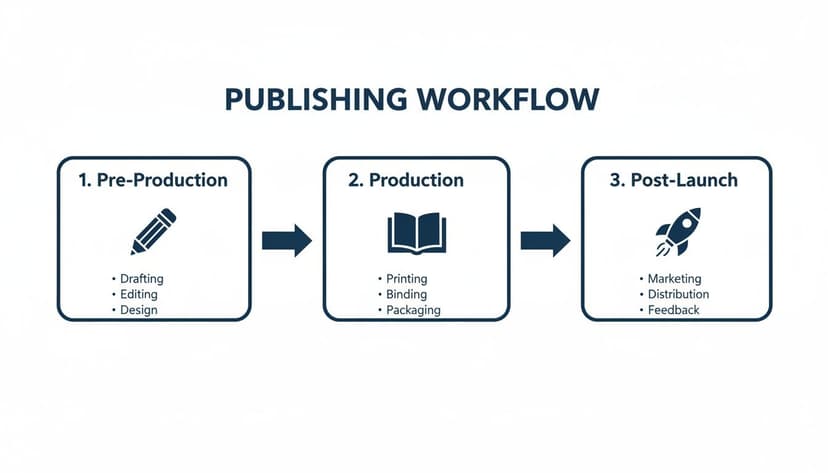
As shown, pre-production and post-launch activities frame the entire project, making them ideal candidates for repeatable systems.
Checklist for a Smoother Pre-Production Phase
Pre-production can easily spiral out of control with vague feedback, endless editing passes, and manuscripts trapped in "revision purgatory." The solution is to create reusable assets and checklists.
- Systematize Beta Reader Feedback: Instead of asking for general "thoughts," create a detailed Google Form or template. Ask pointed questions about plot holes, character arcs, pacing, and clarity to force structured, actionable feedback.
- Create a Master Self-Editing Checklist: Before hiring a professional, develop your own self-editing checklist. Include checks for common grammar mistakes, overused filler words, and consistency in character details (e.g., eye color). Running every manuscript through this process establishes a higher-quality baseline for your editor.
These simple systems transform messy, subjective tasks into a predictable and more manageable workflow.
Assemble Your Post-Production “Launch Kit”
The moment your manuscript is finalized, the marketing scramble often begins. A little preparation can turn launch-week panic into a calm, strategic execution. The key is to create a "Launch Kit"—a dedicated folder where you prepare and store all marketing assets well ahead of launch day.
A well-organized launch kit is the difference between a stressful, haphazard release and a smooth, professional one. It’s a one-time setup that pays dividends for every book you publish.
What to Include in Your Launch Kit:
- Pre-Written Social Media Posts: Draft a full sequence of posts for various platforms, including cover reveals, countdowns, character quotes, and launch day announcements.
- Email Newsletter Copy: Write the entire email campaign for your subscribers, from the pre-order push to the "it's live!" blast.
- Ad Creatives & Copy: If you run ads, finalize your images, copy variations, and targeting ideas in advance.
- Keyword & Category Research: Don't wait until you're on the KDP upload screen. Keep a simple document with your researched Amazon keywords and categories ready to copy and paste.
By completing this work in advance, you remove decision fatigue from your launch week. For those looking to take this further, exploring workflow automation software platforms can connect these systems and save even more time.
Swap Time-Sinks for Smart Tools in Production
The production phase—cover design and interior formatting—is notorious for bogging down even the most disciplined authors. This is also where you can achieve the biggest efficiency gains by swapping manual methods for faster, smarter tools.

The right technology choices can reclaim a significant amount of your time and creative energy, turning weeks of frustrating back-and-forth into a few focused, productive hours.
Stop Waiting on Cover Design
Your book cover is your single most important marketing asset. However, the traditional design process—brief, wait, feedback, wait—can drag on for weeks, draining your budget and momentum.
Modern tools have changed this dynamic. For authors, the goal is to make great decisions quickly without compromising quality. The ability to generate and refine concepts almost instantly, sometimes with the help of AI, has been a game-changer. It's not just a trend for large companies; a comprehensive AI report highlights how organizations are using AI to improve productivity.
Instead of a multi-week conversation with a designer, you can now use certain tools to generate and tweak dozens of professional, genre-appropriate concepts in minutes. This collapses the feedback loop and puts you in the driver's seat.
This immediate visual feedback allows you to test different themes, images, and typography on the fly, which is a powerful advantage for making informed decisions.
For instance, if you're exploring what makes effective science fiction book covers, you could test a dozen different font treatments and image styles in real-time. It’s not just faster—it’s a powerful way to understand what works for your genre.
Finally Nail Your Interior Formatting
Interior formatting can quickly become a time-consuming nightmare. Ensuring your manuscript looks clean and professional while meeting the specific requirements of KDP and other platforms demands meticulous attention to detail. Formatting manually in a word processor is error-prone and difficult to update.
Fortunately, dedicated tools are built to solve this exact problem.
- Vellum: The gold standard for many Mac users, Vellum is known for its beautiful output and simple interface. Import your manuscript, pick a style, and export perfect ebook and print files.
- Atticus: A strong cross-platform alternative to Vellum, Atticus works on PC, Mac, and Linux, combining writing and formatting into one application with similar one-click formatting power.
- Kindle Create: Amazon’s free tool for formatting Kindle ebooks. While not as flexible as paid options, Kindle Create is a solid, no-cost starting point for authors on a tight budget.
The right choice depends on your budget and technical comfort. Investing a small amount in specialized formatting software pays for itself almost immediately in saved time and avoided headaches, turning a tedious job into a simple, repeatable step.
Put Your Promotional Graphics on Autopilot
For launch, you'll need a suite of promotional graphics for social media, ads, and your website. Creating these one by one is a classic time-sink.
Tools like Book Brush or Canva offer templates specifically for authors. You can create a master template with your branding and then quickly generate assets for different platforms.
- Create 3D Mockups: Instantly generate realistic 3D images of your book.
- Build Ad Graphics: Use pre-sized templates for Facebook, Instagram, and BookBub ads.
- Design Social Media Banners: Quickly create headers for your author profiles featuring your new book.
By choosing the right technology, you can dramatically cut down on the administrative drag of the production phase. The goal is to build a production system that is as efficient as an assembly line, freeing you to focus on writing the next story.
Measure What Matters to Keep Getting Better
Building an efficient workflow is an ongoing process of refinement. You can't improve your production pipeline if you aren't measuring your progress. This doesn't require an MBA or complex business software.

It’s about tracking a few simple numbers that matter to an indie author. This helps turn the vague feeling of "being busy" into hard data that shows exactly where your time and money are going.
Key Performance Indicators (KPIs) for Authors
KPIs are simply metrics that show if you're hitting your goals. For an author, this isn't just about royalties; it's about the health of the production process.
Consider tracking these three essential KPIs:
- Time-to-Market: The time from finishing your final draft to launch day. A shorter Time-to-Market can lead to more frequent releases and a steadier income.
- Cost-per-Book: The total cash spent to publish one book, including editing, cover design, formatting, and initial ad spend. Tracking this reveals the true ROI of your efficiency efforts.
- Creative Time Ratio: The percentage of your work hours spent on creative tasks (writing, outlining) versus administrative work (emails, formatting, marketing setup). Your goal is to increase this ratio over time.
The purpose of tracking isn't to hit an arbitrary target but to establish a baseline. Seeing your Time-to-Market drop by three weeks provides tangible motivation that your system improvements are working.
How to Start Tracking (It's Easier Than You Think)
A simple spreadsheet is all you need. Create a new sheet for each book and log the numbers.
For example, after your last book launch, you calculate your stats:
- Time-to-Market: 95 days
- Cost-per-Book: $1,250 ($500 editing, $450 cover, $300 ads)
- Creative Time Ratio: 40% (based on a weekly time log)
For your next book, you implement two changes: you use a standardized feedback form for beta readers and an AI tool to brainstorm science fiction book covers, reducing back-and-forth with a designer.
After that launch, you run the numbers again:
- Time-to-Market: 70 days (a 26% reduction!)
- Cost-per-Book: $950 ($500 editing, $150 cover tool, $300 ads)
- Creative Time Ratio: 55%
The data provides undeniable proof that your new systems are paying off. This fuels the motivation to find the next bottleneck to address. It's about continuous improvement, not overnight perfection.
By taking a few minutes to review your metrics after each launch, you can see what's working and what's not. This is how you build a more profitable, streamlined, and sustainable author business, one book at a time.
Common Questions About Publishing Efficiency
As you refine your workflow, some common questions and hurdles may arise. Here are practical answers to the most frequent sticking points for authors aiming to build a smarter publishing process.
How Much Time Should I Spend on Admin vs. Writing?
There is no single correct answer, but the goal should always be to improve your "Creative Time Ratio." First, you need a baseline. Track your time for one week using a simple app or notebook. You might find you spend more time on administrative tasks like tweaking newsletters or fighting with formatting than you realize.
Many productive authors aim for a 70/30 or even 80/20 split, where 70-80% of their work time is dedicated to high-value creative tasks like writing and outlining. Every strategy in this guide is designed to help you move closer to that ideal.
Won’t Automation and Templates Make My Books Feel Generic?
This is a common concern, but it's based on a misunderstanding of what to systematize. The principle is to automate the process, not the creativity.
A template for beta reader feedback doesn’t make your story generic; it ensures you get structured, actionable feedback to improve your unique story. A checklist for your launch-day tasks doesn't diminish your marketing's impact; it frees up brainpower to write more compelling copy.
Automation isn't there to replace your creative spark; it's there to free up your mental energy so you have more of it.
For example, using an AI tool to brainstorm ideas for romance book covers doesn't force a generic design on you. It simply provides a wide range of concepts to spark your own creativity. The final decision is always yours; the tool just helps you get there faster.
I’m Not Tech-Savvy. Are These Tools Hard to Use?
This is a valid concern. The good news is that most modern author tools are designed with writers, not software engineers, in mind. User-friendliness is a top priority.
Applications for tasks from AI cover generation to interior formatting are typically intuitive and supported by tutorials. Most offer free trials, so you can test them without financial commitment.
If you feel overwhelmed, follow this practical approach:
- Start small. Don't try to master ten new programs at once.
- Identify your #1 pain point. What one task consistently causes the most frustration?
- Find one tool for that one problem. Focus on learning a single tool that solves that specific bottleneck.
The goal isn't to become a tech expert. It's to find one or two pieces of software that solve a significant problem and give you back your time.
Is It Better to Do Everything Myself or Outsource?
For most successful authors, the answer is a strategic mix of both. Efficient publishers handle what's in their wheelhouse and delegate the rest.
Use your workflow map to identify tasks that meet two criteria:
- They are incredibly time-consuming.
- They fall completely outside your expertise.
For many authors, these tasks include complex cover design or meticulous print formatting. These are perfect candidates to either outsource to a freelancer or simplify with a specialized tool. Knowing when to hand a task off—whether to a person or to the right software—is a key skill for scaling your author business.
Ready to Create Your Own Book Cover?
Turn your story into a visual masterpiece. Fill in the details below to start generating professional covers instantly.
