How to Choose a Book Cover Background That Sells
Learn how to choose a book cover background that captures attention and sells books. This guide covers genre, composition, and AI tools for indie authors.
Posted by
 Pablo Yáñez
Related reading
How to Write an Ebook in 2026: A Step-by-Step Guide
Learn how to write an ebook that sells. Our practical guide covers topic validation, drafting, editing, formatting, cover design, and launching on KDP.
Children Book Illustration: From Concept to KDP
Learn the essentials of children book illustration in our complete guide for indie authors. Covers styles, hiring illustrators, budgets, and KDP print specs.
The Bright Pink Color Code for KDP Book Covers
Find the right bright pink color code for your book cover. This guide covers hex, RGB, and CMYK values, plus KDP print settings and design tips for authors.
Ready to design your cover?
Use our AI book cover generator to create tailored book cover concepts in minutes.


Your book cover background is more than just decoration. It’s the visual foundation that tells a potential reader everything they need to know—genre, mood, and promise—in a single glance. For indie authors publishing on platforms like Amazon KDP, where your book is a tiny thumbnail in a sea of competitors, the right background is what stops the scroll.
It’s the silent, hardworking engine of your cover's success.
Why Your Background is a Critical Sales Tool
In a digital bookstore, your book cover is a strategic sales asset. A reader scrolling through a hundred titles makes a snap judgment in seconds, and the book cover background is the largest piece of visual real estate driving that crucial first impression.
A well-chosen background accomplishes several key tasks almost subconsciously:
- Signals Genre: A sun-drenched, soft-focus garden immediately suggests romance. A dark, rain-slicked cityscape with neon reflections signals a thriller. This is non-negotiable for discoverability.
- Establishes Mood: The colors, lighting, and textures tell the reader whether to prepare for suspense, expect heartfelt emotion, or brace for an epic adventure.
- Hints at Setting: It can suggest a specific location—a futuristic space station, a historical battlefield—or a central theme without giving away the plot.
The All-Important Thumbnail Test
Here's the most practical test for any book cover background: how does it look as a tiny thumbnail? On Amazon, that small square is your entire sales pitch. If your background is too busy, too dark, or lacks contrast with the text, your title will disappear into a pixelated smudge. The reader won't even register what your book is called; they'll just scroll past.
An effective book cover background ensures your title and author name are clear and legible, even at a tiny size. If the text gets lost, the background has failed, no matter how beautiful it is.
The stakes are high in the $49.1 billion U.S. book publishing market (ibisworld.com). Online book purchases are often decided in seconds, based almost entirely on the cover's visual impact.
This is where planning and experimentation become an author's secret weapon. Using an AI cover creation tool can allow you to quickly mock up different background concepts. You can test a photorealistic scene against an abstract texture, or a minimalist gradient against a composite image, to see which approach makes your typography stand out most effectively.
Think of the background as the stage and your title as the lead actor. The stage must support the performance, not upstage it. Whether you've written a heart-pounding page-turner or a tender story, getting this element right is a critical part of modern self-publishing. A strong background helps your book look like it belongs on the digital shelf next to the bestsellers in its category, like these popular thriller book covers.
Matching Your Book Cover Background to Genre Expectations
Your book cover background is a visual promise. The moment a reader’s eyes land on it, they’ve already made a split-second assumption about your story. Get it right, and you earn that coveted click. Get it wrong, and you’re just another thumbnail they scroll past.
Think of your background not as an arbitrary image, but as a code. Every genre has a visual language its fans instantly recognize. Your job is to speak that language fluently, which often means prioritizing what your target reader expects to see over your personal aesthetic preferences.
Decoding Genre Signals with a Checklist
Genre conventions are your friend—they’re helpful shortcuts for connecting with the right audience. A gritty, rain-slicked alley immediately signals a noir mystery. A soft-focus, pastel-colored garden is one of the classic romance cover backgrounds, instantly signaling a cozy love story. By using these established visual cues, you’re essentially telling readers, "If you like that kind of story, you'll love this one."
To learn this language, go straight to the source. Spend time studying the top 100 bestsellers in your specific subgenre on Amazon. Ask yourself these questions:
- Common Imagery: What are the recurring visual themes? Dark cityscapes? Isolated figures? Abstract textures?
- Color Palettes: Do you see a lot of high-contrast reds and cool blues, or are the tones more muted and psychological?
- Overall Mood: Is the feeling one of high-stakes urgency, quiet suspense, or outright dread?
This isn't about copying. It's about understanding the visual sandbox you need to play in to be recognized by your target readers.
As a quick-reference guide, here’s a breakdown of the common visual language for several popular genres.
Genre Background Cheatsheet
| Genre | Common Background Style | Typical Color Palette | Mood & Tone |
|---|---|---|---|
| Fantasy | Epic landscapes, mystical forests, ancient ruins, magical energy | Rich jewel tones, earthy browns/greens, or dark, high-contrast palettes | Epic, Mysterious, Magical |
| Sci-Fi | Spaceships, futuristic cityscapes, alien planets, starfields, tech patterns | Cool blues, metallic silvers, deep blacks, punctuated by neon | Futuristic, Expansive, Techy |
| Thriller/Suspense | Dark alleys, isolated figures, stormy weather, distorted or blurred elements | High-contrast black, white, and red; cold blues and grays | Tense, Urgent, Dangerous |
| Romance (Contemp) | Soft-focus scenery (beaches, cafes), elegant patterns, character close-ups | Warm pastels, bright and vibrant colors, soft golds and pinks | Romantic, Hopeful, Emotional |
| Horror | Decrepit houses, dark woods, unsettling textures (cracks, stains), empty rooms | Desaturated colors, sickly greens/yellows, deep blacks and blood reds | Terrifying, Unsettling, Dread |
| Non-Fiction | Clean solid colors, abstract textures, professional stock photos, architectural shots | Varies by topic; often bold and clean (business) or calm and natural (wellness) | Authoritative, Clear, Informative |
Use this table as your starting point, but always verify it by researching the current bestsellers in your specific sub-genre. For instance, the conventions for thriller book covers can shift over time.
This infographic hammers home just how quickly those genre signals need to work.
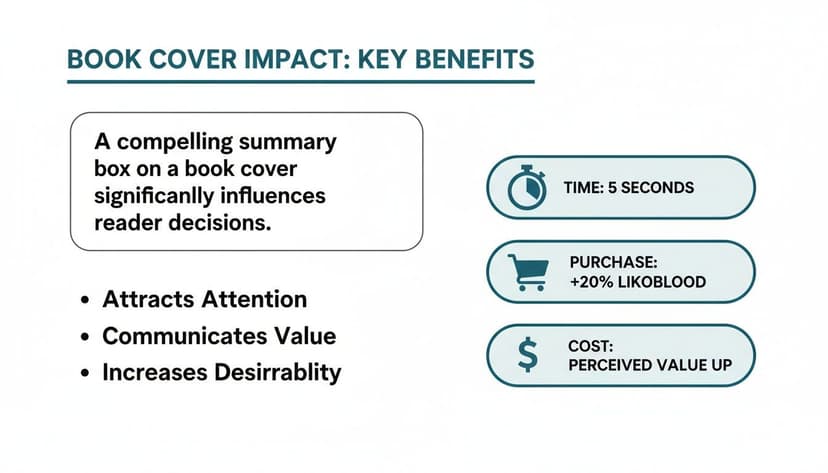
As you can see, your cover has just seconds to do its job. Aligning with genre expectations isn't just a good idea—it's critical for survival.
Common Background Pitfalls to Avoid
One of the most common mistakes new authors make is a background-genre mismatch. Putting a bright, cheerful beach scene on a dark fantasy novel—instead of the brooding fantasy cover backgrounds those readers expect—is a recipe for reader confusion and, worse, negative reviews from buyers who felt misled by the cover.
Pitfall: Trying to be so unique that you become unrecognizable. A cover that stands out for the wrong reasons is just as ineffective as one that blends in. The sweet spot is a background that feels both familiar to the genre and fresh in its execution.
For instance, a historical romance might typically feature a grand ballroom (familiar). To make it fresh, you could alter the lighting to be moody and candlelit, hinting at a story filled with more secrets than the average ballroom romance.
This is where experimenting with an AI tool can be powerful. You can generate the same core scene with different atmospheric effects, testing various lighting schemes to see which one best captures your story's specific tone. This process helps you find a book cover background that honors genre conventions while still carving out a unique space for your novel.
How to Use Composition, Color, and Typography
Finding the perfect background image is a great start, but it's only one piece of the puzzle. How you integrate your title, author name, and other text is what separates an amateur cover from a professional one. Mastering the interplay between your background and typography is essential for creating a design that looks intentional and polished.
These are not abstract art theories; they are practical tools for directing a reader’s eye and creating a powerful first impression.

Key Decision Criteria for Your Background
Your background must support your typography. Use this checklist to evaluate your choices:
- Is there enough contrast? The single most important job of the background is to make the title readable. This means pairing light text with a dark background or vice versa. Low-contrast covers are a guaranteed way to be ignored.
- Pro Tip: If your image is too busy, try blurring it slightly or adding a semi-transparent color overlay behind the text to make it pop.
- Is there sufficient negative space? "Negative space" is the empty or uncluttered area of your background. A simple backdrop provides breathing room for your text, making it the undeniable focal point.
- Common Mistake: Cramming every inch with "interesting" elements. A strategically simple or blurred background is often more effective because it forces the reader's eye right where you want it: on your title.
- Does the composition guide the eye? Use design principles like the rule of thirds. Imagine a 3x3 grid over your cover and place your title or a key visual element along those lines or at their intersections. This creates a more dynamic and professional layout than dead-centering everything.
Integrating Typography Effectively
The font you choose is as much a part of the design as the image. It must be legible and match the tone of your genre. Beyond font selection, the placement over your book cover background is key. The background should support the title, never fight it for attention. To learn more, our guide to fonts for book covers is an excellent resource.
Using a modern AI tool can be a significant time-saver here. You can generate variations in minutes, testing different background colors, layouts, and typographic placements to see what works best. This rapid iteration helps you make confident decisions, ensuring your final cover looks polished and is ready to grab a reader's attention.
How to Source or Create Your Perfect Background
You've defined the what—the mood, genre signals, and composition. Now it's time to acquire the perfect background image. As an indie author, you have three primary options: buying a stock photo, commissioning custom art, or generating a unique image with AI. Each path has distinct implications for cost, time, and creative control.

Decision Matrix: Stock vs. Custom vs. AI
| Method | Pros | Cons | Best For... |
|---|---|---|---|
| Stock Photo | Fast, affordable (often $10-$50), vast selection. | Risk of non-exclusivity (other authors may use the same image), can be time-consuming to search. | Authors on a tight budget or deadline who need a professional-quality image quickly. |
| Custom Art | 100% unique and tailored to your book, total creative control. | Expensive (hundreds of dollars), time-consuming (weeks or months). | Authors with a larger budget who want a completely original, brand-defining cover. |
| AI Generation | Fast and affordable like stock, but creates a unique, exclusive image. High degree of creative control via prompts. | Requires skill in prompt writing to get good results, quality can be inconsistent without a good tool. | Authors who want a unique look without the high cost and long wait times of custom art. |
Sourcing Pitfalls to Avoid
- Stock Photo Licensing: Always verify the license. A "Standard License" may not cover items for resale, like a book. You almost always need an "Enhanced" or "Extended" license. Read the fine print to avoid legal issues. Our guide to book cover photos offers more detail on this.
- AI Prompting: The quality of your AI-generated background depends entirely on the quality of your prompt. Be specific. Instead of "fantasy forest," try: "Enchanted forest at twilight, ancient mossy trees with gnarled roots, clusters of glowing blue mushrooms, ethereal mist on the ground, cinematic lighting, photorealistic." Add mood keywords like "ominous" or "serene." Don't be afraid to iterate and refine your prompt.
Resources like book mockup prompts for Midjourney can help you master this skill. Better yet, using an author-focused AI tool allows you to generate and test backgrounds directly within your cover design project, streamlining the process from weeks to minutes.
How to Finalize Your Cover for KDP and Beyond
You've designed a stunning cover. The creative work is done. Now comes the final technical stage, a crucial step where many indie authors stumble. Preparing your file for platforms like Amazon KDP is about more than just clicking "Save." It's about ensuring your art translates perfectly from screen to print, avoiding rejections and amateur-looking results.
The Print vs. Digital Divide: A Critical Distinction
Ebooks and paperbacks require fundamentally different files. Confusing them will compromise your cover's quality.
- Ebook: Requires a JPEG file in RGB (Red, Green, Blue) color mode. This is the native format for digital screens, ensuring your colors appear vibrant on Kindles and tablets.
- Paperback: Requires a print-ready PDF in CMYK (Cyan, Magenta, Yellow, Key/Black) color mode. This is for physical ink. Uploading an RGB file for print will result in colors that look muddy, dark, or washed out.
Critical Spec for Print: Your print file must have a resolution of 300 DPI (dots per inch). A screen-standard 72 DPI image will look blurry and pixelated in print, instantly marking your book as amateur. This is non-negotiable.
Pre-Upload Technical Checklist
Before you hit "publish," run through this final check. It will save you hours of frustration.
- File Format: Is your ebook a JPEG and your paperback a print-ready PDF?
- Color Profile: Is the ebook RGB and the print file CMYK?
- Resolution: Is the print PDF a full 300 DPI?
- Dimensions: Have you used KDP's calculator to determine the correct spine width and included the necessary bleed for your print cover?
Getting these technical details right is the final act of professionalism. For a deeper dive, our guide on book cover design format can help you avoid costly errors. For those chasing absolute perfection, advanced resources like the Aeon Lossless Background playbook offer pro-level techniques.
Answering Your Top Questions About Book Cover Backgrounds
As you finalize your cover, a few common questions often arise. Here are practical answers to help you publish with confidence.
Can I Just Use a Free Image for My Book Cover Background?
It's tempting, but using a "free" image from a general web search is a significant legal risk. Most of these images are not licensed for commercial use, and selling a book is a commercial activity. Doing so can lead to copyright infringement claims, forced takedowns by retailers, and legal penalties.
Decision Rule: Assume an image is copyrighted unless you find a license that explicitly states it's free for commercial projects (like a CC0 license). Your safest options are to buy a stock photo with a clear commercial license, hire an illustrator, or generate a unique image with an AI tool that grants you full commercial rights. The small cost is an investment in peace of mind.
How Do I Know if My Background Is Too Busy?
There is a simple, effective method to determine this: the "thumbnail test." Shrink your cover design on your screen until it’s about the size of an Amazon search result thumbnail (roughly one inch tall).
The Litmus Test: Can you still easily read the title and your author name? If the text is clear and legible, your background is effective. If the words become a jumbled mess, your background is too distracting and needs to be simplified.
If it fails this test, try blurring the background image, adding a semi-transparent color overlay behind the text, or choosing a less complex visual. The goal is harmony, not a competition between your text and the image.
Should My Ebook and Paperback Have the Same Background?
For brand consistency, yes. Readers should recognize your book instantly, regardless of format. However, the files themselves will be different, and you will need to adjust the background image.
- Ebook: The background is part of a single front-cover file.
- Paperback: The background must extend across a larger file that includes the front cover, back cover, and spine. This means you need a wider image.
Most importantly, your paperback version requires a much higher resolution (300 DPI) to print clearly. An image that looks great on screen will appear blurry in print if the resolution is too low. Whether you use a stock photo or AI, ensure you secure a high-resolution version specifically for your print edition. For example, if you're designing a new romance book cover, you should plan for both formats from the start.
Ready to Create Your Own Book Cover?
Turn your story into a visual masterpiece. Fill in the details below to start generating professional covers instantly.
