How to Self-Publish a Book: A Practical Guide for Authors
Ready to learn how to self publish a book? Our guide breaks down manuscript prep, cover design, KDP distribution, and marketing into actionable steps.
Posted by
 Pablo Yáñez
Related reading
9 Best Book Marketing Tools for Indie Authors (2026)
Compare nine book marketing tools for indie authors, from market research and cover design to reader delivery, email, promotion, and ad tracking.
How to Build a Character Profile for Book Cover Design
Build a visual character profile that keeps cover art accurate and consistent. Define appearance, clothing, references, exclusions, and series continuity.
How to Repurpose One Book Cover for Print, Audio, and Ads
Turn one approved front cover into a print wrap, audiobook square, text-free artwork, mockups, ads, and social assets without rebuilding the design.
Ready to design your cover?
Use our AI book cover generator to create tailored book cover concepts in minutes.

You've finished your manuscript. Congratulations! That's a significant milestone, but the journey from a final draft to a book in the hands of readers is a distinct process. While it may seem complex, self-publishing is a clear, manageable path once you break it down into steps.
Self-publishing isn't just about writing. It's about becoming a creative entrepreneur. As an indie author, you are in control of your project from start to finish.
This guide stays platform-neutral: it covers preparation, packaging, distribution choices, and marketing. Amazon appears as one example. If you already know you are publishing through Amazon, use the dedicated KDP self-publishing guide for its account and upload process.
When you reach the packaging stage, the Book Blurb Generator can help with retailer copy and the KDP Cover Size Calculator can handle your print dimensions. When both are ready, the free KDP Cover Creator combines your cover and blurb into the print-ready wrap file.
Your Publishing Path: From First Draft to First Sale
The entire indie publishing process boils down to four distinct phases: writing and editing your manuscript, creating professional packaging (like your cover), distributing it to retailers like Amazon, and marketing it to find readers.
Think of it as a production line. Each step builds on the last, and skipping one can cause problems later. This guide is your roadmap, designed to walk you through each of these pillars so you can publish a book that looks and feels as professional as any traditionally published title.
The Self-Publishing Journey Visualized
A visual overview can help clarify the entire process. This simple flow chart shows how each stage connects to the next.
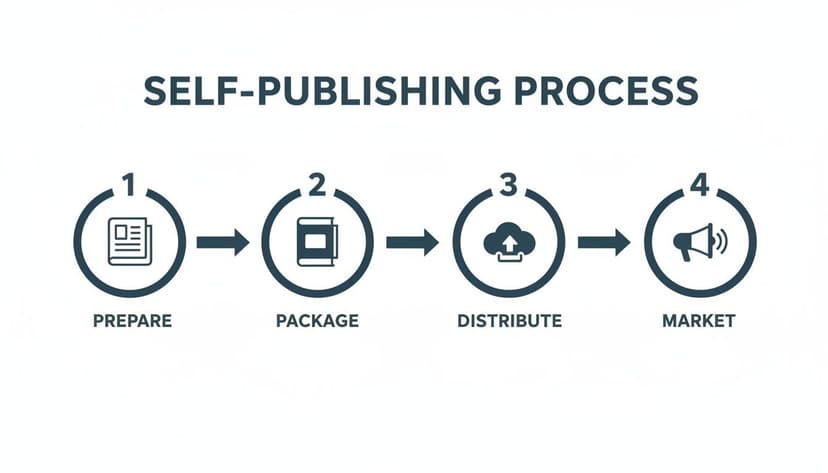
It all starts with a quality manuscript and ends with getting that book into the hands of your ideal audience. Let’s get you there.
The Four Pillars of Self-Publishing
To give you a high-level overview, here’s how the four core stages of publishing your own book function. This table breaks down what you're trying to achieve in each phase.
| Pillar | Primary Goal | Key Activities |
|---|---|---|
| Preparation | To transform a raw manuscript into a polished, error-free story that readers will love. | Self-editing, beta reader feedback, professional editing (developmental, copy, proofreading). |
| Packaging | To create a professional product that signals quality and attracts the right audience. | Cover design, interior formatting (ebook & print), writing compelling back cover copy. |
| Distribution | To make your book available for sale wherever your target readers shop. | Choosing platforms (KDP, IngramSpark), obtaining an ISBN, setting up metadata. |
| Marketing | To connect your book with its intended audience and drive initial and ongoing sales. | Building an author platform, running ads, email marketing, planning a book launch. |
Each pillar is critical. A great story with a poor cover won't sell. A beautiful book that nobody can find remains a passion project. Nailing all four is how you build a career.
Why Choose to Self-Publish?
The indie author movement is no longer a niche alternative—it’s a major force in the publishing industry. In recent years, self-publishing has grown significantly, with indie authors capturing a substantial portion of the ebook market.
The primary appeal is control. You publish on your own timeline, earn much higher royalties (up to 70% on Amazon versus the traditional 10-15%), and retain all of your creative rights. For countless authors, these advantages are more than worth the learning curve of becoming a publisher.
Choosing to self-publish is choosing to invest in yourself. You take ownership of every decision, giving you the power to build a career entirely on your own terms.
From Messy Manuscript to Polished Masterpiece

Typing "The End" is a significant achievement, but it's where the work of producing a book begins. That raw manuscript is far from being a professional product, and the bridge between the two is built with editing and formatting.
This part of the process cannot be skipped. It’s your quality control, and it has a direct impact on your reviews, your sales, and your reputation as an author. A common and costly mistake is rushing through production to save money. Readers on Amazon KDP have little patience for a book with plot holes, typos, or sloppy formatting. A few negative reviews can derail a book's launch.
Understanding the Layers of Editing
Professional editing is a multi-stage process where each layer serves a specific purpose. Understanding what each stage entails helps you budget properly and find the right professional for each job.
Developmental Editing
This is the big-picture view of your book. A developmental editor doesn’t look for comma splices; they analyze the foundation of your story. They examine plot, pacing, character arcs, structure, and overall narrative coherence. This is often the most intensive and expensive edit, but it can elevate a good story into an unforgettable one.
Line and Copy Editing
These two editing stages are often bundled together and focus on the sentence level.
- Line Editing: This is about the art of your prose. A line editor hones your voice, improves clarity and flow, and tightens clunky sentences. They make your writing more effective.
- Copy Editing: This is the technical polish. Your copy editor hunts for errors in spelling, punctuation, and syntax. They also ensure consistency—making sure a character’s eye color doesn’t change halfway through the book.
Proofreading
This is the final quality check. After all other edits are done and the book has been formatted, a proofreader does one last review. Their job is to catch any lingering typos or formatting glitches that slipped through or were introduced during previous stages.
A professional edit is an investment, not an expense. It's the difference between a reader saying, "Great story, but the typos were distracting," and that same reader leaving a five-star review and awaiting your next book.
How to Find and Vet an Editor
Finding an editor can feel overwhelming. A good first step is to look for someone who specializes in your genre. A great thriller editor knows the conventions and reader expectations for thrillers, which are different from what a romance editor looks for.
Once you have candidates, always ask for a sample edit. Most professional editors will edit a few pages of your manuscript (sometimes for free, sometimes for a small fee) to show you their style. This is the best way to determine if you will work well together.
Professional Formatting: Ebook vs. Print
With your manuscript polished, it’s time for interior formatting. This is what makes your words look like a real book, and you need to do it separately for your ebook and print versions.
- Ebook Formatting: Ebooks use reflowable layouts, meaning the text adjusts to fit any screen size or font setting. This requires a clean EPUB file that works well on Kindles and other e-readers.
- Print Formatting: Print books use fixed layouts. Here, everything is set: margins, fonts, page numbers, headers. It’s a more rigid process that requires attention to details like gutter margins (the space in the book’s spine) so words don't get lost.
While tools like Vellum (Mac-only) have made DIY formatting easier, many authors hire a professional, especially for complex print layouts with images. A book with awkward spacing or line breaks signals an amateur production and can pull a reader out of the story.
Creating a Book Cover That Actually Sells

Your book cover is your most important sales tool. On the digital shelf of Amazon, that small thumbnail is a billboard competing for attention. You have less than three seconds to make a reader stop scrolling.
A professional cover accomplishes two things efficiently: it instantly communicates the book's genre, and it sparks an emotional connection. Get that right, and you've won half the battle before a reader even looks at your book description.
Decoding Genre Expectations
Readers shop with their eyes. They have been subconsciously trained to recognize the visual cues of their favorite genres. If your cover doesn't use that visual language, it may be ignored.
Think about the cues you recognize. A shadowy figure under a streetlight with stark, blocky text signals a thriller. A couple in a passionate embrace against a soft, painted backdrop suggests romance. These are calculated design choices that meet reader expectations.
- Typography: The font is a massive genre signal. Ornate serif fonts often suggest historical fiction or high fantasy. Clean, minimalist sans-serif fonts are common in contemporary fiction or non-fiction.
- Color Palette: Color evokes emotion. Deep blues and blacks build suspense, while bright, saturated colors can promise a lighthearted comedy.
- Imagery: The central image should hint at the story's core conflict or promise. A lone spaceship suggests an epic sci-fi adventure; a single elegant object on a plain background suggests a more literary experience.
Your homework is to go to the Amazon top 20 charts for your specific sub-genre and study the covers. What are the common threads in typography and color schemes? This is essential market research.
A cover’s job is not to be a literal scene from your book. Its job is to sell the feeling of your book and make a promise to the reader about the experience they’re about to have.
Your Cover Creation Options
Once you understand the visual language of your genre, you have a few paths for creating your cover, depending on your budget and design comfort.
Hiring a Professional Designer
This is the gold standard. A professional cover designer who specializes in your genre brings market knowledge to your project. They understand trends, have a masterful grasp of composition, and can create a custom design that helps your book stand out. This is the most expensive route, with costs ranging from $500 to $1,500 or more, but it's an investment in your book's marketability.
Using AI Cover Generation Tools
For authors on a tighter budget, AI tools have emerged as a viable alternative. Modern platforms can generate dozens of high-quality, genre-appropriate cover concepts based on your genre, title, and a short summary. This allows you to experiment with different visual approaches.
A key advantage is the ability to test concepts. You can generate multiple options and poll beta readers or your audience to see which one resonates most. Using a book cover generator can provide significant creative control without requiring advanced design software.
Whether you hire a designer or use an AI tool, the goal is the same: a cover that looks professional, accurately represents your genre, and makes a reader stop scrolling.
Managing the Business Side of Being an Author
Writing the book is the art; publishing it is the business. Once your manuscript and cover are ready, you transition from creator to entrepreneur. This part of the journey involves the administrative tasks that make your book discoverable, legitimate, and positioned for success.
Embracing this business mindset is a crucial part of self-publishing. As an indie author, you are your own publisher, making it important to understand how to build a personal brand that feels authentic and resonates with readers.
Understanding ISBNs and ASINs
One of the first business decisions is the ISBN (International Standard Book Number). This 13-digit code is your book's unique identifier, recognized worldwide.
Whether you need one depends on your distribution goals.
- You need your own ISBN if: You plan to sell your print book anywhere besides Amazon. This includes Barnes & Noble, independent bookstores via IngramSpark, or libraries. Buying your own ISBN officially lists you as the publisher.
- You don't need one if: You are only publishing on Amazon. KDP will assign a free ASIN (Amazon Standard Identification Number) to your ebook. For print books sold exclusively on their platform, they provide a free ISBN that is locked to Amazon.
If possible, buying your own ISBNs is recommended. They are often sold in packs from services like Bowker in the US. This provides the freedom to sell your book widely, now or in the future.
Crafting Your Book's Metadata
Metadata is your book's digital DNA. It’s the information you input into platforms like KDP that tells their algorithms—and readers—what your book is about. Getting this right is one of the most powerful, zero-cost marketing actions you can take. Poor metadata makes your book invisible. Great metadata puts it in front of readers searching for a story just like yours.
Mastering your book's metadata is like giving a GPS the correct destination. Without it, even the best-written book will get lost on the way to its ideal reader.
Your Pre-Publishing Metadata Checklist
Have these elements ready before you publish. This will save you from making rushed decisions on details that can impact your launch. The global publishing market continues to grow, driven in part by indie authors utilizing print-on-demand. For more on this trend, you can explore the full Technavio report on the publishing market.
1. A Compelling Blurb (Book Description) This is your sales pitch. Write it like professional back cover copy. Start with a hook, introduce the core conflict, and end with a question or statement that makes people want to know what happens next. Weave in your keywords naturally.
2. The Right Sales Categories Amazon lets you pick two categories, but you can email them and request to be placed in up to ten total. Research where similar books are shelved. A fantasy novel about a magical academy, for instance, should be in categories that reflect that specific niche, similar to what you'd see when looking at fantasy book cover examples. Finding a less-crowded, specific category makes it easier to achieve a bestseller tag.
3. Strategic Keywords KDP gives you seven keyword slots. Use phrases that real readers are typing into the search bar, such as "enemies to lovers romance," "dystopian sci-fi for teens," or "hard-boiled detective mystery." Use a mix of broad and specific terms to cast a wide yet targeted net. A look at the costs of self-publishing shows that while you spend on editing and covers, optimizing metadata is a free way to maximize your return.
Choosing Your Distribution and Pricing Strategy
Your manuscript is polished, the cover is ready, and your metadata is optimized. Now, how do you get your professional-grade book to readers?
This phase is about strategy. Your choices about where and how you price your book will impact your visibility, reach, and income. This is where the business of being an author truly begins.
The self-publishing landscape has given authors direct access to a global marketplace. According to Publishers Weekly's analysis on self-publishing trends, the number of self-published titles continues to grow, making indie authors a significant force in the industry.
Amazon KDP Select vs. Going Wide
A primary decision is whether to go all-in with Amazon or distribute your book across multiple stores. The right answer depends on your career goals.
KDP Select (Amazon Exclusivity)
Enrolling your ebook in KDP Select means you agree not to sell it anywhere else for a 90-day period. In exchange, you get access to powerful perks, most notably inclusion in Kindle Unlimited (KU).
- The upside: You get your book in front of a large, built-in audience of KU subscribers who are voracious readers. You are paid for every page they read. For authors with a series, this can be very lucrative.
- The downside: You cannot sell your ebook on Apple Books, Kobo, Barnes & Noble, or your own website. You are tied completely to the Amazon ecosystem.
For many new authors, KDP Select is a practical starting point. It simplifies marketing and provides direct access to a massive reader pool. Our detailed guide to KDP self-publishing covers this in more detail.
Going Wide (Multi-Retailer Distribution)
The alternative is "going wide," which means making your book available on as many platforms as possible: Amazon, Apple Books, Kobo, Barnes & Noble, Google Play, and others.
- The upside: You build diversified income streams and are not dependent on a single company. You can reach readers globally who may not shop on Amazon.
- The downside: Marketing becomes more complex. Running promotions requires coordination across multiple stores, and it can take longer to build momentum compared to the focused audience of KU.
To manage a wide strategy, most authors use an aggregator. These services distribute your files to all the different retailers for you.
| Aggregator | Key Feature | Best For |
|---|---|---|
| Draft2Digital | User-friendly interface and excellent author support. | Authors who value simplicity and a streamlined process. |
| Smashwords | A massive distribution network, including libraries and subscription services. | Authors aiming for the widest possible global reach. (Now merged with D2D) |
| IngramSpark | The leading platform for print distribution to physical bookstores and libraries. | Authors serious about getting their print book into traditional channels beyond Amazon. |
The choice between exclusivity and going wide isn't permanent. A common strategy is to launch a new book in KDP Select for the first 90 or 180 days to build reviews and momentum, then pull it out and "go wide" to reach a new set of readers.
Setting Your Book's Price
Pricing your book is a mix of psychology and market analysis. It shapes readers' perception of your book's value and is a powerful marketing tool.
Royalties and Price Points
On Amazon KDP, your price directly determines your royalty rate.
- 70% Royalty: For ebooks priced between $2.99 and $9.99.
- 35% Royalty: For any ebook priced below $2.99 or above $9.99.
This structure creates a strong incentive to price within the $2.99-$9.99 range. You earn more money selling a book at $2.99 than at $1.99.
Common Pricing Strategies
Your price should not be static. Smart authors use pricing dynamically.
- Launch Pricing: A common tactic is to launch a new release at a low price, like $0.99 or $2.99, for the first few days. This encourages early sales, helps your book climb the charts, and generates initial reviews.
- Permafree First-in-Series: For authors with a series, making the first book permanently free can be highly effective. It acts as a risk-free advertisement for your entire backlist.
- Genre-Based Pricing: Research the top 100 bestsellers in your specific sub-genre on Amazon. If most successful paranormal romance books are priced at $3.99, pricing yours at $9.99 will make it an outlier. Price to meet reader expectations to maximize sales.
Building Your Book Launch and Marketing Plan
Hitting ‘publish’ isn’t the finish line; it’s the starting line. A great story and cover are essential, but without a plan to reach readers, your book will languish. Marketing isn't an afterthought; it's a foundation you build months before your book goes live.
The goal is not just to have a big launch day, but to create a system that sustains sales long-term.
Laying the Groundwork Before You Launch
Your most powerful marketing assets are those you own and control. The pre-launch period is about finding a core group of readers who will be ready to buy on release day.
Prepare the actual files and copy before that period starts. This book marketing assets guide covers listing copy, mockups, ads, email, captions, and the launch calendar.
-
Build Your Email List: This is your most important marketing tool. Offer a "reader magnet"—a free prequel, character interview, or deleted scene—to encourage sign-ups on your website. This is your direct connection to your fans.
-
Establish an Author Platform: A simple author website with a blog, an "About Me" page, and an email sign-up form is sufficient. It serves as your digital home base.
-
Recruit an Advance Reader Team: An ARC (Advance Reader Copy) team consists of fans who get a free, early copy of your book in exchange for leaving an honest review on Amazon upon its release. Those initial reviews are critical for gaining visibility with both readers and Amazon's algorithms.
Your author platform, no matter how small, is the engine of your career. Nurture your first fans, and they can become evangelists for your work.
Playing the Long Game: Sustainable Marketing
A big launch is great, but the key to a successful author career is momentum. Avoid burnout by picking a few proven strategies you can maintain without sacrificing writing time. As you prepare, understanding how readers discover books is crucial. This means effectively finding keywords to ensure your book appears in relevant searches.
Smart Advertising and Author Alliances
You don't need a large budget to market your book effectively.
1. Experiment with Amazon Ads
Amazon Ads are powerful because they target people who are actively shopping for books. You can start with a budget of just $5 to $10 per day to gather data and see which ads are effective. "Sponsored Products" ads targeting authors similar to you are a good starting point.
2. The Power of Newsletter Swaps
This is a valuable free marketing tactic. Find other authors in your genre with a similar-sized email list and agree to promote each other's books. This puts your book in front of a pre-qualified audience that already enjoys your genre.
3. Use Social Media to Connect, Not Just to Sell
Focus on one or two social media platforms where your target readers spend their time. Your goal is to build relationships by sharing your journey and talking about other books you love, not just posting "buy my book" links. People buy from authors they know, like, and trust.
By combining a solid pre-launch plan with sustainable, long-term tactics, you're not just launching a book—you're building a career.
A Few Common Self-Publishing Questions
When starting out in indie publishing, many questions arise. Here are answers to some of the most common ones.
How Much Does Self-Publishing Cost?
The cost can range from under $100 to several thousand dollars. Your two largest investments will typically be professional editing (anywhere from $500 to $5,000) and cover design ($5 to over $1,000).
You have control over these costs. You can learn to format your own manuscript or use tools to create your cover. Marketing is another area where you set the budget; you can start Amazon Ads for as little as $5 a day.
Do I Need to Buy My Own ISBN for Amazon KDP?
You don't have to. Amazon provides a free ASIN (their identifier) for your ebook. For your print book, they offer a free ISBN, but it can only be used on Amazon.
If you plan to sell your print book "wide" through other stores like Barnes & Noble or distributors like IngramSpark, you must buy your own. Purchasing an ISBN from an official source like Bowker makes you the official publisher, giving you complete control.
How Long Does the Publishing Process Take?
Once your manuscript is complete, expect the production phase—editing, design, formatting, and launch setup—to take between three and six months. This allows time for proper editing, back-and-forth with a cover designer, and setting up your accounts.
Rushing the production timeline is a common mistake. You've spent months or years writing the book; don't compromise its chances by rushing it to market. A professional-quality book needs adequate time for production.
Should I Go Exclusive with KDP Select or Go Wide?
This strategic question depends on your goals. Both paths have advantages.
-
KDP Select (Amazon Exclusive): Enrolling your ebook in KDP Select gets it into the Kindle Unlimited library, where voracious readers can discover it. It also unlocks some of Amazon's promotional tools. For a new author, it's often the fastest way to build an initial audience.
-
Going Wide: Publishing everywhere (Apple Books, Kobo, Barnes & Noble, etc.) creates multiple income streams and reduces dependence on Amazon. It's a long-term strategy for building a stable author career.
A popular approach is to start with KDP Select for the first 90-day enrollment period to gain traction and reviews, then pull the book out and go wide.
Relevant Free Tools
Keep going with the right generator
These tools match the topic of this article and give readers a direct next step.
Book Blurb Generators
Book Blurb Generator
Generate compelling book blurbs with AI. Create back-cover copy, retailer descriptions, and launch-ready blurbs in seconds for any genre.
Open tool
Publishing Tool
KDP Cover Size Calculator
Free interactive calculator for exact KDP spine width and cover dimensions, with a downloadable blank template.
Open tool
Publishing Tool
KDP Cover Creator
Upload your front cover and build the full KDP print wrap — spine, back cover, exact bleed — then download a print-ready 300 DPI PDF. No sign-up, no watermark.
Open tool
Ready to Create Your Own Book Cover?
Turn your story into a visual masterpiece. Fill in the details below to start generating professional covers instantly.