How to Use a Book Cover Mockup Generator Effectively
Learn how to use a book cover mockup generator to create professional designs. This guide offers practical advice on prompts, iteration, and KDP export.
Posted by
 Pablo Yáñez
Related reading
Are Premade Book Covers Worth It? A Practical Guide
Learn when premade book covers are worth buying. Compare speed, exclusivity, customization, series needs, rights, print files, and total cost before you choose.
Book Marketing Assets You Need for a Strong Launch
Plan the book marketing assets for your launch: mockups, ads, A+ images, captions, listing copy, email, video, audiobook art, and a usable calendar.
How to Build a Character Profile for Book Cover Design
Build a visual character profile that keeps cover art accurate and consistent. Define appearance, clothing, references, exclusions, and series continuity.
Ready to design your cover?
Use our AI book cover generator to create tailored book cover concepts in minutes.


For indie authors, a book cover mockup generator isn't just a design tool—it's a critical part of the publishing process. It’s the most efficient way to turn a story concept into professional, market-ready cover art that sells books on platforms like Amazon KDP. This guide explains how to use these tools to generate visual concepts, refine them, and export a file that meets precise technical specifications, all without the high cost of a traditional designer.
Why Indie Authors Need a Better Way to Design Covers
Securing a great book cover presents a common dilemma for indie authors. The traditional route involves high costs for a professional designer with no guarantee they'll capture your vision. The DIY route often means struggling with complex software and producing a cover that looks amateurish next to the competition.
This is a frustrating position, especially since your cover is the single most important marketing asset for your book. A book cover mockup generator provides a practical third option that balances quality, cost, and creative control.

This approach closes the gap between cost and quality. It puts you in the director's chair creatively, without requiring you to become a graphic design expert. This isn't just about saving money; it's about gaining the freedom to experiment and get your cover exactly right for your target audience.
The High Cost of Traditional Design
Hiring a professional designer is a significant investment, particularly for new authors or those on a tight budget. Data from Reedsy shows the average cost for a professional book cover is around $880, with many designers charging between $625 and $1,250. For competitive genres, these costs can increase substantially.
This financial barrier is a primary reason why automated design tools have become indispensable for self-published authors.
Taking Back Creative and Financial Control
When you use a tool to generate cover mockups, you become the art director. Instead of trying to convey your story's mood, themes, and symbolism to a third party, you translate them directly into a visual concept.
This hands-on process offers several key advantages for decision-making:
- Speed: Generate multiple unique concepts in minutes, not weeks.
- Affordability: Produce a high-quality, market-ready cover for a fraction of the cost of hiring a designer.
- Iteration: Easily test different color schemes, fonts, or artistic styles to see what resonates most with your genre's readers.
- Genre Alignment: Quickly create covers that meet the visual expectations of your genre, such as these thriller cover design examples that effectively signal a fast-paced story.
By combining AI-generated artwork with powerful editing features, authors can achieve a professional result without traditional industry gatekeepers. The right platform provides both creative firepower and final editorial control.
Ultimately, a book cover mockup generator empowers you to make informed decisions. It transforms a potential roadblock into an exciting, controllable part of the publishing journey. While many options exist, finding the best book cover design software for your workflow is key to success.
How to Write a Powerful Design Brief
The effectiveness of any book cover mockup generator depends entirely on the quality of your input. A vague instruction like "a fantasy adventure cover" will yield a generic, forgettable image, a world away from the polished fantasy cover mockup ideas a sharp brief can produce. To create a cover that attracts readers and drives sales, you must translate your story’s core elements into a specific, actionable design brief.
This process isn't about artistic skill; it’s about being an expert on your own story. Think like a film director setting up a crucial shot. Your brief must provide the AI with essential details—mood, characters, setting, and symbols—to guide it toward a visual that is both compelling and true to your book's promise.
Deconstructing Your Story for Visuals
First, break your story down into its most critical visual components. Instead of summarizing the plot, focus on the key ingredients that define your story's atmosphere and genre. This is how you move from abstract ideas to concrete instructions for the AI.
Focus on these core areas:
- Mood & Tone: Is your story a dark, nail-biting thriller or a light, hopeful romance? Use descriptive language. Instead of "scary," try "an eerie, foreboding, foggy night."
- Central Symbols: What single object or icon represents your book? A broken crown, a glowing amulet, or a single, wilting rose can communicate a significant part of the narrative.
- Character Archetype: You don’t need a detailed portrait. Provide a defining feature or silhouette. "A lone rogue in a hooded cloak, face obscured by shadows" is far more effective than "a fantasy hero."
- Setting as a Character: Where does the story take place, and what does it feel like? "An opulent, high-tech city with flying vehicles at night" creates a different mood than "a desolate, windswept desert at dusk."
A strong design brief doesn't just list elements; it paints a picture with words. The more specific and evocative your language, the more accurately the AI can capture the unique essence of your book.
From Vague Ideas to Actionable Prompts
The goal is to convert these story concepts into a detailed prompt that a book cover mockup generator can execute. For instance, a romance author must go beyond "a love story." They need to consider the visual cues that attract romance readers. A review of strong romance book cover examples reveals how specific imagery—like a couple in a dramatic embrace—instantly signals the genre and emotional stakes.
To illustrate, let's look at how to build a better brief. This framework helps translate your story's essence into language an AI can understand and render effectively.
Brief-Building Framework: From Concept to Prompt
| Story Element | Vague Idea | Actionable Prompt Detail |
|---|---|---|
| Genre | Urban Fantasy | "A glowing magical rune on a brick alley wall at night, rain-slicked pavement reflecting neon signs." |
| Character | A strong female lead | "A determined woman with windswept hair, leather jacket, looking over a futuristic city skyline." |
| Symbolism | A magical sword | "An ancient, glowing sword resting on a moss-covered stone in an enchanted forest, ethereal light." |
The difference is clarity. By being this specific, you move from hoping for a good result to directing the creative process. Your brief becomes the blueprint for a cover that not only looks professional but also connects instantly with your ideal reader on a crowded digital bookshelf.
From AI Concept to Polished Cover: The Art of Iteration
The initial image generated by the AI should be viewed as a strong first draft, not the final product. It is an excellent starting point, but the real creative work happens during iteration. This is the stage where you refine, tweak, and mold that initial concept into a polished, market-ready cover that perfectly captures your story’s tone.
Do not be discouraged if the first result isn't perfect. A modern book cover mockup generator provides the tools needed to shape that initial concept. You can generate multiple variations, explore different compositions, and test artistic styles without starting from scratch.
This process begins by turning your core story idea into a clear, actionable brief that the AI can work with.
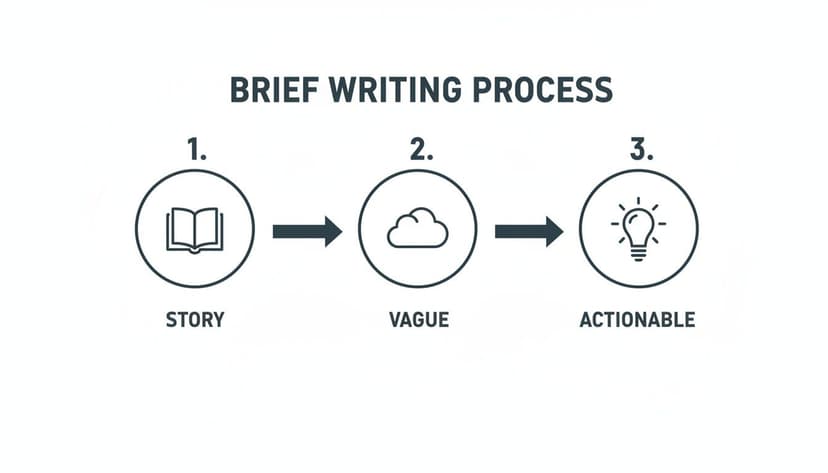
Translating a vague idea into a specific instruction is the key to getting great results from the AI and streamlining the refinement process.
Hands-On Refinement Techniques
Once you have a base design with potential, you can take creative control and fine-tune every detail. Experimentation is crucial to improving upon the original concept.
Here are a few key refinement tactics:
- Generate Variations: Create subtle alternatives to your best concept. You might change a character's pose, adjust the lighting for more drama, or swap background elements to see what works best.
- Use Visual Utilities: Tools for style conversion can instantly give your cover a new artistic feel, transforming a photorealistic image into something more painterly. Other tools can help you nudge, resize, or replace specific objects within the image.
- AI-Powered Editing: If an initial generation includes distracting text, an AI-powered "Remove Text" feature can clean the image, providing a perfect canvas for your own typography.
The purpose of iteration is to close the gap between the AI's interpretation and your actual vision. Each adjustment brings you one step closer to a cover that effectively sells the story you've written.
Making AI Work For You
The market for AI powered content creation is growing rapidly, but raw AI outputs can sometimes feel generic. That is why a platform that combines intelligent generation with powerful editing tools is so valuable.
A well-designed tool keeps you in control. You can refine prompts, generate dozens of variations for a single project, and then use an intuitive editor to finalize typography and layout. You can even use such a tool for creative A/B testing to see which cover concepts resonate most with your audience before finalizing a design.
Sometimes, the most effective technique is to step away from the screen. After working on a design, take a break and return with fresh eyes. You may be surprised by what you notice—and can improve—with a little distance.
Nailing the Typography and Layout for Maximum Impact
You can have a stunning piece of AI art, but if the typography is weak, the entire cover will fail. The text—your title, author name, and tagline—is what ultimately sells the book. It must be legible, powerful, and perfectly suited to your genre.
The first major decision is the font, as it instantly signals your book's tone. A classic serif font might suggest a historical novel, while a sharp, clean sans-serif is common for modern thrillers or sci-fi. Any professional book cover generator should include a robust text editor, giving you the power to fine-tune every element. This is about more than just picking a font; it’s about crafting a cohesive, professional message.
Establish a Clear Visual Hierarchy
When a potential reader sees your cover, their eyes must know where to look first. This is visual hierarchy, and it is non-negotiable, especially for the small thumbnail images on Amazon.
Your book title is the primary element. It must be the largest and boldest text on the cover. Your author name should be secondary—smaller but still easily readable. All other text, like a series name or tagline, should be the least prominent.
To achieve a strong hierarchy, focus on three things:
- Size: The title should be significantly larger than all other text.
- Weight: Use a bold or heavy font style for the title to give it more presence.
- Placement: Position the title where it will grab attention, typically in the upper third or center of the cover.
A strong hierarchy ensures that even with a quick glance, a reader absorbs the two most important pieces of information: the book's title and its author. If a reader has to squint to read your title on their phone, you have likely lost a sale.
The Make-or-Break Role of Color and Contrast
Readability is not just about font size; it's also about how clearly the text stands out against the background art. This is where color theory and contrast are essential.
The rule is simple: use light text on a dark background and dark text on a light background. A common pitfall is placing text over a complex background with both light and dark areas.
A good mockup generator will provide tools to address this. You can add a subtle drop shadow, a thin outline, or a semi-transparent colored box behind the text to improve legibility without obscuring the artwork.
Of course, the words themselves must be compelling. Strong effective copywriting strategies can help you craft a title and tagline that turn browsers into buyers. Every typographic choice should serve one goal: making your cover an effective and effortless sales tool.
Finalizing and Exporting Your KDP-Ready File
You have refined the artwork and perfected the typography. Your cover is now ready for the final step: preparing it for Amazon KDP. This stage can be a source of technical frustration for many authors, who must navigate requirements for DPI, CMYK, and bleed. A professional book cover mockup generator is designed to handle these technical details for you.
Instead of wrestling with complex software settings, the tool exports a file that is pre-formatted to meet Amazon's strict technical standards, ensuring your cover looks as sharp in print as it does on screen.
KDP Technical Requirements Made Simple
If your file does not meet KDP's technical requirements, it will be rejected. Blurry images, incorrect color profiles, or improper sizing can delay your launch. A good generator eliminates this guesswork.
Here is what happens behind the scenes when you export your file:
- Resolution: The file is automatically saved at 300 DPI (dots per inch), the industry standard for high-quality printing. This ensures your cover is crisp and not pixelated.
- Color Mode: The generator uses the correct color mode for each format. It exports in CMYK (Cyan, Magenta, Yellow, Key/Black) for paperbacks, which is required by commercial printers. For ebooks, it uses RGB (Red, Green, Blue), which is optimized for digital screens.
- Dimensions: It calculates the exact dimensions based on your trim size and automatically includes the required "bleed"—an extra margin that is trimmed off during printing to ensure the art extends to the edge of the page.
A quality book cover mockup generator is not just a creative tool; it's a technical partner. It bridges the gap between your design vision and the non-negotiable standards of print-on-demand platforms like KDP.
Your Final Pre-Flight Checklist
Before you export the final file, perform one last review. This five-minute check can prevent the frustration of having to re-upload your files later. Think of it as the final proofread before publication.
Run through this quick checklist:
- Any Last-Minute Typos? Read your title, author name, and tagline out loud to catch any errors.
- Is the Hierarchy Clear? Shrink the cover on your screen to thumbnail size. Does the title still stand out?
- Does it Match Your Genre? Does the cover look like it belongs with the bestsellers in your category? A quick review of other covers, like these paranormal romance book cover examples, can serve as a useful benchmark.
- Is the Branding Consistent? If the book is part of a series, does it share a consistent design language with the other books?
The self-publishing market is increasingly crowded. According to some reading predictions from publishing experts, professional visuals are more critical than ever. In such a competitive landscape, an error-free, professionally designed cover is not just an asset—it's a requirement.
Once you have checked every box, you can export your file with confidence.
Got Questions About Book Cover Generators?
Using AI design tools for the first time can feel intimidating, especially for something as important as your book cover. It's normal to have questions about creative control, final quality, and the legal implications. Let's address some of the most common concerns for indie authors.
Can I Actually Sell a Book with an AI-Generated Cover?
Yes, but it is crucial to use the right tool. A reputable generator designed for authors, like BeYourCover, is built specifically for commercial use. When you create and finalize a cover on such a platform, you are granted the necessary commercial license. This means you can use the cover on Amazon KDP, in marketing materials, and on your website without concerns about copyright infringement.
Always review the terms of service. Any serious platform for authors will have clear policies that grant you the rights to publish and sell your cover. This is a critical, deal-breaking feature.
A professional book cover generator delivers a commercial asset, not just a pretty picture. Its purpose is to provide a sales-ready product, which includes securing the proper usage rights for you.
How Much Control Do I Really Have Over the Design?
The fear of producing a generic, "cookie-cutter" cover is valid. However, modern generators offer significant creative control. The process is a collaboration between you and the AI, not just a single button press.
You function as the art director. The AI generates a base illustration from your brief, and you then guide the process to completion. You can:
- Generate dozens of variations to explore different poses, lighting, and compositions.
- Use visual utilities to fine-tune the image, such as changing a character's outfit or repositioning a key object.
- Utilize an advanced text editor to perfect the typography, including font, size, color, effects, and placement.
This iterative process ensures the final cover is uniquely yours and reflects your specific vision. From the core artwork to the title font, you have the final say. If you're writing a paranormal romance, for instance, you can iterate until the design hits the perfect balance of dark fantasy and romantic tension, just as you see in successful paranormal romance book cover examples.
Will This Work for My Ebook and My Paperback?
Yes. A key benefit of a good book cover generator is its ability to handle the different technical specifications for both digital and print formats. Once your design is complete, the tool manages the export process for you.
It will create a high-resolution JPEG in the RGB color space for your ebook, ensuring it looks vibrant on screens. For your KDP paperback, it will generate a print-ready PDF in the CMYK color space at 300 DPI, automatically adding the correct bleed and trim lines for your chosen book size. This ensures you have consistent branding across all formats without needing to master the technical details of print production.
Ready to Create Your Own Book Cover?
Turn your story into a visual masterpiece. Fill in the details below to start generating professional covers instantly.