6 Best AI Book Cover Generators in 2026 (Free Trials & Commercial Use)
We tested the best ai book cover generator tools for 2026, comparing free trials, commercial use licensing, and real costs.
Posted by
 Pablo Yáñez
Related reading
9 Best Book Marketing Tools for Indie Authors (2026)
Compare nine book marketing tools for indie authors, from market research and cover design to reader delivery, email, promotion, and ad tracking.
6 Best Book Brush Alternatives for Indie Authors (2026)
Looking for a Book Brush alternative? Six tools for indie authors compared — AI cover generators, mockup makers, and free options — with real pricing.
6 Best Canva Alternatives for Book Cover Design (2026)
The best Canva alternatives for book cover design: AI cover generators, free pro design apps, and author-specific tools — compared with honest pros and cons.
Ready to design your cover?
Use our AI book cover generator to create tailored book cover concepts in minutes.

Last updated: September 27, 2026
Finding the best AI book cover generator is essential for modern authors who want to stand out in a crowded digital marketplace. While traditional design services typically cost $300-$800 per cover (see our breakdown of book cover design costs), AI tools have revolutionized the process, offering professional results in minutes.
In this guide, we compare the top 6 AI book cover makers based on real-world testing using standardized benchmark prompts. Whether you're looking for a free AI book cover generator or a professional-grade suite, we've analyzed the pros, cons, and output quality of each.
Already chose a tool? Use our separate AI book cover workflow to move from genre research and brief to editing, proofing, and export. If you want to direct the work from a conversational assistant or integration, see how to create book covers with an AI agent.
Quick Comparison: Best AI Book Cover Generators
| Tool | Best for | Free trial / free credits | Cheapest realistic path to a downloadable cover | Commercial-use caveats | Ebook-only or print wrap? | Key limitation |
|---|---|---|---|---|---|---|
| BeYourCover | Authors who want one workflow from concept to publishable files | 2 free designs according to BeYourCover | Free to test, then $19 one-time for a usable single-book workflow | Commercial use included; still proof final files before upload | Strong for ebook, audiobook, series, and full print wrap (KDP & B&N) | Smaller asset ecosystem than Canva |
| NightCafe | Art-first experimentation and model variety | Free daily credits on a limited plan | Usually practical only if you are willing to combine it with another editor; paid plans from $12.49/mo | Commercial rights available, but you still need to verify model/output terms for your exact workflow | Best for ebook art concepts, not print wrap production | No built-in book-cover layout system |
| Canva | Manual editing, resizing, and finishing | Free plan available | Free for rough mockups; realistically Pro is the cheapest smooth path at $12/mo if you need premium assets/export flexibility | Rights depend on plan and asset source; some AI and stock usage is tied to Canva licensing rules | Fine for ebook-only; print wrap is manual setup | AI art and typography still need human correction |
| Ideogram | Style testing and text-in-image experiments | Free limited plan | Free to explore, but paid use starts around $20/mo if you want repeatable output volume | Commercial use is generally allowed on paid plans, but confirm current terms before publishing commercially | Better for ebook concepts than print wrap | Limited post-generation editing |
| Venngage | Beginners who prefer templates over prompting | Free limited plan | Free for basic testing, but serious exporting pushes you toward $49/mo | Commercial usage rights included, but free exports are restricted | Ebook-first; not a realistic print wrap tool | High price relative to output quality |
| DIY Book Covers | Zero-budget template covers | Free basic plan | Free if a generic template is acceptable; paid one-time from $19 | Commercial use included for its templates, but this is not true AI generation | Ebook-only or very basic cover mockups | No actual AI image generation |
Takeaway: In this test set, BeYourCover is the best overall because it was the only option that consistently moved from prompt to editable, publishable book-cover workflow without forcing a second app. The best budget pick is BeYourCover again for single-book authors because a one-time payment beats monthly subscriptions once you need an actual downloadable cover. NightCafe is best for experimentation if you care more about unusual art direction than production convenience. If licensing clarity matters most, BeYourCover, Venngage, and DIY Book Covers were simpler to classify than Canva, where rights can depend on plan level and the specific asset used.
| Feature | BeYourCover | NightCafe | Canva | Ideogram | Venngage | DIY Book Covers |
|---|---|---|---|---|---|---|
| Genre-Specific AI | ✓ Yes | ✗ No | ✗ No | ✗ No | ✗ No | ✓ Yes |
| Input Workflow | Brief + prompt | Prompt | Template + prompt | Prompt | Template + prompt | Template |
| Editing Workflow | Transform, style conversion, remove text, text layers, typography controls | External | Good manual editor | ~ Limited | Good manual editor | Basic |
| Conversational Refinement | ✓ Cover Chat | ✗ No | ~ Prompt edits only | ~ Prompt edits only | ✗ No | ✗ No |
| Series Covers | ✓ Yes | ✗ No | ~ Manual reuse | ✗ No | ✗ No | ~ Manual reuse |
| Full Wrap Print Covers | ✓ KDP & B&N | ✗ No | Manual setup | ✗ No | ✗ No | ~ Limited |
| Audiobook Covers | ✓ Yes | ✗ No | Manual resize | ✗ No | ✗ No | ✗ No |
| Marketing Assets | ✓ Yes | ~ Limited | ✓ Yes | ~ Limited | ~ Limited | ✗ No |
| AI Quality | ★★★★★ | ★★★★☆ | ★★★☆☆ | ★★★★☆ | ★★☆☆☆ | ★☆☆☆☆ |
| Commercial License | ✓ Included | ✓ Included | ⚠ Pro only | ✓ Included | ✓ Included | ✓ Included |
| Price | Free / $19 one-time | Free / $12.49/mo | Free / $12/mo | Free / $20/mo | Free / $49/mo | Free / $19 one-time |
| Best For | All-in-one author workflow | Artistic covers | General design | Style experiments | Beginners | Quick templates |
Our Testing Methodology: The Benchmark Prompts
We used the same four prompts across all tools, but the evaluation did not stop at “which image looks coolest.” The core question was practical: which platform gets an author to a cover they could realistically publish with the least cleanup, the least licensing confusion, and the lowest total spend?
Scoring Framework
| Criterion | What we looked for | Why it matters |
|---|---|---|
| Prompt adherence | Did the tool follow composition, mood, objects, and layout instructions? | A beautiful image is not useful if it ignores the brief. |
| Typography handling | Could it place or generate title/author text cleanly? | Typography is where many AI covers still fail. |
| Editability | Could we fix mistakes inside the same tool? | A workable editor cuts hours from the process. |
| Genre fit | Did the result instantly read as horror, romance, nonfiction, or children's? | Readers judge genre in seconds from the thumbnail. |
| Print-readiness | Could the workflow realistically support trim, spine, back cover, and export needs? | Ebook-only tools break down once print enters the picture. |
| Commercial-use clarity | Were usage rights easy to understand before publishing? | This is critical for paid books and ads. |
| Free-trial usefulness | Can a user test meaningfully before paying? | A “free trial” with no real export path is weak value. |
| Total cost to usable cover | What would it cost to get from prompt to a cover you'd actually publish? | Subscription price alone is misleading. |
Each tool was tested with the four benchmark prompts at least twice, using the first or second credible result rather than iterating until something perfect appeared. This matters because the buyer's question is not just best ai for book cover design in theory; it is how much effort a first-time author needs to spend before getting something usable. A result counted as “usable” only if it met three conditions: the imagery matched the brief, the layout could be cleaned up without rebuilding from scratch, and the final file could plausibly be exported for an ebook or print workflow.
In practice, human cleanup was still required almost everywhere. The biggest failure point across these ai book cover design tools 2026 was typography: image models are much better at mood and scene construction than at crisp, commercially acceptable title treatment. That lines up with broader explanations of how AI image systems infer visuals from text prompts rather than designing within real publishing constraints. For print-readiness, we anchored our checks to Amazon KDP’s cover size and calculator guidance, because spine width, bleed, and trim-safe layout are not optional if you plan to publish a paperback.
The 4 Benchmark Prompts Used for Testing
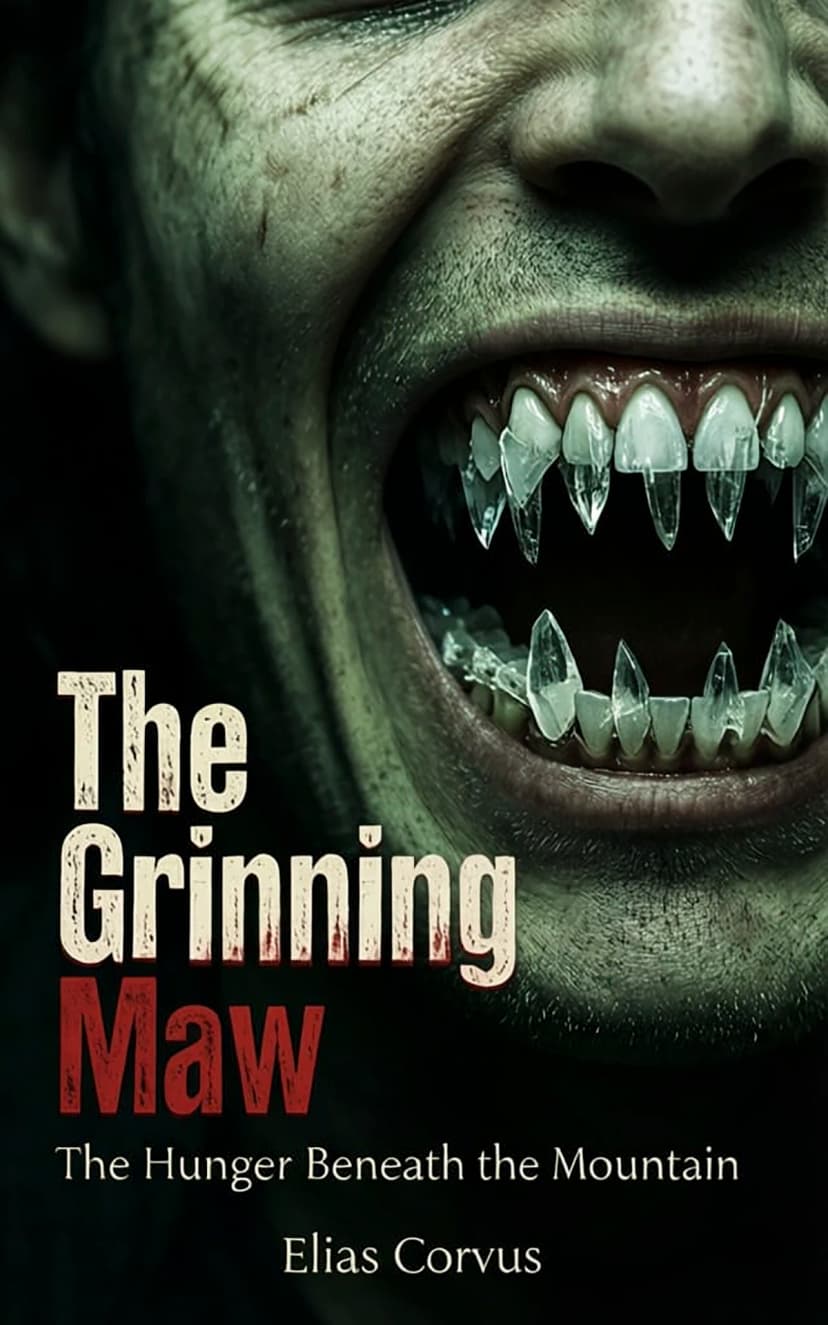
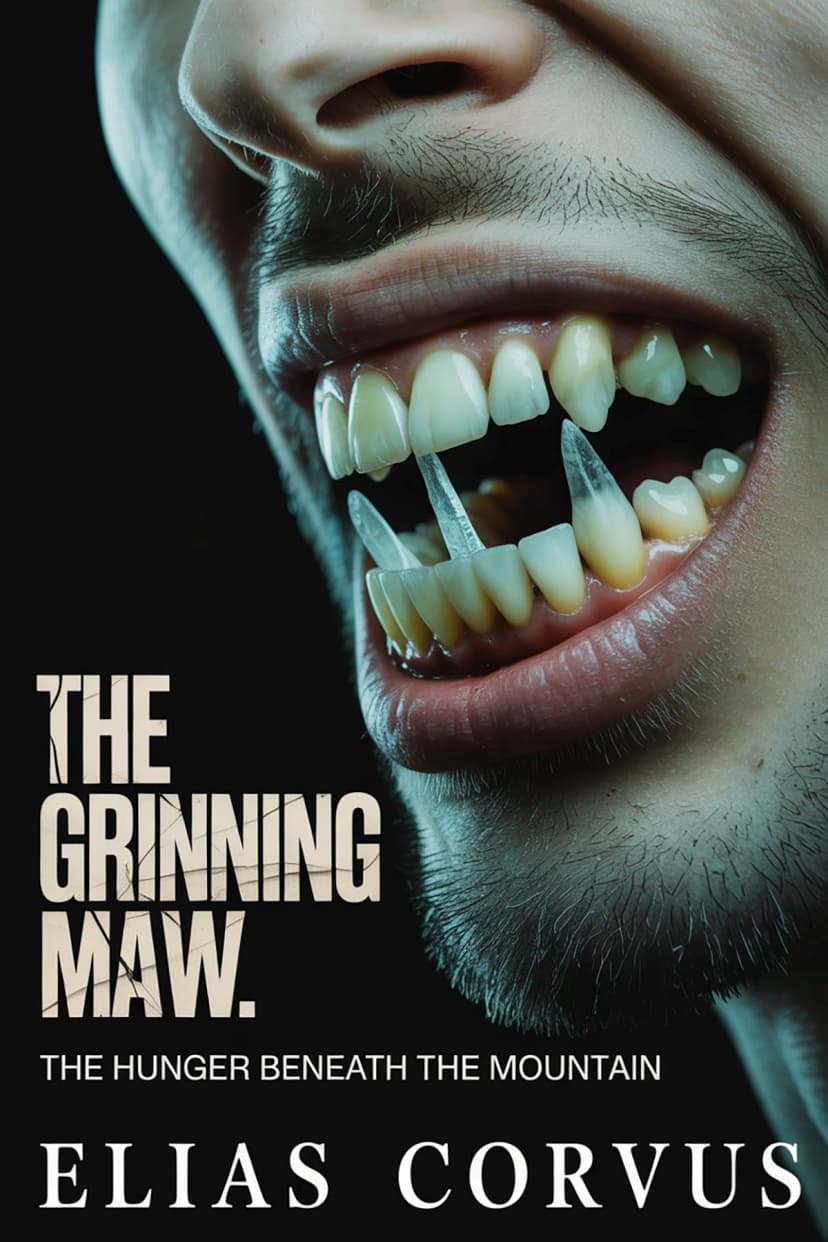
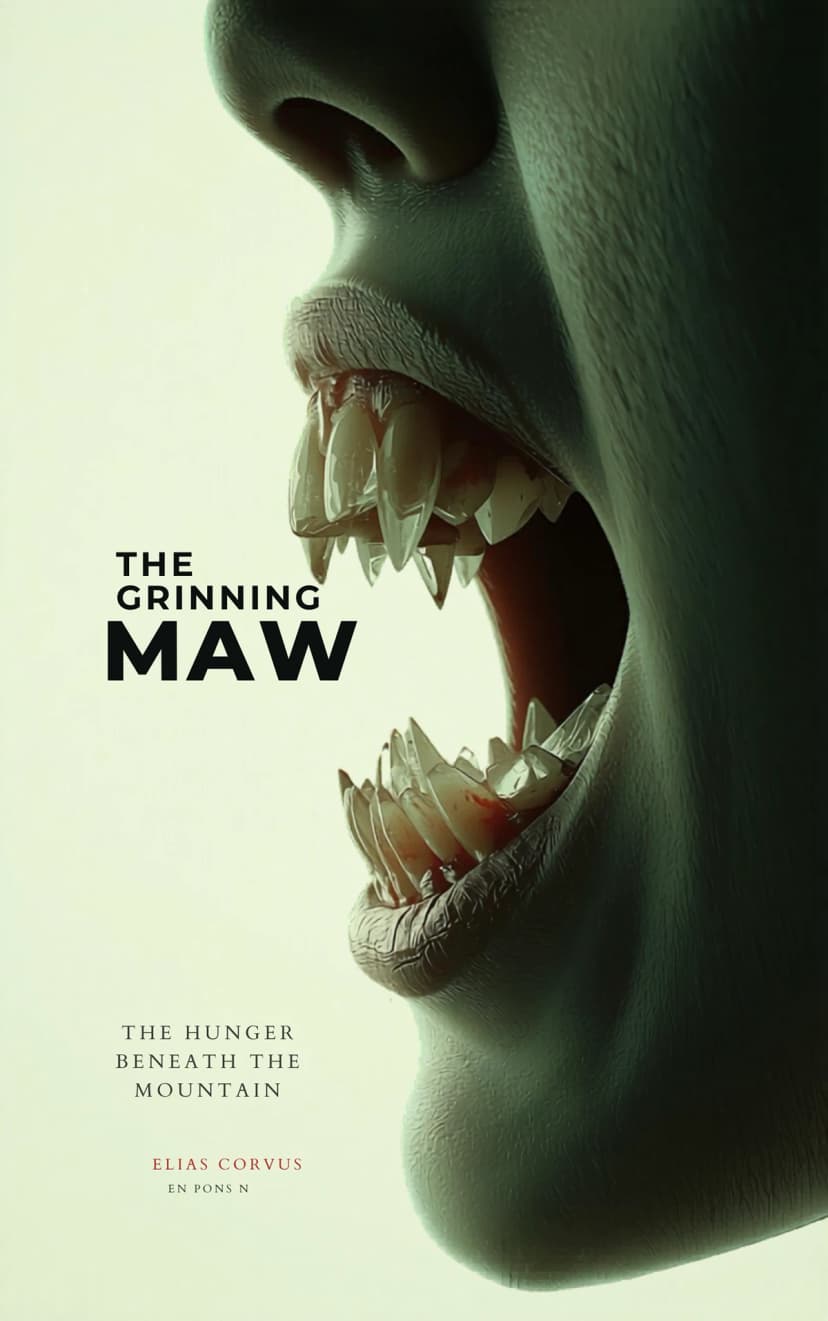
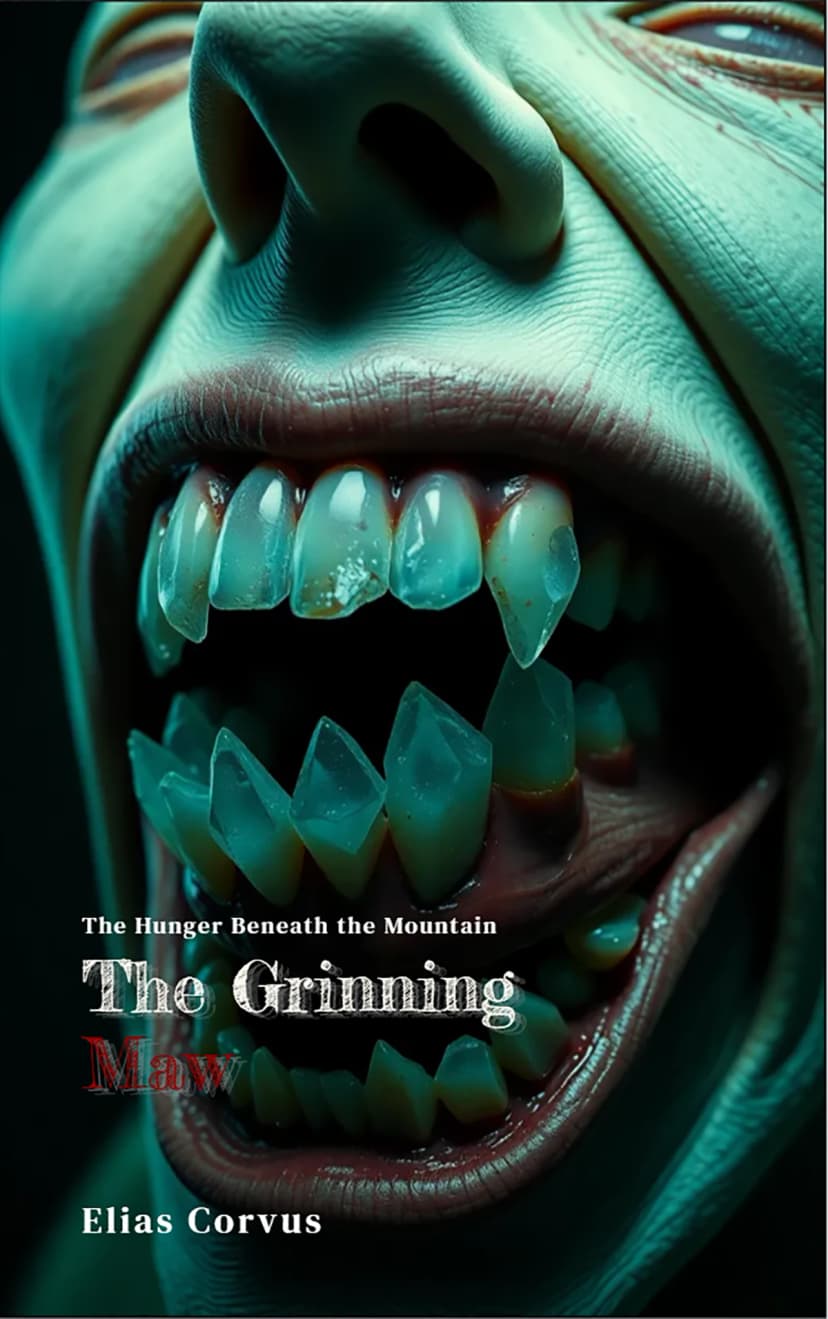
1. Horror Prompt ("The Grinning Maw")
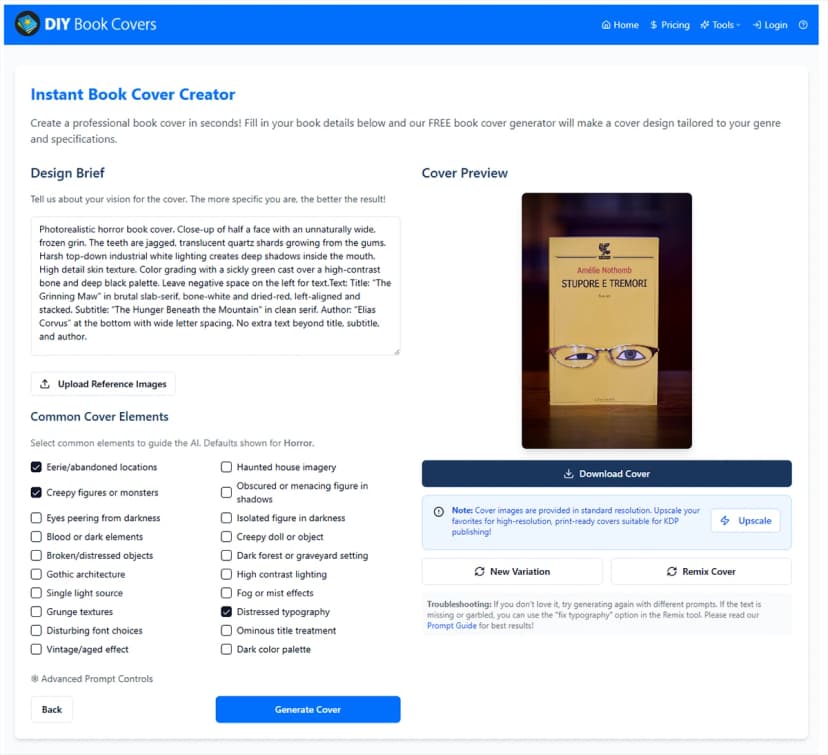
"Photorealistic horror book cover. Close-up of half a face with an unnaturally wide, frozen grin. The teeth are jagged, translucent quartz shards growing from the gums. Harsh top-down industrial white lighting creates deep shadows inside the mouth. High detail skin texture. Color grading with a sickly green cast over a high-contrast bone and deep black palette. Leave negative space on the left for text. Text: Title: 'The Grinning Maw' in brutal slab-serif, bone-white and dried-red, left-aligned and stacked. Subtitle: 'The Hunger Beneath the Mountain' in clean serif. Author: 'Elias Corvus' at the bottom with wide letter spacing."
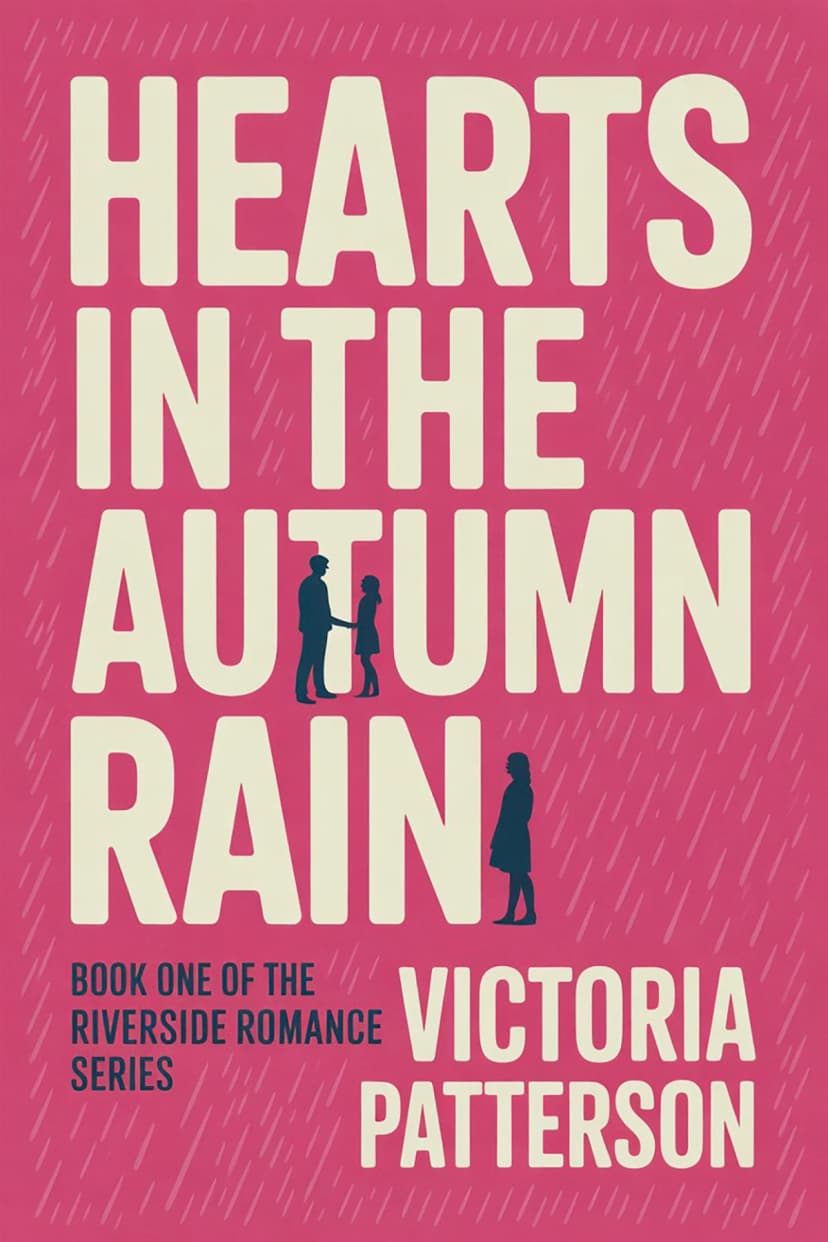
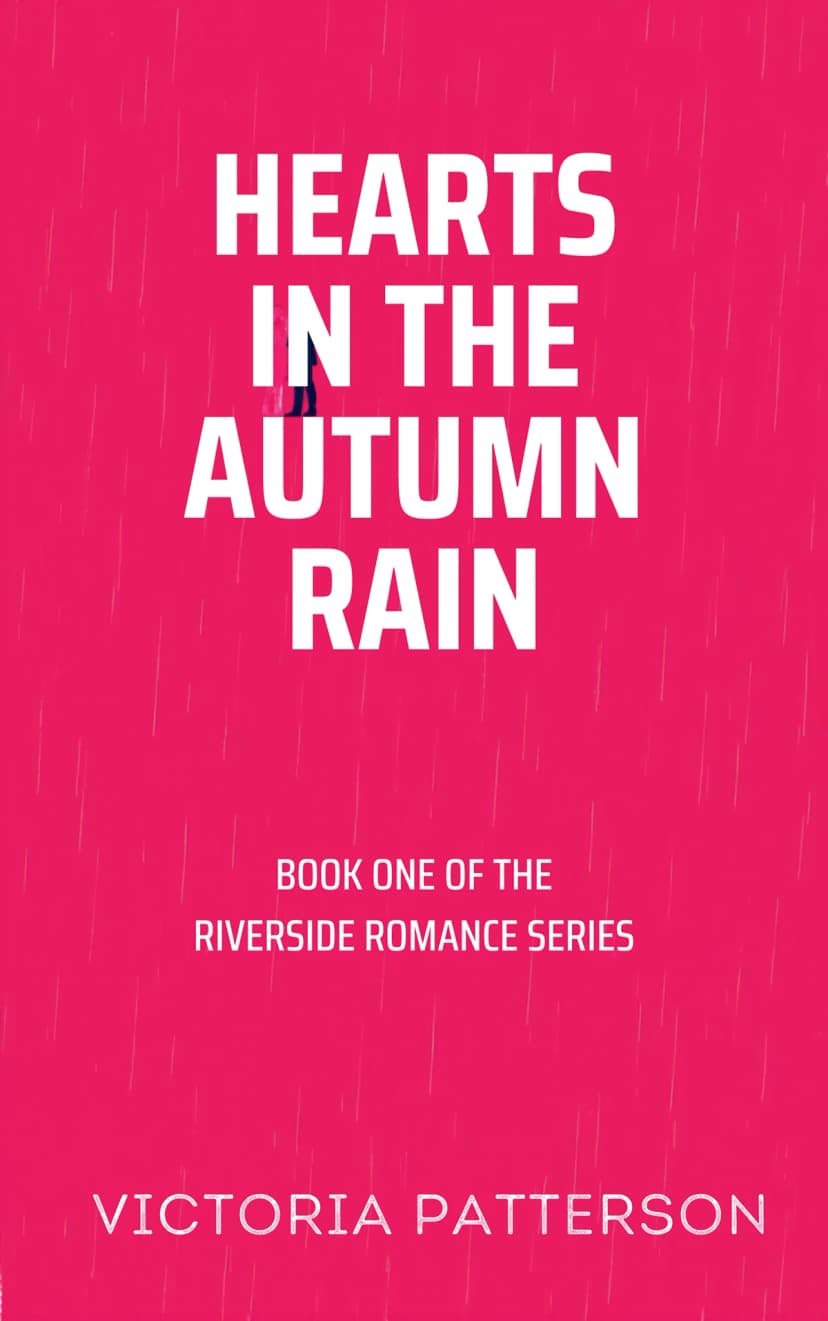
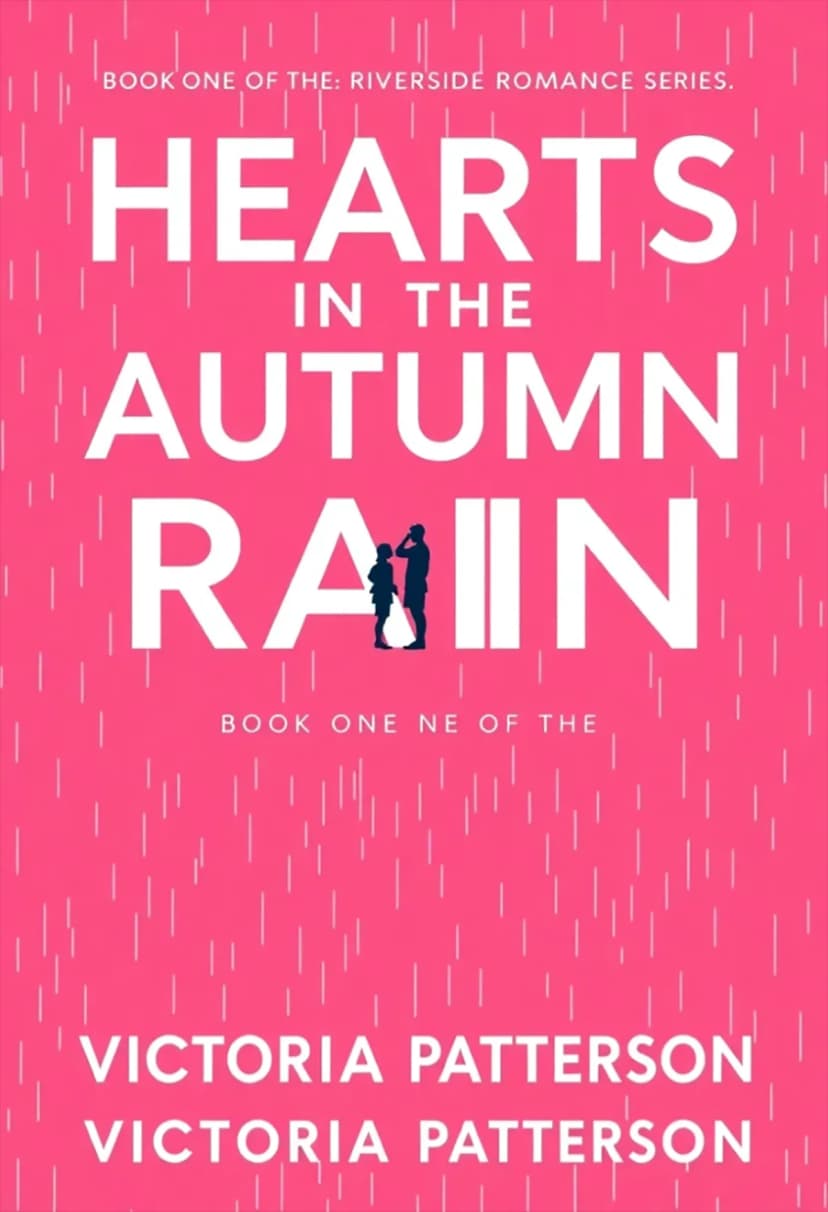
2. Romance Prompt ("Hearts in the Autumn Rain")
"Typography-first mass-market bestseller cover with a solid hot pink (#FF2D8F) background and subtle halftone rain texture. The title 'HEARTS IN THE AUTUMN RAIN' dominates about 70% of the cover in tall bold condensed white sans-serif, left-aligned with little margin and stacked across four lines: HEARTS / IN THE / AUTUMN / RAIN, occupying roughly the top 55-60%. Between 'AUTUMN' and 'RAIN,' two tiny flat navy (#1A1A2E) silhouette figures (man and woman) face each other across the letter 'U,' together no more than 12% of cover height and never overlapping text. Subtitle 'BOOK ONE OF THE' and 'RIVERSIDE ROMANCE SERIES' appears in small flat navy (#1A1A2E) sans-serif with wide tracking, left-aligned. Author name 'VICTORIA PATTERSON' is set in wide-tracked white capitals near the bottom."
3. Non-Fiction Prompt ("Sustainable Architecture")
"Photorealistic nonfiction book cover with a seamless warm cream background filling the entire cover. Centered is a pristine cylindrical concrete pillar floating against the backdrop, split perfectly down the middle: the left half industrial gray with subtle texture, the right half overtaken by vibrant emerald moss and delicate ferns emerging from fine cracks, divided by a razor-sharp vertical line. Soft studio lighting from the upper left creates a gentle shadow beneath the cylinder. Minimal, high-fashion editorial aesthetic. Title: 'THE RISE OF SUSTAINABLE ARCHITECTURE: DESIGNING BUILDINGS FOR TOMORROW' in bold condensed uppercase sans-serif, black, tightly tracked, stacked across three lines at the top. Subtitle: 'Environmental Innovation, Material Science, and the Future of Urban Design' in elegant black serif. Author: 'DR. HELENA WHITMORE' anchored at the bottom."
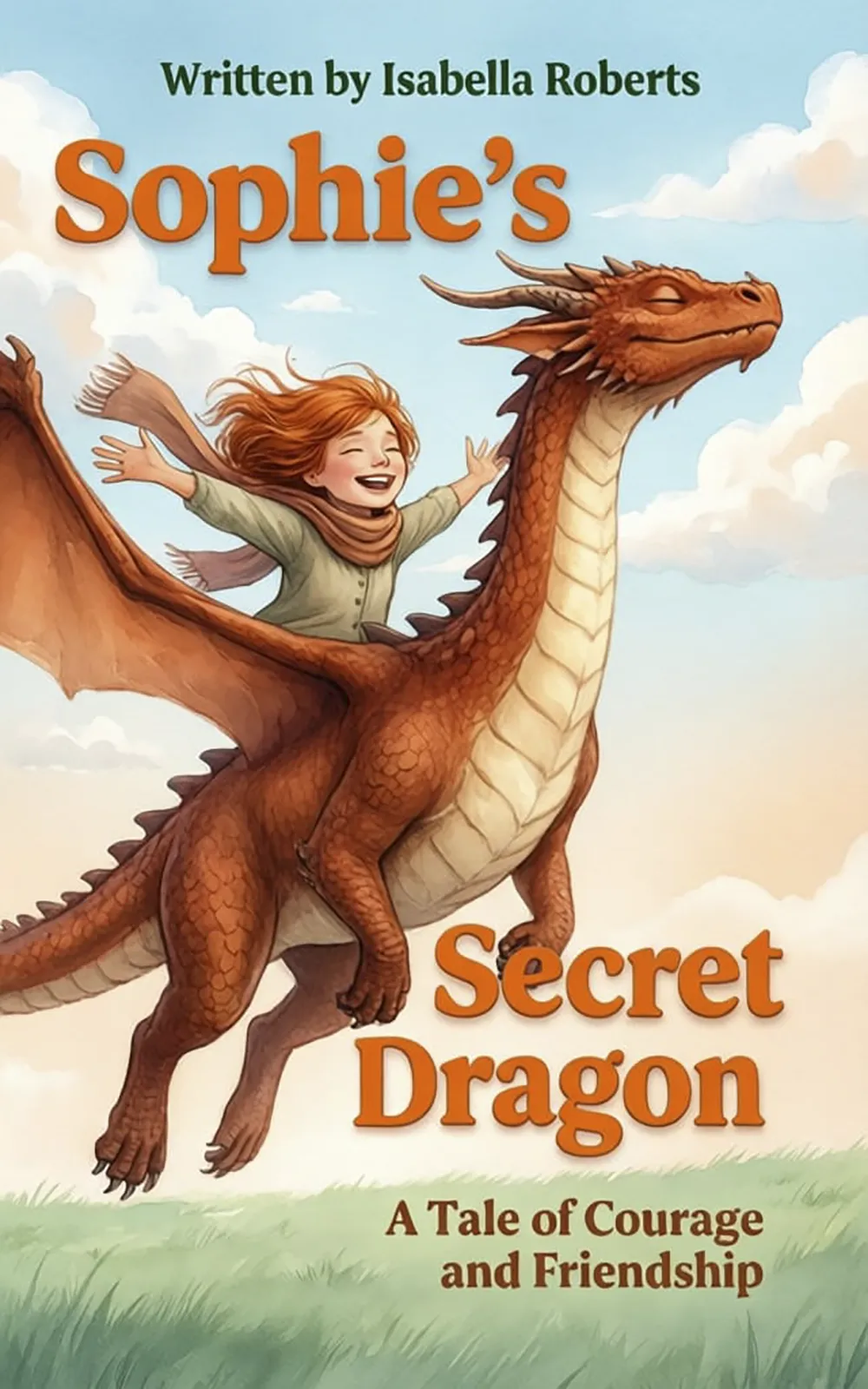
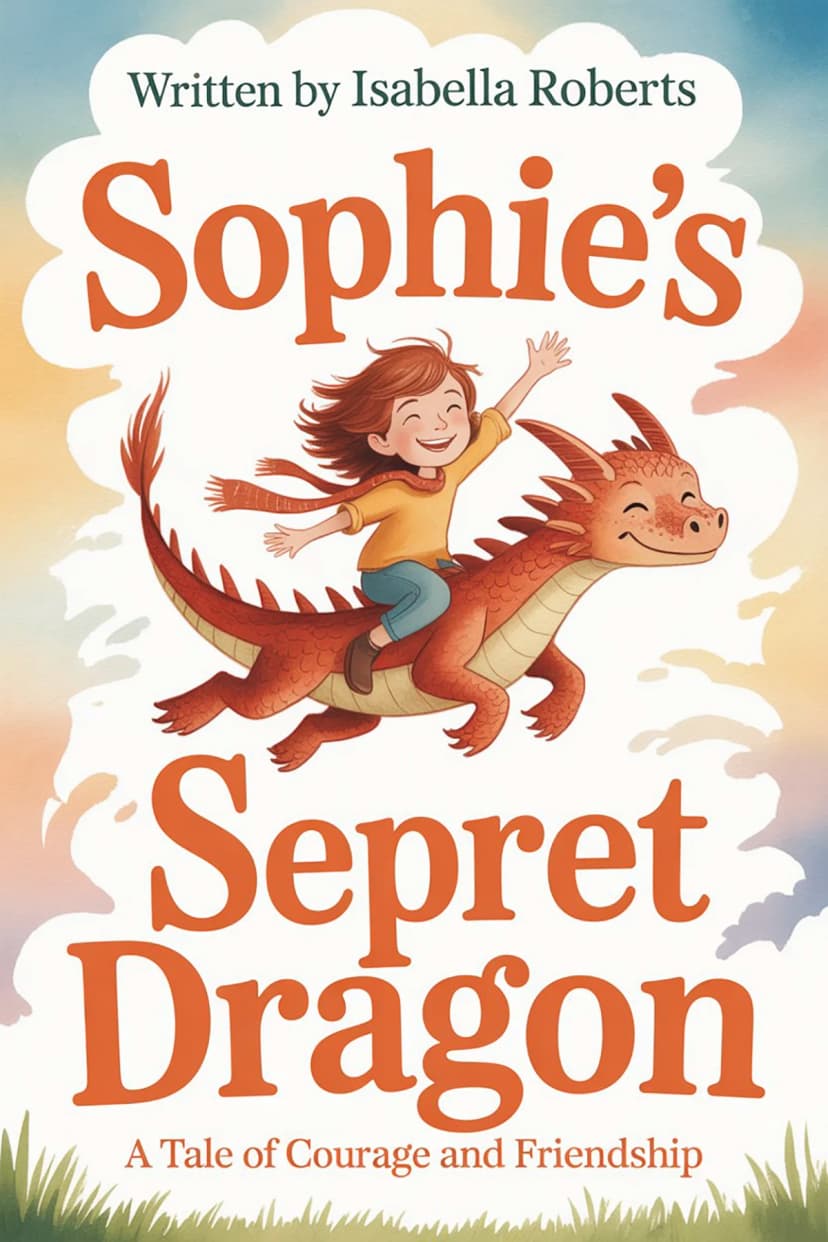
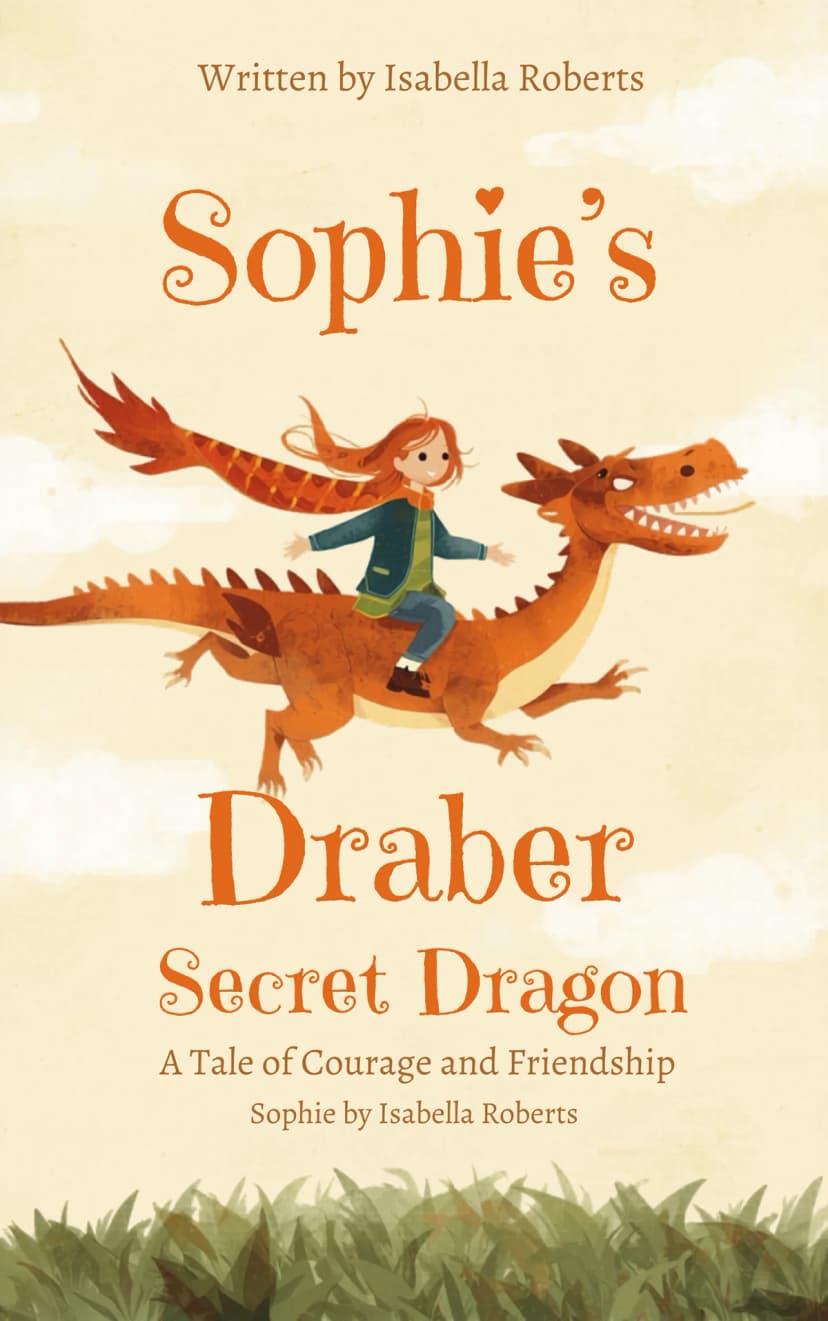
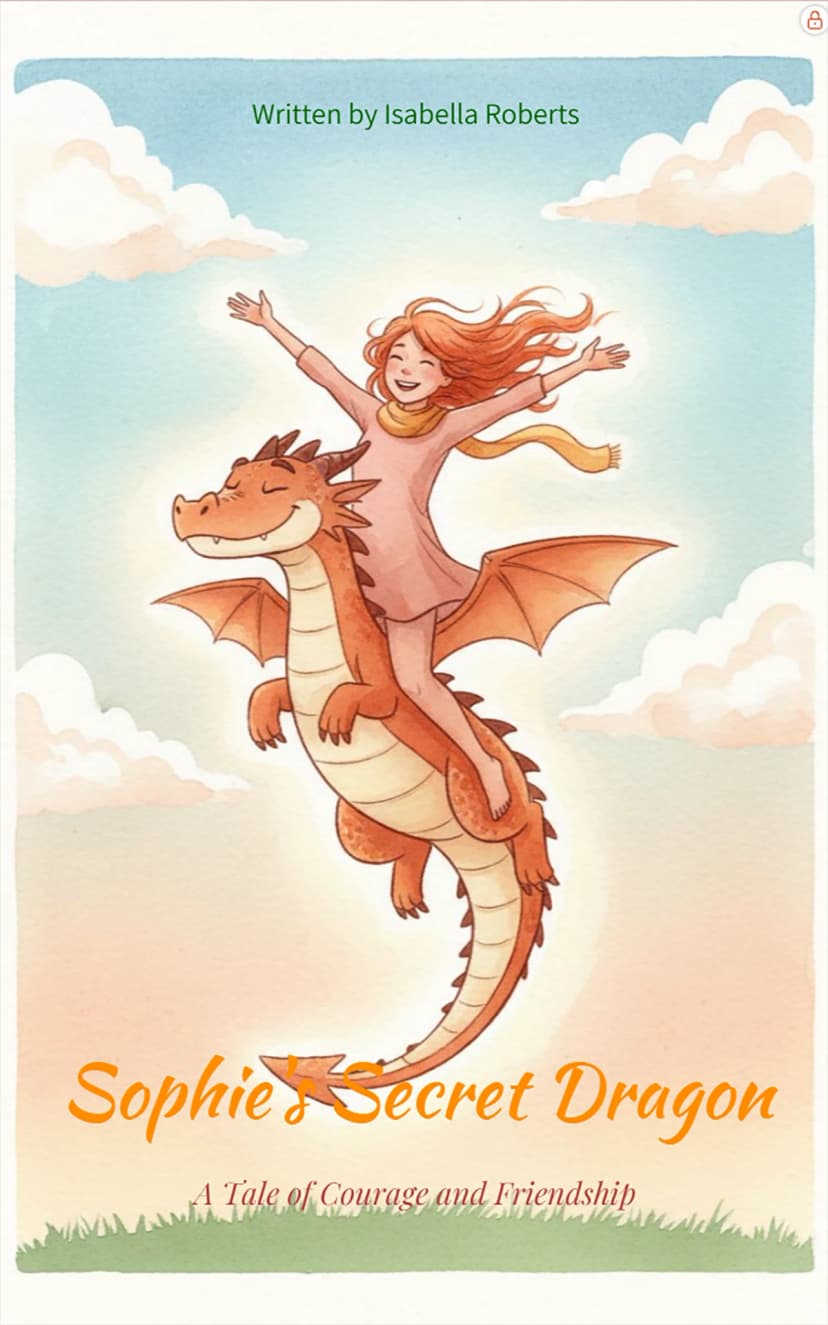
4. Children's Prompt ("Sophie's Secret Dragon")
"Typography-first mass-market bestseller cover in a storybook-classic watercolor style with soft brush strokes and gentle texture. Background sky with puffy white clouds over a warm gradient that shifts from peachy cream at the horizon to soft robin's egg blue at the top, with a minimal sage green grass line along the bottom edge. At the center, Sophie rides on Ember the dragon, soaring upward as one joyful silhouette. Sophie stretches her arms wide, copper-red hair streaming behind, scarf flowing. Ember grins playfully with eyes closed, warm terracotta scales and a cream belly. Title split in two parts: 'Sophie's' at the top left and 'Secret Dragon' at the bottom right, set in a chunky playful serif in bright cheerful orange. Author lines 'Written by Isabella Roberts' appear at the top in clean deep green sans-serif."
Detailed Comparison of AI Book Cover Generators
1. BeYourCover - Purpose-Built AI Book Cover Generator
Rating: 4.8/5
Best for: Authors who want one workflow for ebook, print, audiobook, and promo assets
Pricing: Free trial available, then $19-$39 one-time — the $39 tier covers unlimited books
Website: beyourcover.com
What Sets BeYourCover Apart
BeYourCover is a purpose-built platform designed exclusively for book cover creation. Unlike generic AI image generators, it understands the specific visual language of book covers - composition, typography hierarchy, and genre-specific color palettes - and it now covers far more of the publishing workflow than just front-cover generation.
You can start with either a book brief or a direct prompt, generate multiple directions, iterate with "More like this," then move into editing tools like Transform, Style Conversion, Remove Text, and a text editor with custom layers and typography controls. You can also skip the menus entirely and use Cover Chat, describing the change you want in plain English and watching the cover update — chatting itself is free, and a credit is only spent when you generate. From the same cover, Pro users can create audiobook versions, full wrap print covers with spine and back for Amazon KDP and Barnes & Noble Press, and marketing assets like ad images, social mockups, and promo video.
Once a cover is finished, it can also become the anchor for a series: name the next book and its cover is generated to match the first — same art style, palette, title lettering, and recurring characters, with a new scene each time. That is the part generic AI art tools cannot reproduce, because it depends on the tool understanding that your books belong together.
Real-World Generations with BeYourCover
We tested BeYourCover using our benchmark prompts. The results demonstrate its superior ability to handle complex layouts and professional typography.
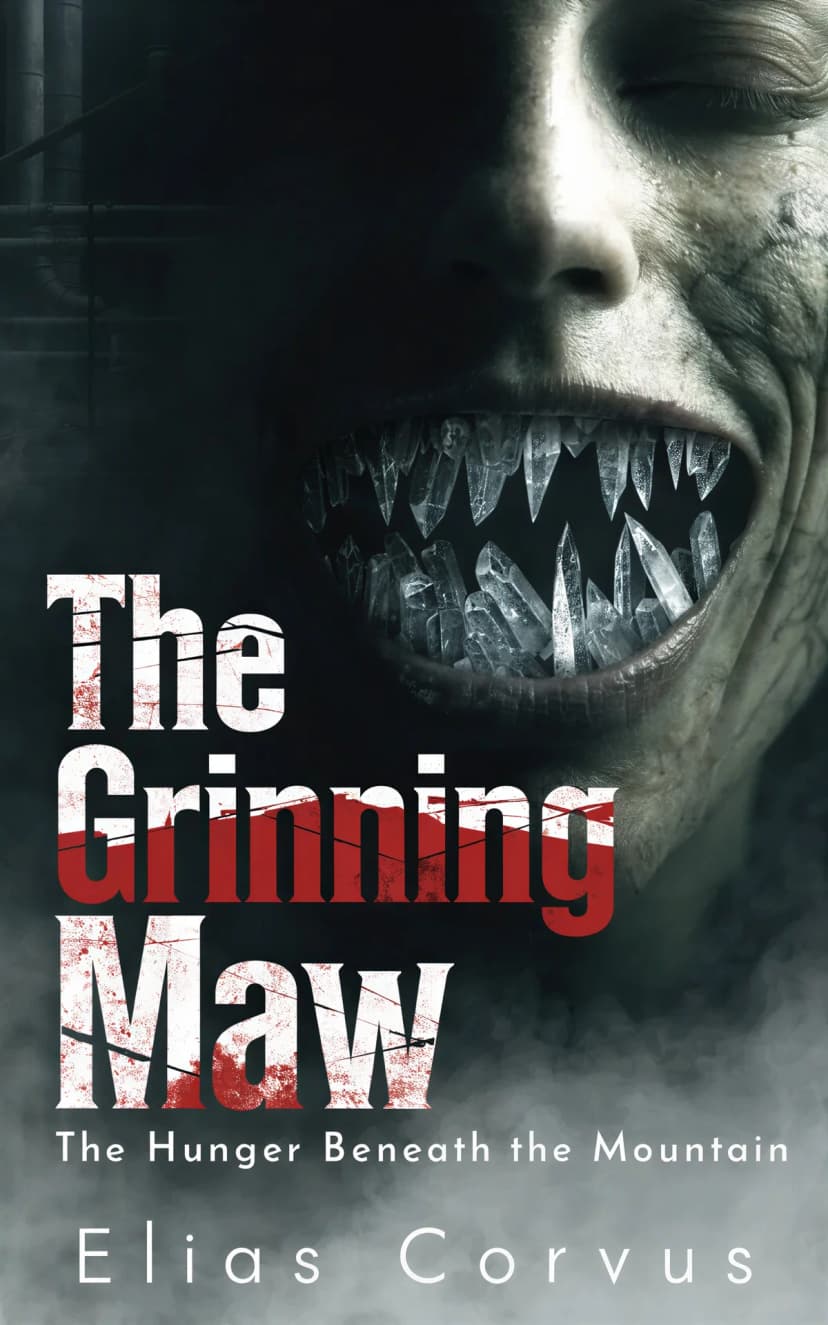
Horror Benchmark Result
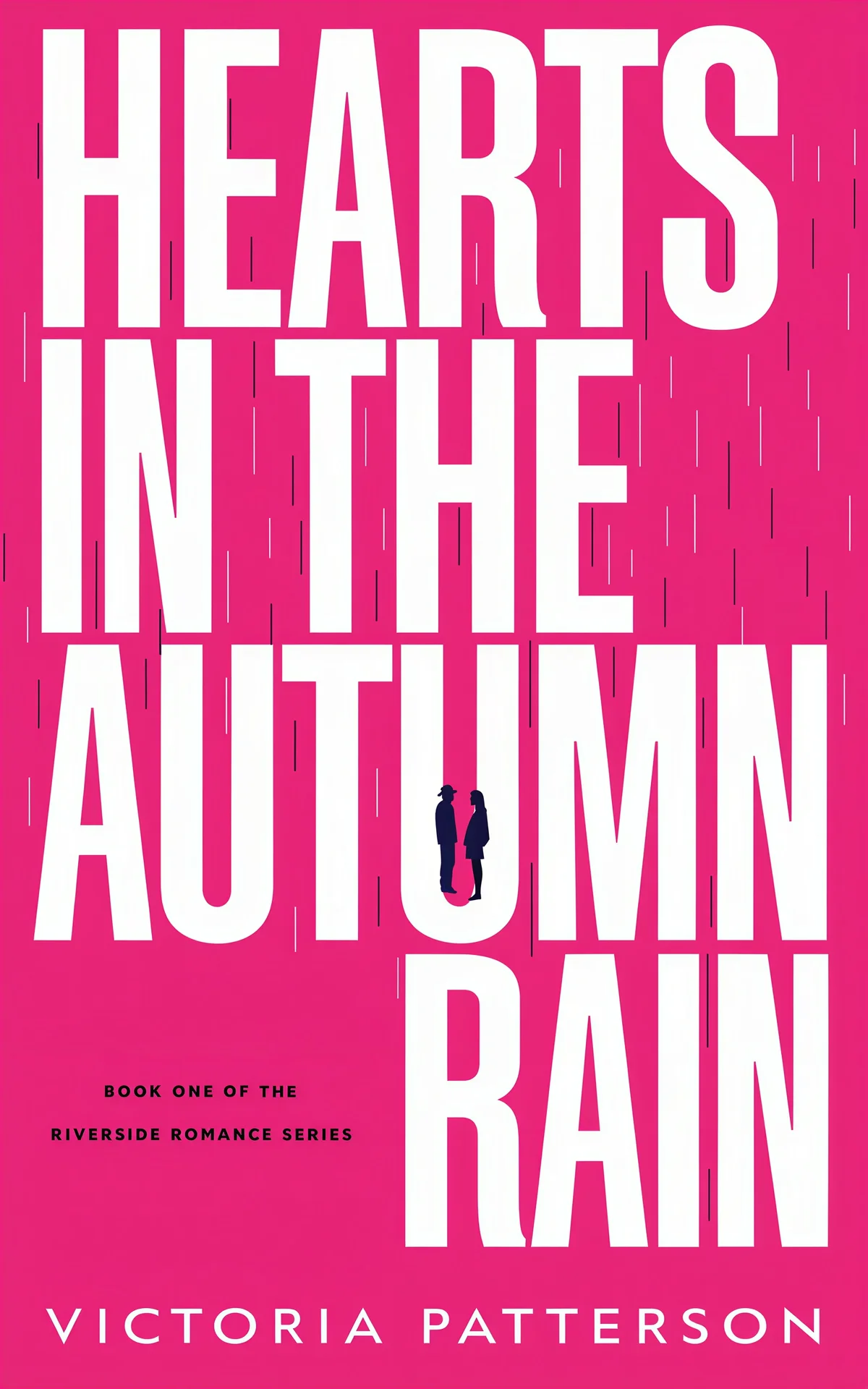
Romance Benchmark Result

Non-Fiction Benchmark Result
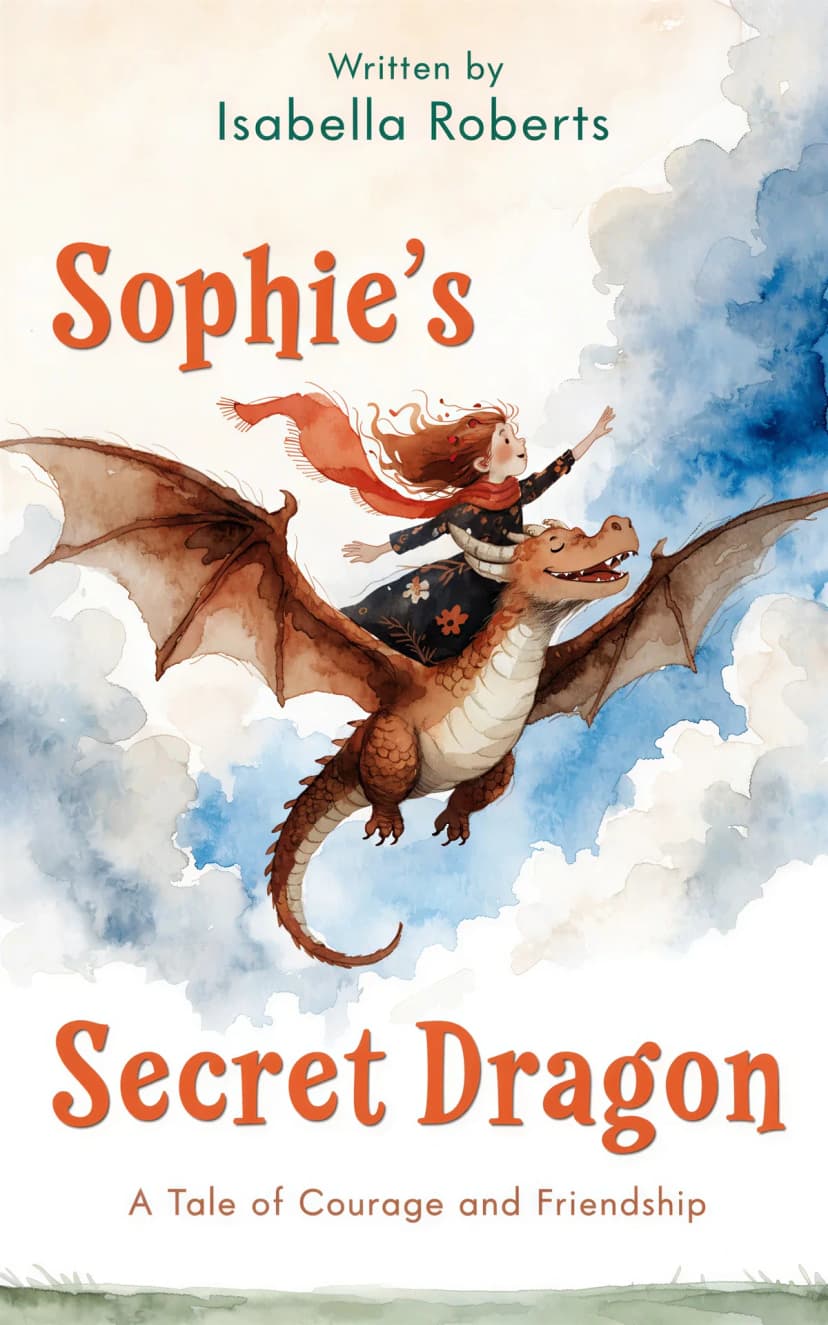
Children's Benchmark Result
Pros:
- Specialized training on real book covers ensures genre-appropriate designs.
- Supports both brief-based and prompt-based generation, plus "More like this" iterations.
- On Pro and Enterprise you can upload the manuscript itself (.docx, .pdf, .txt or .epub): the AI reads the story for its setting, recurring images and tone, so the first covers come from the book rather than from a short summary.
- Cover Chat lets you refine a cover by describing the change in plain English, which no other tool in this test set offers.
- Series covers generate matching covers for each following book, keeping style, palette, title lettering, and recurring characters consistent.
- Replace person puts you, or anyone who agreed to it, on a finished cover from one photo, keeping the cover's pose, style and text.
- Includes Transform, Style Conversion, Remove Text, and a text editor with custom text layers and typography controls (letter spacing, line height, shadows, outlines).
- Reference Image Generation accepts up to 4 of your own images as style references, and the External Cover Studio takes a finished cover you already own.
- Full Wrap workflow creates front, spine, and back covers for Amazon KDP and Barnes & Noble Press, plus audiobook and marketing asset exports from the same project.
- One-time payment model is much cheaper than monthly subscriptions for single-book authors.
- For agencies and small publishers, the Enterprise plans add client workspaces, brand kits, a one-click marketing kit per book and client review links.
Cons:
- Smaller Font Library: While the fonts are curated for books, the total number is smaller than general design platforms.
- No general-purpose design surface: It is built for covers and the book's own marketing assets, so it will not replace a tool like Canva for unrelated graphics work.
The BeYourCover Workflow Advantage:
- Start with a brief or prompt: Use the AI book cover generator with your story summary or a direct visual prompt — or, on Pro, upload your manuscript so the AI reads the book itself.
- Choose a direction: An AI art director designs six drafts for your book, and you pick the two that become your first covers. Then use book cover templates and "More like this" to explore other fits.
- Refine the cover: Describe the change in Cover Chat, or edit artwork directly with Transform, Style Conversion, and Remove Text, then set the title treatment with text layers and typography controls.
- Build format variants: Create the ebook version you want, then adapt it into a square audiobook cover or a full wrap print cover with back and spine for KDP or Barnes & Noble Press.
- Create launch assets: Generate high-res exports plus marketing resources like 4:5 ad images, 9:16 or 4:5 mockups, and a short promo video.
- Turn it into a series: Make the finished cover your series anchor, and every following book is generated to match its style, palette, lettering, and characters.
Try it Free: Start with the free AI book cover generator - no credit card required.
2. NightCafe - Creative AI Art Generator for Book Covers
Rating: 4.5/5
Best for: Authors wanting unique, artistic covers with maximum creative freedom
Pricing: Free limited plan, paid plans from $12.49/month
Website: creator.nightcafe.studio
NightCafe is the winner for pure artistic creativity. It uses advanced generative AI models including DALL-E 3 and Flux to create original artwork.
NightCafe Test Results
NightCafe produces high-quality artistic images with good text rendering, though prompt adherence is in the middle - not perfect, but not bad.


Pros:
- Unmatched variety of AI models. If you are an expert in AI image generation, you can take advantage of that.
- Very active community and daily free credits.
- Good prompt adherence.
Cons:
- No built-in book cover templates or safe-zone guides.
- Font looks unprofessional: fonts lack creativity for some genres.
Verdict: If you are an author who wants absolute control over the image model used and you're comfortable using a second tool for typography, NightCafe is arguably better than BeYourCover for creative flexibility.
3. Ideogram - Best for Experimenting with Styles
Rating: 4.0/5
Best for: Experimental covers with embedded text
Pricing: Free limited plan, paid plans from $20/month
Website: ideogram.ai
Ideogram offers numerous Styles you can use for experimenting, but they are not focused on genre conventions.
Ideogram Test Results
Ideogram shows good prompt adherence and produces high-quality images, but human skin can look unnatural. While it handles text better than most, it still isn't perfect.

Pros:
- Good at text rendering; it can often "bake" the title directly into the art.
- Fast generation and great for social media teasers.
Cons:
- "Uncanny Valley" Faces: Human skin and eyes often look plastic or unnatural compared to BeYourCover's photorealistic models.
- Limited post-generation editing.
Verdict: For authors who want to experiment with different pre-built styles, Ideogram is the go-to tool.
4. Canva with AI Image Generation
Rating: 3.5/5
Best for: DIY authors comfortable with design tools
Pricing: Free plan available, Pro from $12/month
Website: canva.com
Canva's Magic Media feature brings AI image generation to their platform, but it's not optimized for book covers specifically. Authors using Canva for AI-generated book covers often struggle with text rendering and genre-specific layouts.
Canva Test Results
Canva produces good images and follows instructions well, but frequently struggles with accurate text rendering, requiring manual correction.

Pros:
- Familiar interface for existing Canva users
- Massive asset library (photos, graphics, fonts)
- Collaboration features for team projects
- Print-on-demand integration
Cons:
- AI lacks book cover training - produces generic images
- Manual text placement required
- Time-consuming compared to specialized tools
- Results often look "homemade" rather than professional
- No understanding of genre conventions
Verdict: Canva remains the king of general marketing. Use it to finish a cover you generated elsewhere, but its native AI is still too generic for professional book covers. If you are actively looking to switch, we compared the best Canva alternatives for book cover design in a dedicated guide.
5. Venngage - AI-Assisted Book Cover Generator
Rating: 3.2/5
Best for: Beginners who want AI-assisted templates
Pricing: Free limited plan, $49/month for Venngage AI
Website: venngage.com
Venngage combines AI-powered suggestions with a drag-and-drop editor for book cover AI design. While user-friendly, it's more about AI-assisted templates than true AI generation.
Venngage Test Results
Venngage generally produces lower-quality images and struggles to follow detailed instructions. It also has a significant barrier to entry: you need a company email domain to register (Gmail, Outlook, etc. are not accepted).

Pros:
- AI suggests layouts, fonts, and color palettes
- Commercial usage rights included
- Free plan available for basic use
- Good customer support
Cons:
- Requires a company email to register (Gmail, Outlook, etc. are blocked)
- AI sometimes ignores detailed prompts
- Template-based rather than generative
- Limited artistic originality
- Free plan has export restrictions
- Not specialized for book publishing
Verdict: Suitable for authors new to design who want AI guidance, but for professional AI book cover generation, BeYourCover's specialized approach delivers superior results.
6. DIY Book Covers - CoverMaker
Rating: 2.5/5
Best for: Quick, traditional-style covers on zero budget
Pricing: Free basic plan, paid plans from $19 one-time
Website: diybookcovers.com
DIY Book Covers offers a CoverMaker tool that's free but extremely basic. It's template-driven with no actual AI image generation.
DIY Book Covers Test Results
In our testing, DIY Book Covers failed to produce usable results for most prompts. It only showed generic images, ignored instructions, and never displayed any text.

Pros:
- Completely free for basic use
- Genre-specific templates
- 3D mockup generation
- Very fast (under 10 seconds)
Cons:
- No AI image generation at all
- Purely template-based
- Non-existent customization
- Generic, recognizable designs
- Basic typography options only
Verdict: Only for authors with zero budget who need something immediately.
Why AI Book Cover Generators Are Essential for Modern Authors
Self-publishing is more competitive than ever. With millions of books published annually on platforms like Amazon KDP, your cover is your #1 marketing asset.
Traditional design services are excellent but often out of reach for debut authors. AI tools bridge this gap by:
- Reducing Costs: Saving $500+ per book allows you to spend more on actual ads.
- Speed to Market: You can iterate on a cover concept in 20 minutes instead of waiting 2 weeks for a designer's first draft.
- A/B Testing: You can generate 5 different styles—atmospheric AI fantasy book covers, sleek sci-fi book cover designs, and more—and let your newsletter subscribers vote on the winner.
What Is the Best AI Book Cover Generator for Your Budget and Use Case?
If you want the short answer to what is the best ai book cover generator, it is BeYourCover for most self-publishing authors. It is the strongest all-round pick because it combines generation, editing, typography help, and format expansion inside one book-specific workflow. That matters more than raw image quality alone.
That said, the best choice changes with your budget and the kind of cover you need:
- Best overall: BeYourCover. It gave the most complete author workflow, especially if you need ebook, audiobook, and print versions from one project.
- Best affordable option: BeYourCover or DIY Book Covers, depending on what “affordable” means. If you mean “lowest cost to a professional-looking result,” BeYourCover wins. If you mean “absolutely no budget today,” DIY Book Covers is the fallback, but quality is far lower.
- Best free-trial testing option: NightCafe for image experimentation, BeYourCover for evaluating an actual publishing workflow. Compare free-trial features: one lets you explore art styles, the other lets you test whether you can ship.
- Best for style experimentation: Ideogram. It is fun, fast, and often good at integrated text effects, though not dependable enough for a full commercial workflow by itself.
- Best for manual finishing and team edits: Canva. It is still useful as a finishing environment, especially if you already work there.
- Best for commercial publishing workflows: BeYourCover, because the licensing posture is straightforward and the output path is closer to what a real author needs.
For authors comparing affordable ai book cover generators 2026, the important distinction is between entry price and real publishing cost. A tool can advertise a free plan and still cost more overall if you end up paying monthly, exporting to another app, or rebuilding typography manually. In this lineup, one-time pricing is a major advantage for single-title authors.
A good rule of thumb:
- Choose a general AI art tool if you already know how to handle typography and layout elsewhere.
- Choose a book-specific tool if you want the fewest moving parts and the fastest path to publication.
- Choose a template tool only if speed matters more than originality.
If your main goal is to publish a commercial book without design headaches, be your cover is the clearest answer in this list.
Frequently Asked Questions About AI Book Cover Generators
Q: Is it okay to use AI to make a book cover?
A: Yes, in most cases. The practical issue is not whether AI-assisted covers are forbidden; it is whether you have the right to use the generated image, any included stock assets, and the final exported design commercially. Creating original cover art with an AI tool is usually fine if the platform permits commercial use and you follow its terms. Problems arise when users assume every generated image, stock element, or font carries the same rights.
Q: Can I publish a book with an AI-generated cover?
A: Yes. Many indie authors already do. Before publishing, check three things: the platform’s commercial-use terms, whether any third-party assets were added, and whether the final cover meets distributor specs. For print, trim size, bleed, and spine width still matter, which is why Amazon provides its own cover requirements and calculator. If you need help with ebook dimensions too, review this guide to Kindle ebook cover size. If you are publishing only an ebook, the bar is lower, but readability at thumbnail size remains essential.
Q: What should I check before commercial use?
A: For any ai book cover generator commercial use license, review these points:
- Does the tool allow commercial publication of generated outputs?
- Do different plans have different rights? Canva is the most common example where plan level and asset source can affect usage.
- Did you add stock photos, icons, or fonts with separate license terms?
- Can you prove where the cover came from if a retailer or collaborator asks?
- Are you creating ads, merchandise, or only the book cover? Some terms distinguish between these uses.
The safest path is the simplest one: generate and finish the cover in a platform whose terms clearly include commercial use, then save the final exported file and the applicable plan details.
Q: Are Canva AI book covers safe to use commercially?
A: Often yes, but Canva requires more care than the simpler “commercial rights included” language used by some other tools in this list. If you generate art in Canva and also use Canva stock elements, fonts, or premium assets, your rights can depend on the subscription tier and the specific element license. That does not make Canva unusable; it just means you should read the current Canva content licensing terms before publishing a paid book.
Q: Can ChatGPT design a book cover?
A: Not by itself in the same way a dedicated cover tool can. ChatGPT is most useful for concept development, prompt writing, subtitle options, back-cover copy, and art-direction refinement. It can help you describe mood, audience, comps, typography, and scene details far better than a blank prompt box can. But for actual visual generation, layout control, and export, you still need a cover design tool or image-generation platform.
Q: Can AI-generated book covers really compete with professional designers?
A: Yes, especially for ebook-first releases, rapid testing, and lower-budget launches. But they do not replace elite cover designers in every case. AI is strongest when the goal is speed, iteration, and strong genre signaling, like nailing the instantly recognizable look of AI romance book covers. Human designers still lead when you need custom illustration direction, premium typography, a bookstore-level brand system, or complex print packaging. Even the best ai for book cover design still benefits from human judgment.
Q: How much does an AI book cover generator cost compared to hiring a designer?
A: Professional designers charge $300-$800. Most AI tools range from free limited plans to $49/month, with some offering one-time payments starting at $19. For more details, see our book cover design cost guide.
Q: Can I use BeYourCover for print books, audiobooks, and marketing assets too?
A: Yes. BeYourCover now supports full wrap print covers with front, spine, and back editing for both Amazon KDP and Barnes & Noble Press, plus square audiobook versions and marketing resources like ad images, social mockups, and promo video. Agencies and publishers on the Enterprise plans also get a marketing kit per book, on each client's brand kit, with a review link the client approves. For print exports, you should still proof the final PDF before uploading to KDP or IngramSpark.
Final Thoughts: Choosing Your Tool
If you only want one recommendation, choose BeYourCover. It is the strongest answer to what is the best ai book cover generator because it solves the full author problem, not just the image-generation part. In these tests, it was the only platform that consistently felt built around publishing rather than generic design or AI art play.
Here is the practical buyer summary:
- Best overall: BeYourCover for authors who want a fast route from concept to ebook, print, audiobook, and promo assets.
- Best affordable option: BeYourCover for single-book authors who want to avoid a monthly subscription treadmill.
- Best free-trial testing option: NightCafe if you want to experiment with styles first; BeYourCover if you want to test a real publishing workflow with usable output.
- Best for commercial publishing workflows: BeYourCover, because the rights position is clearer and the print-ready path is much more direct than with general-purpose tools.
Choose NightCafe if your top priority is artistic freedom and you do not mind finishing the cover somewhere else. Choose Ideogram if you want to explore unconventional styles or text-forward looks. Choose Canva if you already live in Canva and mainly need a finishing workspace. Skip Venngage unless template guidance matters more to you than output quality, and treat DIY Book Covers as an emergency no-budget option rather than a long-term solution.
AI is enough when you need a solid ebook cover, a quick market test, a lead magnet, a preorder mockup, or a competent genre cover on a controlled budget. Hire a human designer when the launch is high-stakes, the book is central to a long-term author brand, or the packaging is complex enough that spine math, series consistency, foil-ready print files, or custom illustration direction become part of the job. That is especially true for wide print distribution, collector editions, and premium nonfiction where typography does most of the selling.
Try the Free AI Book Cover Generator ->
Ready to Create Your Own Book Cover?
Turn your story into a visual masterpiece. Fill in the details below to start generating professional covers instantly.
Fill in the form on the site to generate your cover: Book Title, Author Name, optional Subtitle, Summary or Prompt, choose Genre, and click "Generate My Cover."
Still deciding on the inputs? Two free tools help before you generate: the book title generator covers fiction, business, and self-help titles, and the character name generator names the protagonist your cover concept will be built around. Both are free and take under a minute.
Relevant Free Tools
Keep going with the right generator
These tools match the topic of this article and give readers a direct next step.
Character Name Generators
Character Name Generator
Generate character names with AI. Find hero, villain, fantasy, male, and female name ideas that fit your genre, tone, and setting.
Open tool
Book Title Generators
Book Title Generator
Generate compelling book titles with AI. Get 10 unique, commercially viable title ideas for your book in seconds. Free, no signup required.
Open tool
Ready to Create Your Own Book Cover?
Turn your story into a visual masterpiece. Fill in the details below to start generating professional covers instantly.